Why and when you should use JPA
Are you struggling with performance issues in your Spring, Jakarta EE, or Java EE application?
Imagine having a tool that could automatically detect performance issues in your JPA and Hibernate data access layer long before pushing a problematic change into production!
With the widespread adoption of AI agents generating code in a heartbeat, having such a tool that can watch your back and prevent performance issues during development, long before they affect production systems, can save your company a lot of money and make you a hero!
Hypersistence Optimizer is that tool, and it works with Spring Boot, Spring Framework, Jakarta EE, Java EE, Quarkus, Micronaut, or Play Framework.
So, rather than allowing performance issues to annoy your customers, you are better off preventing those issues using Hypersistence Optimizer and enjoying spending your time on the things that you love!
Introduction
If you are wondering why and when you should use JPA or Hibernate, then this article is going to provide you an answer to this very common question. Because I’ve seen this question asked very often on the /r/java Reddit channel, I decided that it’s worth writing an in-depth answer about the strengths and weaknesses of JPA and Hibernate.
Although JPA has been a standard since it was first released in 2006, it’s not the only way you can implement a data access layer using Java. We are going to discuss the advantages and disadvantages of using JPA or any other popular alternatives.
Why and when JDBC was created
In 1997, Java 1.1 introduced the JDBC (Java Database Connectivity) API, which was very revolutionary for its time since it was offering the possibility of writing the data access layer once using a set of interfaces and run it on any relational database that implements the JDBC API without needing to change your application code.
The JDBC API offered a Connection interface to control the transaction boundaries and create simple SQL statements via the Statement API or prepared statements that allow you to bind parameter values via the PreparedStatement API.
So, assuming we have a post database table and we want to insert 100 rows, here’s how we could achieve this goal with JDBC:
int postCount = 100;
int batchSize = 50;
try (PreparedStatement postStatement = connection.prepareStatement("""
INSERT INTO post (
id,
title
)
VALUES (
?,
?
)
"""
)) {
for (int i = 1; i <= postCount; i++) {
if (i % batchSize == 0) {
postStatement.executeBatch();
}
<pre><code> int index = 0;
postStatement.setLong(
++index,
i
);
postStatement.setString(
++index,
String.format(
&quot;High-Performance Java Persistence, review no. %1$d&quot;,
i
)
);
postStatement.addBatch();
}
postStatement.executeBatch();
</code></pre>
} catch (SQLException e) {
fail(e.getMessage());
}
While we took advantage of multi-line Text Blocks and try-with-resources blocks to eliminate the PreparedStatement close call, the implementation is still very verbose. Note that the bind parameters start from 1, not 0 as you might be used to from other well-known APIs.
To fetch the first 10 rows, we could need to run an SQL query via the PreparedStatement, which will return a ResultSet representing the table-based query result. However, since applications use hierarchical structures, like JSON or DTOs to represent parent-child associations, most applications needed to transform the JDBC ResultSet to a different format in the data access layer, as illustrated by the following example:
int maxResults = 10;

List<Post> posts = new ArrayList<>();

try (PreparedStatement preparedStatement = connection.prepareStatement("""
        SELECT
            p.id AS id,
            p.title AS title
        FROM post p
        ORDER BY p.id
        LIMIT ?
        """
)) {
    preparedStatement.setInt(1, maxResults);

<pre><code>try (ResultSet resultSet = preparedStatement.executeQuery()) {
    while (resultSet.next()) {
        int index = 0;

        posts.add(
            new Post()
                .setId(resultSet.getLong(++index))
                .setTitle(resultSet.getString(++index))
        );
    }
}
</code></pre>

} catch (SQLException e) {
    fail(e.getMessage());
}
Again, this is the nicest way we could write this with JDBC as we’re using Text Blocks, try-with-resources, and a Fluent-style API to build the Post objects.
Nevertheless, the JDBC API is still very verbose and, more importantly, lacks many features that are required when implementing a modern data access layer, like:
- A way to fetch objects directly from the query result set. As we have seen in the example above, we need to iterate the
ReusltSetand extract the column values to set thePostobject properties. - A transparent way to batch statements without having to rewrite the data access code when switching from the default non-batching mode to using batching.
- support for optimistic locking
- A pagination API that hides the underlying database-specific Top-N and Next-N query syntax
Why and when Hibernate was created
In 1999, Sun released J2EE (Java Enterprise Edition), which offered an alternative to JDBC, called Entity Beans.
However, since Entity Beans were notoriously slow, overcomplicated, and cumbersome to use, in 2001, Gavin King decided to create an ORM framework that could map database tables to POJOs (Plain Old Java Objects), and that’s how Hibernate was born.
Being more lightweight than Entity Beans and less verbose than JDBC, Hibernate grew more and more popular, and it soon became the most popular Java persistence framework, winning over JDO, iBatis, Oracle TopLink, and Apache Cayenne.
Why and when was JPA created?
Learning from the Hibernate project success, the Java EE platform decided to standardize the way Hibernate and Oracle TopLink, and that’s how JPA (Java Persistence API) was born.
JPA is only a specification and cannot be used on its own, providing only a set of interfaces that define the standard persistence API, which is implemented by a JPA provider, like Hibernate, EclipseLink, or OpenJPA.
When using JPA, you need to define the mapping between a database table and its associated Java entity object:
@Entity
@Table(name = "post")
public class Post {

<pre><code>@Id
private Long id;

private String title;

public Long getId() {
    return id;
}

public Post setId(Long id) {
    this.id = id;
    return this;
}

public String getTitle() {
    return title;
}

public Post setTitle(String title) {
    this.title = title;
    return this;
}
</code></pre>

}
Afterward, we can rewrite the previous example which saved 100 post records looks like this:
for (long i = 1; i <= postCount; i++) {
    entityManager.persist(
        new Post()
            .setId(i)
            .setTitle(
                String.format(
                    "High-Performance Java Persistence, review no. %1$d",
                    i
                )
            )
    );
}
To enable JDBC batch inserts, we just have to provide a single configuration property:
<property name="hibernate.jdbc.batch_size" value="50"/>
Once this property is provided, Hibernate can automatically switch from non-batching to batching without needing any data access code change.
And, to fetch the first 10 post rows, we can execute the following JPQL query:
int maxResults = 10;

List<Post> posts = entityManager.createQuery("""
    select p
    from post p
    order by p.id
    """, Post.class)
.setMaxResults(maxResults)
.getResultList();
If you compare this to the JDBC version, you will see that JPA is much easier to use.
The advantages and disadvantages of using JPA and Hibernate
JPA, in general, and Hibernate, in particular, offer many advantages.
- You can fetch entities or DTOs. You can even fetch hierarchical parent-child DTO projection.
- You can enable JDBC batching without changing the data access code.
- You have support for optimistic locking.
- You have a pessimistic locking abstraction that’s independent of the underlying database-specific syntax so that you can acquire a READ and WRITE LOCK or even a SKIP LOCK.
- You have a database-independent pagination API.
- You can provide a
Listof values to an IN query clause, as explained in this article. - You can use a strongly consistent caching solution that allows you to offload the Primary node, which, for rea-write transactions, can only be called vertically.
- You have built-in support for audit logging via Hibernate Envers.
- You have built-in support for multitenancy.
- You can generate an initial schema script from the entity mappings using the Hibernate hbm2ddl tool, which you can supply to an automatic schema migration tool, like Flyway.
- Not only that you have the freedom of executing any native SQL query, but you can use the SqlResultSetMapping to transform the JDBC
ResultSetto JPA entities or DTOs.
The disadvantages of using JPA and Hibernate are the following:
- While getting started with JPA is very easy, become an expert requires a significant time investment because, besides reading its manual, you still have to learn how database systems work, the SQL standard as well as the specific SQL flavor used by your project relation database.
- There are some less-intuitive behaviors that might surprise beginners, like the flush operation order.
- The Criteria API is rather verbose, so you need to use a tool like Codota to write dynamic queries more easily.
The overall community and popular integrations
JPA and Hibernate are extremely popular. According to the 2018 Java ecosystem report by Snyk, Hibernate is used by 54% of every Java developer that interacts with a relational database.
This result can be backed by Google Trends. For instance, if we compare the Google Trends of JPA over its main competitors (e.g., MyBatis, QueryDSL, and jOOQ), we can see that JPA is many times more popular and shows no signs of losing its dominant market share position.
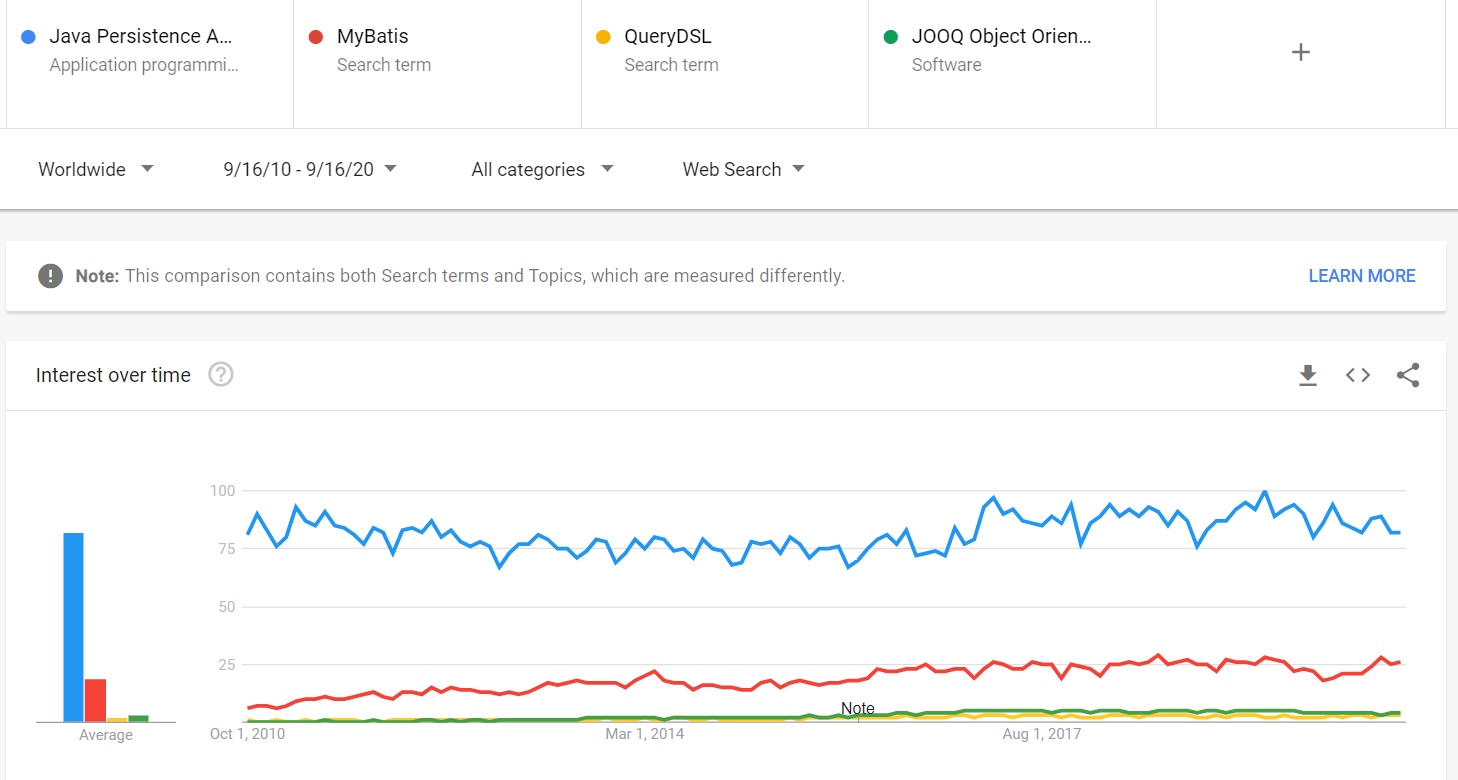
Being so popular brings many benefits, like:
- The Spring Data JPA integration works like a charm. In fact, one of the biggest reasons why JPA and Hibernate are so popular is because Spring Boot uses Spring Data JPA, which, in turn, uses Hibernate behind the scenes.
- If you have any problem, there’s a good chance that these 30k Hibernate-related StackOverflow answers and 16k JPA-related StackOverflow answers will provide you with a solution.
- There are 73k Hibernate tutorials available. Only my site alone offers over 250 JPA and Hibernate tutorials that teach you how to get the most out of JPA and Hibernate.
- There are many video courses you can use as well, like my High-Performance Java Persistence video course.
- There are over 300 books about Hibernate on Amazon, one of which is my High-Performance Java Persistence book as well.
JPA alternatives
One of the greatest things about the Java ecosystem is the abundance of high-quality frameworks. If JPA and Hibernate are not a good fit for your use case, you can use any of the following frameworks:
- MyBatis, which is a very lightweight SQL query mapper framework.
- QueryDSL, which allows you to build SQL, JPA, Lucene, and MongoDB queries dynamically.
- jOOQ, which provides a Java metamodel for the underlying tables, stored procedures, and functions and allows you to build an SQL query dynamically using a very intuitive DSL and in a type-safe manner.
So, use whatever works best for you.
If you enjoyed this article, I bet you are going to love my Book and Video Courses as well.



Conclusion
In this article, we saw why JPA was created and when you should use it. While JPA brings many advantages, you have many other high-quality alternatives to use if JPA and Hibernate don’t work best for your current application requirements.
And, sometimes, as I explained in this free sample of my High-Performance Java Persistence book, you don’t even have to choose between JPA or other frameworks. You can easily combine JPA with a framework like jOOQ to get the best of both worlds.








