
One year of blogging
Are you struggling with performance issues in your Spring, Jakarta EE, or Java EE application?
Imagine having a tool that could automatically detect performance issues in your JPA and Hibernate data access layer long before pushing a problematic change into production!
With the widespread adoption of AI agents generating code in a heartbeat, having such a tool that can watch your back and prevent performance issues during development, long before they affect production systems, can save your company a lot of money and make you a hero!
Hypersistence Optimizer is that tool, and it works with Spring Boot, Spring Framework, Jakarta EE, Java EE, Quarkus, Micronaut, or Play Framework.
So, rather than allowing performance issues to annoy your customers, you are better off preventing those issues using Hypersistence Optimizer and enjoying spending your time on the things that you love!
Teaching is my way of learning
Exactly one year ago today, I wrote my very first blog post. It’s been such a long journey ever since, so it’s time to draw a line and review all my technical writing accomplishments.
I realized that sharing knowledge is a way of pushing myself to reason thoroughly on a particular subject. So, both my readers and I have something to learn from my writing. Finding time to think of future blog topics, researching particular subjects, writing code snippets and the ever-present pre-publishing reviews is worth the hassle.
Under the umbrella
The Internet is huge, so being heard is not something you would leave to chance. From the start, I knew that I needed to do more than writing high-quality articles. When nobody knows anything about you, your only chance is strategic marketing.
Several well-received articles, and Allen Coin proposed me for the Dev of the Week column.
The fastest way of drawing UML class diagrams
Are you struggling with performance issues in your Spring, Jakarta EE, or Java EE application?
Imagine having a tool that could automatically detect performance issues in your JPA and Hibernate data access layer long before pushing a problematic change into production!
With the widespread adoption of AI agents generating code in a heartbeat, having such a tool that can watch your back and prevent performance issues during development, long before they affect production systems, can save your company a lot of money and make you a hero!
Hypersistence Optimizer is that tool, and it works with Spring Boot, Spring Framework, Jakarta EE, Java EE, Quarkus, Micronaut, or Play Framework.
So, rather than allowing performance issues to annoy your customers, you are better off preventing those issues using Hypersistence Optimizer and enjoying spending your time on the things that you love!
A picture is worth a thousand words
Understanding a software design proposal is so much easier once you can actually visualize it. While writing diagrams might take you an extra effort, the small time investment will pay off when others will require less time to understand your proposal.
Software is a means, not a goal
We are writing software to support other people business requirements. Understanding business goals are the first step towards coming up with an effective design proposal. After gathering input from your product owner, you should write down the business story. Writing it makes you reason more about the business goal and the product owner can validate your comprehension.
After the business goals are clear you need to move to technical challenges. A software design proposal is derived from both business and technical requirements. The quality of service may pose certain challenges that are better addressed by a specific design pattern or software architecture.
How to prevent lost updates in long conversations
Are you struggling with performance issues in your Spring, Jakarta EE, or Java EE application?
Imagine having a tool that could automatically detect performance issues in your JPA and Hibernate data access layer long before pushing a problematic change into production!
With the widespread adoption of AI agents generating code in a heartbeat, having such a tool that can watch your back and prevent performance issues during development, long before they affect production systems, can save your company a lot of money and make you a hero!
Hypersistence Optimizer is that tool, and it works with Spring Boot, Spring Framework, Jakarta EE, Java EE, Quarkus, Micronaut, or Play Framework.
So, rather than allowing performance issues to annoy your customers, you are better off preventing those issues using Hypersistence Optimizer and enjoying spending your time on the things that you love!
Introduction
All database statements are executed within the context of a physical transaction, even when we don’t explicitly declare transaction boundaries (BEGIN, COMMIT, ROLLBACK). Data integrity is enforced by the ACID properties of database transactions.
Logical vs Physical transactions
A logical transaction is an application-level unit of work that may span over multiple physical (database) transactions. Holding the database connection open throughout several user requests, including user think time, is definitely an anti-pattern.
A database server can accommodate a limited number of physical connections, and often those are reused by using connection pooling. Holding limited resources for long periods of time hinders scalability. So database transactions must be short to ensure that both database locks and the pooled connections are released as soon as possible.
A beginner’s guide to database locking and the lost update phenomena
Are you struggling with performance issues in your Spring, Jakarta EE, or Java EE application?
Imagine having a tool that could automatically detect performance issues in your JPA and Hibernate data access layer long before pushing a problematic change into production!
With the widespread adoption of AI agents generating code in a heartbeat, having such a tool that can watch your back and prevent performance issues during development, long before they affect production systems, can save your company a lot of money and make you a hero!
Hypersistence Optimizer is that tool, and it works with Spring Boot, Spring Framework, Jakarta EE, Java EE, Quarkus, Micronaut, or Play Framework.
So, rather than allowing performance issues to annoy your customers, you are better off preventing those issues using Hypersistence Optimizer and enjoying spending your time on the things that you love!
Introduction
A database is highly concurrent system. There’s always a chance of update conflicts, like when two concurring transactions try to update the same record. If there would be only one database transaction at any time then all operations would be executed sequentially. The challenge comes when multiple transactions try to update the same database rows as we still have to ensure consistent data state transitions.
The SQL standard defines three consistency anomalies (phenomena):
- Dirty reads, prevented by Read Committed, Repeatable Read and Serializable isolation levels
- Non-repeatable read, prevented by Repeatable Read and Serializable isolation levels
- Phantom reads, prevented by the Serializable isolation level
A lesser-known phenomenon is the lost updates anomaly and that’s what we are going to discuss in this current article.
Isolation levels
Most database systems use Read Committed as the default isolation level (MySQL using Repeatable Read instead). Choosing the isolation level is about finding the right balance of consistency and scalability for our current application requirements.
All the following examples are going to be run on PostgreSQL. Other database systems may behave differently according to their specific ACID implementation.
PostgreSQL uses both locks and MVCC (Multiversion Concurrency Control). In MVCC read and write locks are not conflicting, so readers don’t block writers and writers don’t block readers.
How does the bytecode enhancement dirty checking mechanism work in Hibernate 4.3
Are you struggling with performance issues in your Spring, Jakarta EE, or Java EE application?
Imagine having a tool that could automatically detect performance issues in your JPA and Hibernate data access layer long before pushing a problematic change into production!
With the widespread adoption of AI agents generating code in a heartbeat, having such a tool that can watch your back and prevent performance issues during development, long before they affect production systems, can save your company a lot of money and make you a hero!
Hypersistence Optimizer is that tool, and it works with Spring Boot, Spring Framework, Jakarta EE, Java EE, Quarkus, Micronaut, or Play Framework.
So, rather than allowing performance issues to annoy your customers, you are better off preventing those issues using Hypersistence Optimizer and enjoying spending your time on the things that you love!
Introduction
Now that you know the basics of Hibernate dirty checking, we can dig into enhanced dirty checking mechanisms. While the default graph-traversal algorithm might be sufficient for most use-cases, there might be times when you need an optimized dirty checking algorithm and instrumentation is much more convenient than building your own custom strategy.
Using Ant Hibernate Tools
Traditionally, The Hibernate Tools have been focused on Ant and Eclipse. Bytecode instrumentation has been possible since Hibernate 3, but it required an Ant task to run the CGLIB or Javassist bytecode enhancement routines.
From mostly interested to most interesting
Are you struggling with performance issues in your Spring, Jakarta EE, or Java EE application?
Imagine having a tool that could automatically detect performance issues in your JPA and Hibernate data access layer long before pushing a problematic change into production!
With the widespread adoption of AI agents generating code in a heartbeat, having such a tool that can watch your back and prevent performance issues during development, long before they affect production systems, can save your company a lot of money and make you a hero!
Hypersistence Optimizer is that tool, and it works with Spring Boot, Spring Framework, Jakarta EE, Java EE, Quarkus, Micronaut, or Play Framework.
So, rather than allowing performance issues to annoy your customers, you are better off preventing those issues using Hypersistence Optimizer and enjoying spending your time on the things that you love!
No money can buy this feeling
Ever since I started this blog, helping others on Stack Overflow or contributing to Open Source Software many good things have happened.
Being mentioned on the same page with Christoph Engelbert is more than flattering. With all optimism, I’ve never thought I’d get this nomination.
Thank you, Jelastic, you made my day!




How to customize Hibernate dirty checking mechanism
Are you struggling with performance issues in your Spring, Jakarta EE, or Java EE application?
Imagine having a tool that could automatically detect performance issues in your JPA and Hibernate data access layer long before pushing a problematic change into production!
With the widespread adoption of AI agents generating code in a heartbeat, having such a tool that can watch your back and prevent performance issues during development, long before they affect production systems, can save your company a lot of money and make you a hero!
Hypersistence Optimizer is that tool, and it works with Spring Boot, Spring Framework, Jakarta EE, Java EE, Quarkus, Micronaut, or Play Framework.
So, rather than allowing performance issues to annoy your customers, you are better off preventing those issues using Hypersistence Optimizer and enjoying spending your time on the things that you love!
Introduction
In my previous article I described the Hibernate automatic dirty checking mechanism. While you should always prefer it, there might be times when you want to add your own custom dirtiness detection strategy.
Custom dirty checking strategies
Hibernate offers the following customization mechanisms:
The anatomy of Hibernate dirty checking mechanism
Are you struggling with performance issues in your Spring, Jakarta EE, or Java EE application?
Imagine having a tool that could automatically detect performance issues in your JPA and Hibernate data access layer long before pushing a problematic change into production!
With the widespread adoption of AI agents generating code in a heartbeat, having such a tool that can watch your back and prevent performance issues during development, long before they affect production systems, can save your company a lot of money and make you a hero!
Hypersistence Optimizer is that tool, and it works with Spring Boot, Spring Framework, Jakarta EE, Java EE, Quarkus, Micronaut, or Play Framework.
So, rather than allowing performance issues to annoy your customers, you are better off preventing those issues using Hypersistence Optimizer and enjoying spending your time on the things that you love!
Introduction
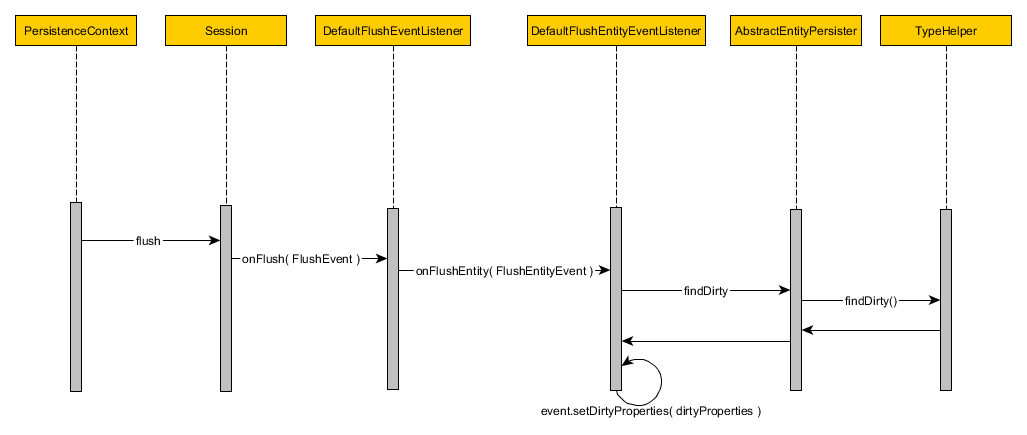
The persistence context enqueues entity state transitions that get translated to database statements upon flushing. For managed entities, Hibernate can auto-detect incoming changes and schedule SQL UPDATES on our behalf. This mechanism is called automatic dirty checking.
The default dirty checking strategy
By default Hibernate checks all managed entity properties. Every time an entity is loaded, Hibernate makes an additional copy of all entity property values. At flush time, every managed entity property is matched against the loading-time snapshot value:
So the number of individual dirty checks is given by the following formula:

where
n = The number of managed entities
p = The number of properties of a given entity
Even if only one property of a single entity has ever changed, Hibernate will still check all managed entities. For a large number of managed entities, the default dirty checking mechanism may have a significant CPU and memory footprint. Since the initial entity snapshot is held separately, the persistence context requires twice as much memory as all managed entities would normally occupy.
How does AUTO flush strategy work in JPA and Hibernate
Are you struggling with performance issues in your Spring, Jakarta EE, or Java EE application?
Imagine having a tool that could automatically detect performance issues in your JPA and Hibernate data access layer long before pushing a problematic change into production!
With the widespread adoption of AI agents generating code in a heartbeat, having such a tool that can watch your back and prevent performance issues during development, long before they affect production systems, can save your company a lot of money and make you a hero!
Hypersistence Optimizer is that tool, and it works with Spring Boot, Spring Framework, Jakarta EE, Java EE, Quarkus, Micronaut, or Play Framework.
So, rather than allowing performance issues to annoy your customers, you are better off preventing those issues using Hypersistence Optimizer and enjoying spending your time on the things that you love!
Introduction
The Hibernate AUTO flush mode behaves differently whether you are bootstrapping Hibernate via JPA or using the stand-alone mechanism.
When using JPA, the AUTO flush mode causes all queries (JPQL, Criteria API, and native SQL) to trigger a flush prior to the query execution. However, this is not the case when bootstrapping Hibernate using the native API.
Not all queries trigger a Session flush
Many would assume that Hibernate always flushes the Session before any executing query. While this might have been a more intuitive approach, and probably closer to the JPA’s AUTO FlushModeType, Hibernate tries to optimize that. If the currently executed query is not going to hit the pending SQL INSERT/UPDATE/DELETE statements then the flush is not strictly required.
As stated in the reference documentation, the AUTO flush strategy may sometimes synchronize the current persistence context prior to a query execution. It would have been more intuitive if the framework authors had chosen to name it FlushMode.SOMETIMES.




