Java application performance tuning using Lightrun
Are you struggling with performance issues in your Spring, Jakarta EE, or Java EE application?
Imagine having a tool that could automatically detect performance issues in your JPA and Hibernate data access layer long before pushing a problematic change into production!
With the widespread adoption of AI agents generating code in a heartbeat, having such a tool that can watch your back and prevent performance issues during development, long before they affect production systems, can save your company a lot of money and make you a hero!
Hypersistence Optimizer is that tool, and it works with Spring Boot, Spring Framework, Jakarta EE, Java EE, Quarkus, Micronaut, or Play Framework.
So, rather than allowing performance issues to annoy your customers, you are better off preventing those issues using Hypersistence Optimizer and enjoying spending your time on the things that you love!
Introduction
In this article, I’m going to show you analyze a Java application using Lightrun so that you can discover various performance tuning improvements you could apply to your current Java application.
In this previous article, I explained what Lightrun is and how you can use it to inject dynamic logs, capture runtime snapshots, or add dynamic metrics.
In this article, I’m going to use Lightrun as an alternative to my JPA Association Fetching Validator.
DefaultLoadEventListener
When fetching a JPA entity using Hibernate, a LoadEvent is triggered, which is handled by the DefaultLoadEventListener, as follows:
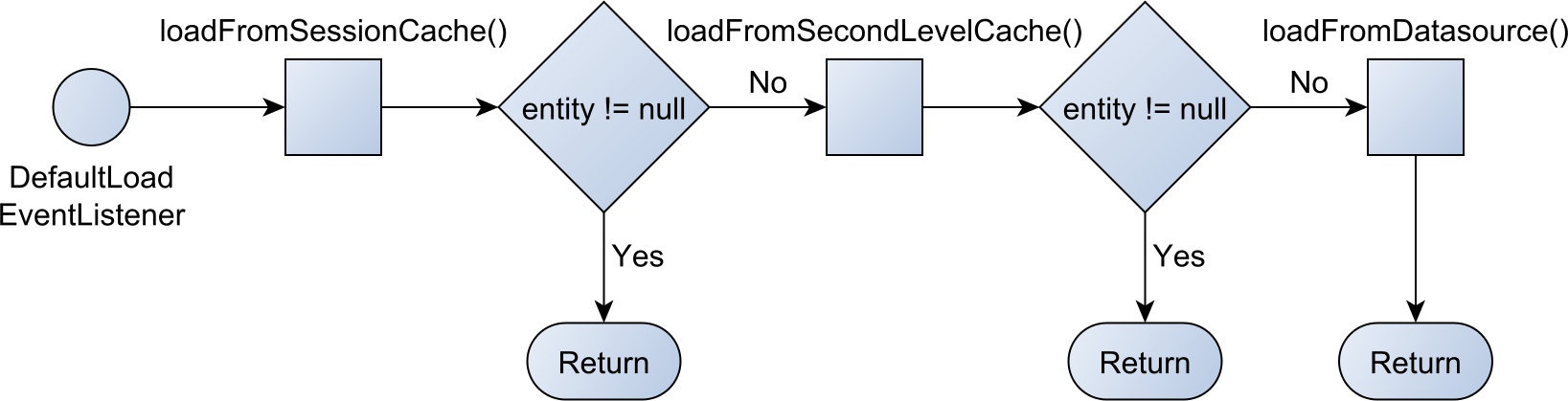
The DefaultLoadEventListener will check whether the entity is located in the current JPA Persistence Context or first-level cache. If the entity is found there, then the very same Object reference is going to be returned.
This means that two consecutive entity fetch calls will always return the same Java Object reference. And this is the reason why JPA and Hibernate provide application-level repeatable reads.
If the entity is not found in the first-level cache, Hibernate will try to load it from the second-level cache if and only if the second-level cache was enabled.
Last, if the entity cannot be loaded from any cache, it will be loaded from the database.
Now, this process can happen when calling EntityManager.find, when traversing an association, or indirectly for the FetchType.EAGER strategy.
Inspecting N+1 query issues
The JPA Association Fetching Validator article explains how you can assert the JPA association fetches programmatically. This tool is very useful during testing, but it’s less practical for consultants who have to examine a production system for the very first time.
For instance, let’s take an example from the Spring PetClinic application:
@Entity
@Table(name = "pets")
public class Pet extends NamedEntity {

    @Column(name = "birth_date")
    @DateTimeFormat(pattern = "yyyy-MM-dd")
    private LocalDate birthDate;

    @ManyToOne
    @JoinColumn(name = "type_id")
    private PetType type;

    @ManyToOne
    @JoinColumn(name = "owner_id")
    private Owner owner;

}
The Pet entity has two parent associations, type and owner, each one being annotated with the @ManyToOne annotation. However, by default, the @ManyToOne association uses the FetchType.EAGER fetching strategy.
So, if we load 2 Pet entities while also fetching their associated owner associations:
List<Pet> pets = entityManager.createQuery("""
    select p
    from Pet p
    join fetch p.owner
    where p.id in :petIds
    """)
.setParameter("petIds", List.of(3L, 6L))
.getResultList();
Hibernate will execute 3 queries:
SELECT
    p.id as id1_1_1_,
    p.name as name2_1_1_,
    p.birth_date as birth_da3_1_1_,
    p.owner_id as owner_id4_1_1_,
    p.type_id as type_id5_1_1_,
    o.id as id1_0_0_,
    o.first_name as first_na2_0_0_,
    o.last_name as last_nam3_0_0_,
    o.address as address4_0_0_,
    o.city as city5_0_0_,
    o.telephone as telephon6_0_0_
FROM
    pets p
JOIN
    owners o ON o.id = p.owner_id
WHERE
    p.id IN (3, 6)

SELECT
    pt.id as id1_3_0_,
    pt.name as name2_3_0_
FROM
    types pt
WHERE
    pt.id = 3

SELECT
    pt.id as id1_3_0_,
    pt.name as name2_3_0_
FROM
    types pt
WHERE
    pt.id = 6
So, why there were 3 queries executed instead of only 1? That’s the infamous N+1 query issue.
Java Performance Tuning using Lightrun
While you can detect the N+1 query issues using integration tests, sometimes you cannot do that because the system you were hired to analyze is deployed into production, and you haven’t seen the source code yet.
In this kind of situation, a tool like Lightrun becomes very handy as you can simply inject dynamically a runtime snapshot that’s recorded only when a given condition is met.
The first step is to add a runtime snapshot in the loadFromDatasource method of the DefaultLoadEventListener Hibernate class.

Notice that the snapshot is recorded only of the isAssociationFetch() method of the associated LoadEvent returns true. This condition allows us to capture the secondary queries executed by the N+1 query issue.
Now, when loading all the pet owners with the last name of Davis, the PetClinic application executes the following SQL queries:
SELECT DISTINCT
    o.id AS id1_0_0_,
    p.id AS id1_1_1_,
    o.first_name AS first_na2_0_0_,
    o.last_name AS last_nam3_0_0_,
    o.address AS address4_0_0_,
    o.city AS city5_0_0_,
    o.telephone AS telephon6_0_0_,
    p.name AS name2_1_1_,
    p.birth_date AS birth_da3_1_1_,
    p.owner_id AS owner_id4_1_1_,
    p.type_id AS type_id5_1_1_,
    p.owner_id AS owner_id4_1_0__,
    p.id AS id1_1_0__
FROM
    owners o
LEFT OUTER JOIN
    pets p ON o.id=p.owner_id
WHERE
    o.last_name LIKE 'Davis%'

SELECT
    pt.id as id1_3_0_,
    pt.name as name2_3_0_
FROM
    types pt
WHERE
    pt.id = 6

SELECT
    pt.id as id1_3_0_,
    pt.name as name2_3_0_
FROM
    types pt
WHERE
    pt.id = 3
And when checking the Lightrun Snapshot console, we can see that two records have been registered:
The first snapshot looks as follows:

And the second snapshot looks like this:

Notice that the two snapshots correspond to the secondary queries executed by the Spring Petclinic application due to the extensive use of the FetchType.EAGER strategy.
Cool, right?
If you enjoyed this article, I bet you are going to love my Book and Video Courses as well.



Conclusion
While you can detect these N+1 query issues during testing using the JPA Association Fetching Validator, if your task is to analyze a runtime system you’ve never ever seen before, then Lightrun is a great tool to discover all sorts of issues and the reason why they happen.
Especially because Java Performance Tuning is one of the most common reasons I’m getting hired, Lightrun is a great addition to my toolset.
This research was funded by Lightrun and conducted in accordance with the blog ethics policy.
While the article was written independently and reflects entirely my opinions and conclusions, the amount of work involved in making this article happen was compensated by Lightrun.