How to map table rows to columns using SQL PIVOT or CASE expressions
Are you struggling with performance issues in your Spring, Jakarta EE, or Java EE application?
What if there were a tool that could automatically detect what caused performance issues in your JPA and Hibernate data access layer?
Wouldn’t it be awesome to have such a tool to watch your application and prevent performance issues during development, long before they affect production systems?
Well, Hypersistence Optimizer is that tool! And it works with Spring Boot, Spring Framework, Jakarta EE, Java EE, Quarkus, Micronaut, or Play Framework.
So, rather than fixing performance issues in your production system on a Saturday night, you are better off using Hypersistence Optimizer to help you prevent those issues so that you can spend your time on the things that you love!
Introduction
While reading the wonderful SQL Antipatterns book by Bill Karwin, which is a great reference for any developer that needs to interact with a Relational Database System, I found an example where the SQL PIVOT clause would work like a charm.
In this post, I’m going to explain how to transpose a ResultSet using PIVOT so that rows become columns.
Domain Model
As an exercise, let’s imagine that our enterprise system is comprised of lots of Microservices which need to be configured on-demand. While each Microservice comes with its own configuration, we might need to configure them dynamically so that we increase the connection pool size, or make them switch from one database node to another.
For this purpose, we could have a dedicated database schema which serves configuration metadata to our Microservices. If a service reads a component property from the database, that value overrides the default value that was defined at built-time.
The metadata database schema looks as follows:
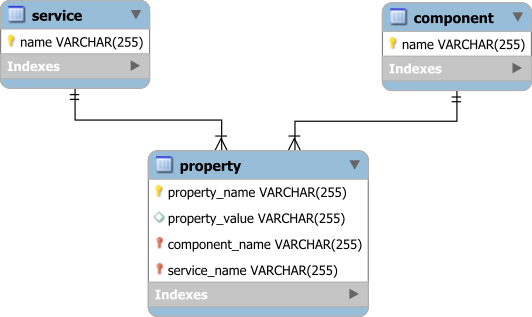
As you can see, the Property table is using an EAV model while using Foreign Keys for the Service and Component references.
Projecting the Component properties
When way to query a given component property across multiple services is to execute the following SQL query:
List<Object[]> componentProperties = entityManager
.createNativeQuery(
    "SELECT " +
    "   p.service_name AS serviceName, " +
    "   p.component_name AS componentName, " +
    "   p.property_name, " +
    "   p.property_value " +
    "FROM Property p " +
    "WHERE " +
    "   p.component_name = :name")
.setParameter("name", "dataSource")
.getResultList();
However, the ResultSet looks as follows:
componentProperties = {java.util.ArrayList@4968}  size = 8
 0 = {java.lang.Object[4]@4971}
  0 = "Apollo"
  1 = "dataSource"
  2 = "databaseName"
  3 = "high_performance_java_persistence"
 1 = {java.lang.Object[4]@4972}
  0 = "Artemis"
  1 = "dataSource"
  2 = "databaseName"
  3 = "high_performance_java_persistence"
 2 = {java.lang.Object[4]@4973}
  0 = "Apollo"
  1 = "dataSource"
  2 = "password"
  3 = "admin"
 3 = {java.lang.Object[4]@4974}
  0 = "Artemis"
  1 = "dataSource"
  2 = "password"
  3 = "admin"
 4 = {java.lang.Object[4]@4975}
  0 = "Apollo"
  1 = "dataSource"
  2 = "serverName"
  3 = "192.168.0.5"
 5 = {java.lang.Object[4]@4976}
  0 = "Artemis"
  1 = "dataSource"
  2 = "url"
  3 = "jdbc:oracle:thin:@192.169.0.6:1521/hpjp"
 6 = {java.lang.Object[4]@4977}
  0 = "Apollo"
  1 = "dataSource"
  2 = "username"
  3 = "postgres"
 7 = {java.lang.Object[4]@4978}
  0 = "Artemis"
  1 = "dataSource"
  2 = "username"
  3 = "oracle"
We don’t want to deal with an Object[] array, and we’d rather use a DataSourceConfiguration DTO to store all the DataSource information associated with a given service.

If the sqlQuery is a String variable, then we can map its ResultSet to the DataSourceConfiguration DTO like this:
List<DataSourceConfiguration> dataSources = entityManager
.createNativeQuery(sqlQuery)
.setParameter("name", "dataSource")
.unwrap(Query.class)
.setResultTransformer(
    Transformers.aliasToBean(
        DataSourceConfiguration.class
    )
)
.getResultList();
You can find more details about fetching DTO projections with JPA and Hibernate in this article.
Bill Karwin’s query
In his book, Bill Karwin propose the following SQL query to transpose the ResultSet rows to columns:
SELECT DISTINCT
   userName.service_name AS "serviceName",
   c.name AS "componentName",
   databaseName.property_value AS "databaseName",
   url.property_value AS "url",
   serverName.property_value AS "serverName",
   userName.property_value AS "userName",
   password.property_value AS "password"
FROM Component c
LEFT JOIN Property databaseName
   ON databaseName.component_name = c.name AND
      databaseName.property_name = 'databaseName'
LEFT JOIN Property url
   ON url.component_name = c.name AND
      url.property_name = 'url'
LEFT JOIN Property serverName
   ON serverName.component_name = c.name AND
      serverName.property_name = 'serverName'
LEFT JOIN Property userName
   ON userName.component_name = c.name AND
      userName.property_name = 'username'
LEFT JOIN Property password
   ON password.component_name = c.name AND
      password.property_name = 'password'
WHERE
   c.name = :name
Well, first of all, this query does not really render the expected result because properties get mixed between different services:
dataSources = {java.util.ArrayList@4990}  size = 2
 0 = {com.vladmihalcea.book.hpjp.hibernate.query.pivot.DataSourceConfiguration@4991}
  serviceName = "Apollo"
  componentName = "dataSource"
  databaseName = "high_performance_java_persistence"
  url = "jdbc:oracle:thin:@192.169.0.6:1521/hpjp"
  serverName = "192.168.0.5"
  userName = "postgres"
  password = "admin"
 1 = {com.vladmihalcea.book.hpjp.hibernate.query.pivot.DataSourceConfiguration@4994}
  serviceName = "Artemis"
  componentName = "dataSource"
  databaseName = "high_performance_java_persistence"
  url = "jdbc:oracle:thin:@192.169.0.6:1521/hpjp"
  serverName = "192.168.0.5"
  userName = "oracle"
  password = "admin"
Second, while the EAV model is more like a design smell than an Anti-Pattern, the aforementioned SQL query is surely an Anti-Pattern from a performance perspective.
We can do way better than this!
SQL PIVOT
Both Oracle and SQL Server support the PIVOT SQL clause, and so we can rewrite the previous query as follows:
SELECT *
FROM (
   SELECT
       p.service_name AS "serviceName",
       p.component_name AS "componentName",
       p.property_name ,
       p.property_value
   FROM Property p
   WHERE
       p.component_name = :name
)
PIVOT(
   MAX(property_value)
   FOR property_name IN (
       'databaseName' AS "databaseName",
       'url' AS "url",
       'serverName' AS "serverName",
       'username' AS "userName",
       'password' AS "password")
)
This time, the result looks much better:
dataSources = {java.util.ArrayList@4997}  size = 2
 0 = {com.vladmihalcea.book.hpjp.hibernate.query.pivot.DataSourceConfiguration@4998}
  serviceName = "Apollo"
  componentName = "dataSource"
  databaseName = "high_performance_java_persistence"
  url = null
  serverName = "192.168.0.5"
  userName = "postgres"
  password = "admin"
 1 = {com.vladmihalcea.book.hpjp.hibernate.query.pivot.DataSourceConfiguration@5041}
  serviceName = "Artemis"
  componentName = "dataSource"
  databaseName = "high_performance_java_persistence"
  url = "jdbc:oracle:thin:@192.169.0.6:1521/hpjp"
  serverName = null
  userName = "oracle"
  password = "admin"
Only the Artemis service has a url property defined. More, there’s no extra JOIN for each column that we need to transpose from a row value.
SQL CASE
If you’re not using Oracle or SQL Server, you can still transpose rows to columns using a CASE expression and a GROUP BY clause:
SELECT
    p.service_name AS "serviceName",
    p.component_name AS "componentName",
    MAX(
        CASE WHEN property_name = 'databaseName'
        THEN property_value END
    ) AS "databaseName",
    MAX(
        CASE WHEN property_name = 'url'
        THEN property_value END)
    AS "url",
    MAX(
        CASE WHEN property_name = 'serverName'
        THEN property_value END
    ) AS "serverName",
    MAX(
        CASE WHEN property_name = 'username'
        THEN property_value END
    ) AS "userName",
    MAX(
        CASE WHEN property_name = 'password'
        THEN property_value END
    ) AS "password"
FROM Property p
WHERE
   p.component_name = :name
GROUP BY
    p.service_name,
    p.component_name
This query return the following result:
dataSources = {java.util.ArrayList@4992}  size = 2
 0 = {com.vladmihalcea.book.hpjp.hibernate.query.pivot.DataSourceConfiguration@4993}
  serviceName = "Apollo"
  componentName = "dataSource"
  databaseName = "high_performance_java_persistence"
  url = null
  serverName = "192.168.0.5"
  userName = "postgres"
  password = "admin"
 1 = {com.vladmihalcea.book.hpjp.hibernate.query.pivot.DataSourceConfiguration@5177}
  serviceName = "Artemis"
  componentName = "dataSource"
  databaseName = "high_performance_java_persistence"
  url = "jdbc:oracle:thin:@192.169.0.6:1521/hpjp"
  serverName = null
  userName = "oracle"
  password = "admin"
If you enjoyed this article, I bet you are going to love my Book and Video Courses as well.



Conclusion
Pivoting tables is a very handy feature when working with reports, and there are multiple approaches to tackling this issue. Using PIVOT or CASE expressions is the right thing to do, while the JOIN approach is both suboptimal and may generate a wrong ResultSet.
For more about this topic, check out this article from Markus Winand.









Hi Vlad!
The problem with the JOIN solution is that your properties reference both service and component, but your join conditions only check the component. If you remove the DISTINCT modifier, you see that it generates way too many rows, because it’s doing a Cartesian product.
I found this solution that works better:
No DISTINCT is needed, and it correlates the properties correctly.
FYI, I revised my SQL Antipatterns book with improvements and new topics in 2022: https://pragprog.com/titles/bksap1/sql-antipatterns-volume-1/
I’m currently working on an all-new Volume 2 book.
Thanks for the tip. I’m looking forward to reading the second edition.