
Transactions and Concurrency Control
Are you struggling with performance issues in your Spring, Jakarta EE, or Java EE application?
What if there were a tool that could automatically detect what caused performance issues in your JPA and Hibernate data access layer?
Wouldn’t it be awesome to have such a tool to watch your application and prevent performance issues during development, long before they affect production systems?
Well, Hypersistence Optimizer is that tool! And it works with Spring Boot, Spring Framework, Jakarta EE, Java EE, Quarkus, Micronaut, or Play Framework.
So, rather than fixing performance issues in your production system on a Saturday night, you are better off using Hypersistence Optimizer to help you prevent those issues so that you can spend your time on the things that you love!
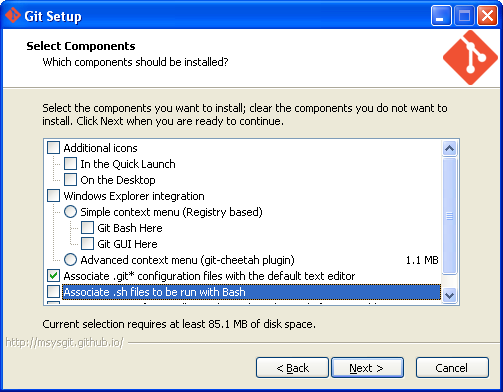


The most common SSH windows utilities are the ones coming with Putty.
First you need to go to Putty binaries repository and download the following resources:
If you don’t have a SSH public/private key pair you can generate it using the puttygen utility.
From now on I’ll use %USER_HOME% whenever I refer to your Windows user home folder, which depending on your Windows version may be located in:
| Version | Path | ||
|---|---|---|---|
| Windows XP | C:\Documents and Settings\vlad | ||
| Windows 7 and later | C:\Users\vlad | ||
You need to create a %USER_HOME%.ssh folder to store your SSH private key.
mkdir .ssh

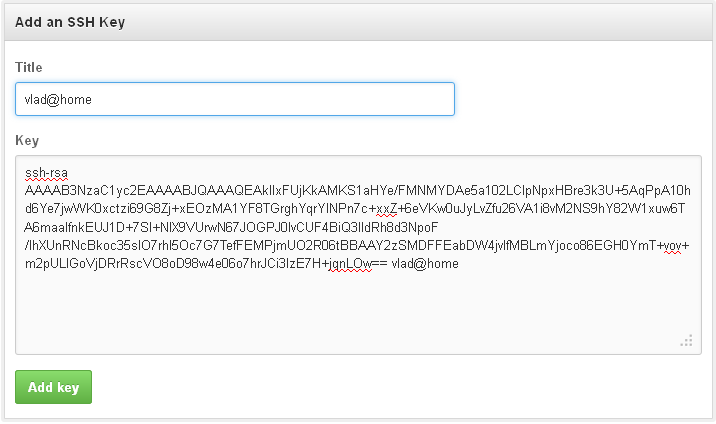
You should now have a %USER_HOME%\.ssh\github-rsa.ppk file.
In Windows 10, you can access the Startup folder associated with your user account under this path:
C:\Users\%USERNAME%\AppData\Roaming\Microsoft\
Windows\Start Menu\Programs\Startup
Make sure the shortcut’s target contains the path to your key as well.
C:\Putty\pageant.exe %USER_HOME%\.ssh\github-rsa.ppk
In order to set a parameter to a shortcut, you can right-click the shortcut, choose Properties, and edit the Target text area to set the parameter you wish to send to the shortcut executable.


Now, you need to set up your username and email address that will be used when issuing a commit:
$ git config --global user.name "Vlad Mihalcea"
$ git config --global user.email mail@vladmihalcea.com
First, you need to establish a Plink connection, to make sure the SSH authentication works:
D:\kits\Putty>plink.exe -v git@github.com
Looking up host "github.com"
Connecting to 192.30.252.129 port 22
Server version: SSH-2.0-libssh-0.6.0
Using SSH protocol version 2
We claim version: SSH-2.0-PuTTY_Release_0.63
Using Diffie-Hellman with standard group "group14"
Doing Diffie-Hellman key exchange with hash SHA-1
Host key fingerprint is:
ssh-rsa 2048 16:27:ac:a5:76:28:2d:36:63:1b:56:4d:eb:df:a6:48
Initialised AES-256 SDCTR client->server encryption
Initialised HMAC-SHA-256 client->server MAC algorithm
Initialised AES-256 SDCTR server->client encryption
Initialised HMAC-SHA-256 server->client MAC algorithm
Pageant is running. Requesting keys.
Pageant has 1 SSH-2 keys
Using username "git".
Trying Pageant key #0
Authenticating with public key "artsoft96" from agent
Sending Pageant's response
Access granted
Opening session as main channel
Opened main channel
Server refused to allocate pty
Started a shell/command
Server sent command exit status 1
Hi vladmihalcea! You've successfully authenticated, but GitHub does not provide shell access.
Disconnected: All channels closed
Now clone one of your GitHub repositories and play with git. You shouldn’t be asked for your username/password.
D:\vlad\GitHub>git clone git@github.com:vladmihalcea/db-util.git
Cloning into 'db-util'...
remote: Reusing existing pack: 213, done.
remote: Total 213 (delta 0), reused 0 (delta 0)
Receiving objects: 100% (213/213), 150.94 KiB | 97.00 KiB/s, done.
Resolving deltas: 100% (86/86), done.
Checking connectivity... done.
D:\vlad\GitHub>cd db-util
D:\vlad\GitHub\db-util>git commit -a -m "Change developer id to author"
[master 93ee2bf] Change developer id to author
 1 file changed, 1 insertion(+), 1 deletion(-)
D:\vlad\GitHub\db-util>git push
Counting objects: 7, done.
Delta compression using up to 2 threads.
Compressing objects: 100% (3/3), done.
Writing objects: 100% (3/3), 337 bytes | 0 bytes/s, done.
Total 3 (delta 2), reused 0 (delta 0)
To git@github.com:vladmihalcea/db-util.git
   21e9c0e..93ee2bf  master -> master







