SQL EXISTS and NOT EXISTS
Are you struggling with performance issues in your Spring, Jakarta EE, or Java EE application?
Imagine having a tool that could automatically detect performance issues in your JPA and Hibernate data access layer long before pushing a problematic change into production!
With the widespread adoption of AI agents generating code in a heartbeat, having such a tool that can watch your back and prevent performance issues during development, long before they affect production systems, can save your company a lot of money and make you a hero!
Hypersistence Optimizer is that tool, and it works with Spring Boot, Spring Framework, Jakarta EE, Java EE, Quarkus, Micronaut, or Play Framework.
So, rather than allowing performance issues to annoy your customers, you are better off preventing those issues using Hypersistence Optimizer and enjoying spending your time on the things that you love!
Introduction
In this article, we are going to see how the SQL EXISTS operator works and when you should use it.
Although the EXISTS operator has been available since SQL:86, the very first edition of the SQL Standard, I found that there are still many application developers who don’t realize how powerful SQL subquery expressions really are when it comes to filtering a given table based on a condition evaluated on a different table.
Database table model
Let’s assume we have the following two tables in our database, that form a one-to-many table relationship. The student table is the parent, and the student_grade is the child table since it has a student_id Foreign Key column referencing the id Primary Key column in the student table.
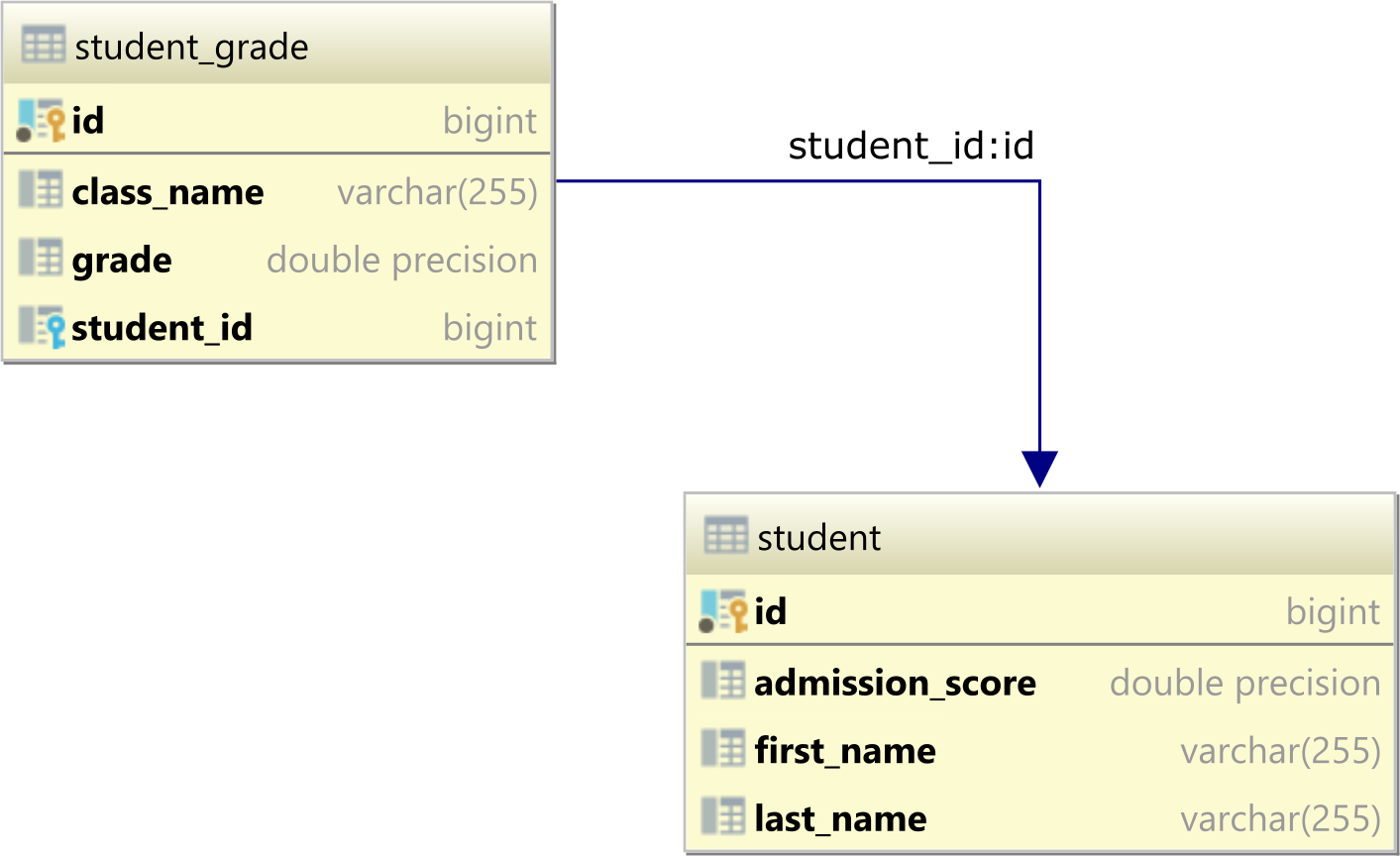
The student table contains the following two records:
| id | first_name | last_name | admission_score |
|----|------------|-----------|-----------------|
| 1  | Alice      | Smith     | 8.95            |
| 2  | Bob        | Johnson   | 8.75            |
And, the student_grade table stores the grades the students received:
| id | class_name | grade | student_id |
|----|------------|-------|------------|
| 1  | Math       | 10    | 1          |
| 2  | Math       | 9.5   | 1          |
| 3  | Math       | 9.75  | 1          |
| 4  | Science    | 9.5   | 1          |
| 5  | Science    | 9     | 1          |
| 6  | Science    | 9.25  | 1          |
| 7  | Math       | 8.5   | 2          |
| 8  | Math       | 9.5   | 2          |
| 9  | Math       | 9     | 2          |
| 10 | Science    | 10    | 2          |
| 11 | Science    | 9.4   | 2          |
SQL EXISTS
Let’s say we want to get all students that have received a 10 grade in Math class.
If we are only interested in the student identifier, then we can run a query like this one:
SELECT
    student_grade.student_id
FROM
    student_grade
WHERE
    student_grade.grade = 10 AND
    student_grade.class_name = 'Math'
ORDER BY
    student_grade.student_id
But, the application is interested in displaying the full name of a student, not just the identifier, so we need info from the student table as well.
In order to filter the student records that have a 10 grade in Math, we can use the EXISTS SQL operator, like this:
SELECT
    id, first_name, last_name
FROM
    student
WHERE EXISTS (
    SELECT 1
    FROM
        student_grade
    WHERE
        student_grade.student_id = student.id AND
        student_grade.grade = 10 AND
        student_grade.class_name = 'Math'
)
ORDER BY id
When running the query above, we can see that only the Alice row is selected:
| id | first_name | last_name |
|----|------------|-----------|
| 1  | Alice      | Smith     |
The outer query selects the student row columns we are interested in returning to the client. However, the WHERE clause is using the EXISTS operator with an associated inner subquery.
The EXISTS operator returns true if the subquery returns at least one record and false if no row is selected. The database engine does not have to run the subquery entirely. If a single record is matched, the EXISTS operator returns true, and the associated other query row is selected.
The inner subquery is correlated because the student_id column of the student_grade table is matched against the id column of the outer student table.
YouTube Video
I also published a YouTube video about EXISTS and NOT EXISTS conditional operators, so if you’re interested in this topic, you might want to watch this video lesson as well.
SQL NOT EXISTS
Let’s consider we want to select all students that have no grade lower than 9. For this, we can use NOT EXISTS, which negates the logic of the EXISTS operator.
Therefore, the NOT EXISTS operator returns true if the underlying subquery returns no record. However, if a single record is matched by the inner subquery, the NOT EXISTS operator will return false, and the subquery execution can be stopped.
To match all student records that have no associated student_grade with a value lower than 9, we can run the following SQL query:
SELECT
    id, first_name, last_name
FROM
    student
WHERE NOT EXISTS (
    SELECT 1
    FROM
        student_grade
    WHERE
        student_grade.student_id = student.id AND
        student_grade.grade < 9
)
ORDER BY id
When running the query above, we can see that only the Alice record is matched:
| id | first_name | last_name |
|----|------------|-----------|
| 1  | Alice      | Smith     |
Cool, right?
If you enjoyed this article, I bet you are going to love my Book and Video Courses as well.



Conclusion
The advantage of using the SQL EXISTS and NOT EXISTS operators is that the inner subquery execution can be stopped as long as a matching record is found.
If the subquery requires to scan a large volume of records, stopping the subquery execution as soon as a single record is matched can greatly speed up the overall query response time.