The best way to write a Spring Data Exists Query
Are you struggling with performance issues in your Spring, Jakarta EE, or Java EE application?
Imagine having a tool that could automatically detect performance issues in your JPA and Hibernate data access layer long before pushing a problematic change into production!
With the widespread adoption of AI agents generating code in a heartbeat, having such a tool that can watch your back and prevent performance issues during development, long before they affect production systems, can save your company a lot of money and make you a hero!
Hypersistence Optimizer is that tool, and it works with Spring Boot, Spring Framework, Jakarta EE, Java EE, Quarkus, Micronaut, or Play Framework.
So, rather than allowing performance issues to annoy your customers, you are better off preventing those issues using Hypersistence Optimizer and enjoying spending your time on the things that you love!
Introduction
In this article, I’m going to show you the best way to write a Spring Data Exists Query that’s efficient from an SQL perspective.
While doing consulting, I’ve encountered several options that are commonly used without developers knowing there are actually better alternatives.
Domain Model
Let’s assume we have the following Post entity:
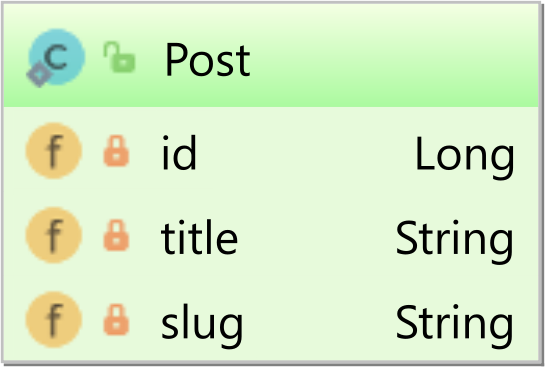
The slug property is a business key, meaning it has a unique constraint, and, for this reason, we can annotate it with the @NaturalId Hibernate annotation:
@Entity
@Table(
    name = "post",
    uniqueConstraints = @UniqueConstraint(
        name = "UK_POST_SLUG",
        columnNames = "slug"
    )
)
public class Post {
⠀
    @Id
    private Long id;
⠀
    private String title;
⠀
    @NaturalId
    private String slug;
⠀
    public Long getId() {
        return id;
    }
⠀
    public Post setId(Long id) {
        this.id = id;
        return this;
    }
⠀
    public String getTitle() {
        return title;
    }
⠀
    public Post setTitle(String title) {
        this.title = title;
        return this;
    }
⠀
    public Post setSlug(String slug) {
        this.slug = slug;
        return this;
    }
}
How NOT to write an Exists query with Spring Data
First, let’s start with various methods which, while popular, you are better off avoiding.
Emulating existence with a findBy query
Spring Data provides a way to derive queries from method names, so you can write a findBy query to emulate existence, like this:
@Repository
public interface PostRepository
        extends JpaRepository<Post, Long> {
⠀
    Optional<Post> findBySlug(String slug);
}
Since the findBySlug method is meant for fetching a Post entity, I’ve seen cases when this method was used for equality checks, like in the following example:
assertTrue(
    postRepository.findBySlug(slug).isPresent()
);
The problem with this approach is that an entity is actually fetched just for the sake of checking whether there is an associated record for the provided filtering criteria:
SELECT
    p.id AS id1_0_,
    p.slug AS slug2_0_,
    p.title AS title3_0_
FROM
    post p
WHERE
    p.slug = 'high-performance-java-persistence'
Using a
fidnByquery to fetch an entity to check for its existence is a waste of resources since not only you cannot use a covering query in case you have an index on theslugproperty, but you have to send the entity result set over the network to the JDBC Driver, only to silently discard it.
Checking existence using Query By Example
Another very popular, but inefficient, way to check existence is using the Query By Example feature:
assertTrue(
    postRepository.exists(
        Example.of(
            new Post().setSlug(slug),
            ExampleMatcher.matching()
                .withIgnorePaths(Post_.ID)
                .withMatcher(Post_.SLUG, exact())
        )
    )
);
The Query By Example feature builds a Post entity that is going to be used as a reference when matching the properties given by the provided ExampleMatcher specification.
When executing the above Query By Example method, Spring Data generates the same SQL query that was generated by the previous findBy method:
SELECT
    p.id AS id1_0_,
    p.slug AS slug2_0_,
    p.title AS title3_0_
FROM
    post p
WHERE
    p.slug = 'high-performance-java-persistence'
While the Query By Example feature might be useful for fetching entities, it’s not very efficient to use it with the
existsgeneric method of the Spring Data JPARepository.
How to write an Exists query with Spring Data
There are better ways to write a Spring Data Exists Query.
Checking existence with an existsBy query method
Spring Data offers an existsBy query method, which we can define in the PostRepository, as follows:
@Repository
public interface PostRepository
        extends JpaRepository<Post, Long> {
⠀
    boolean existsBySlug(String slug);
}
When calling the existsBySlug method on PostgreSQL or MySQL:
assertTrue(
    postRepository.existsBySlug(slug)
);
Spring Data generates the following SQL query:
SELECT
    p.id AS col_0_0_
FROM
    post p
WHERE
    p.slug = 'high-performance-java-persistence'
LIMIT 1
The PostgreSQL Execution Plan for this query looks as follows:
Limit
    (cost=0.28..8.29 rows=1 width=8)
    (actual time=0.021..0.021 rows=1 loops=1)
  ->  Index Scan using uk_post_slug on post p
      (cost=0.28..8.29 rows=1 width=8)
      (actual time=0.020..0.020 rows=1 loops=1)
        Index Cond: ((slug)::text = 'high-performance-java-persistence'::text)
⠀
Planning Time: 0.088 ms
Execution Time: 0.033 ms
And, the MySQL one, like this:
-> Limit: 1 row(s)
   (cost=0.00 rows=1)
   (actual time=0.001..0.001 rows=1 loops=1)
    -> Rows fetched before execution
       (cost=0.00 rows=1)
       (actual time=0.000..0.000 rows=1 loops=1)
So, the query is very fast, and the extra LIMIT operation doesn’t really affect performance since it’s done on a one-record result set anyway.
Checking existence with a COUNT SQL query
Another option to emulate existence is using a COUNT query:
@Repository
public interface PostRepository
        extends JpaRepository<Post, Long> {
⠀
    @Query(value = """
        select count(p.id) = 1
        from Post p
        where p.slug = :slug
        """
    )
    boolean existsBySlugWithCount(@Param("slug") String slug);
}
The
COUNTquery works fine in this particular case since we are matching a UNIQUE column value.However, generally, for queries that return result sets having more than one record, you should prefer using
EXISTSinstead ofCOUNT, as explained by Lukas Eder in this article.
When calling the existsBySlugWithCount method on PostgreSQL and MySQL:
assertTrue(
    postRepository.existsBySlugWithCount(slug)
);
Spring Data executes the following SQL query:
SELECT
    count(p.id) > 0 AS col_0_0_
FROM
    post p
WHERE
    p.slug = 'high-performance-java-persistence'
And, the PostgreSQL Execution Plan for this query looks as follows:
Aggregate
  (cost=8.29..8.31 rows=1 width=1)
  (actual time=0.023..0.024 rows=1 loops=1)
  ->  Index Scan using uk_post_slug on post p
      (cost=0.28..8.29 rows=1 width=8)
      (actual time=0.019..0.020 rows=1 loops=1)
        Index Cond: ((slug)::text = 'high-performance-java-persistence'::text)
⠀
Planning Time: 0.091 ms
Execution Time: 0.044 ms
And on MySQL:
-> Aggregate: count('1')
   (actual time=0.002..0.002 rows=1 loops=1)
    -> Rows fetched before execution
       (cost=0.00 rows=1)
       (actual time=0.000..0.000 rows=1 loops=1)
Although there’s an extra Aggregate step for the COUNT operator, that step is very fast since there’s a single record to count.
Checking existence with a CASE WHEN EXISTS SQL query
And the last option to emulate existence is using a CASE WHEN EXISTS native SQL query:
@Repository
public interface PostRepository
        extends JpaRepository<Post, Long> {
⠀
    @Query(value = """
        SELECT
            CASE WHEN EXISTS (
                SELECT 1
                FROM post
                WHERE slug = :slug
            )
            THEN 'true'
            ELSE 'false'
            END
        """,
        nativeQuery = true
    )
    boolean existsBySlugWithCase(@Param("slug") String slug);
}
And, we can call the existsBySlugWithCase method like this:
assertTrue(
    postRepository.existsBySlugWithCase(slug)
);
The PostgreSQL Execution Plan for this query looks as follows:
Result
  (cost=8.29..8.29 rows=1 width=1)
  (actual time=0.021..0.022 rows=1 loops=1)
  InitPlan 1 (returns $0)
    ->  Index Only Scan using uk_post_slug on post
          (cost=0.27..8.29 rows=1 width=0)
          (actual time=0.020..0.020 rows=1 loops=1)
          Index Cond: (slug = 'high-performance-java-persistence'::text)
          Heap Fetches: 1
⠀
Planning Time: 0.097 ms
Execution Time: 0.037 ms
And on MySQL:
-> Rows fetched before execution
   (cost=0.00 rows=1)
   (actual time=0.000..0.000 rows=1 loops=1)
-> Select #2 (subquery in projection; run only once)
    -> Limit: 1 row(s)
        (cost=0.00 rows=1)
        (actual time=0.000..0.001 rows=1 loops=1)
        -> Rows fetched before execution
           (cost=0.00 rows=1)
           (actual time=0.000..0.000 rows=1 loops=1)
So, this is just as fast as the previous LIMIT and COUNT queries. On other databases, you might want to check out to see if there’s any difference.
If you enjoyed this article, I bet you are going to love my Book and Video Courses as well.



Conclusion
Therefore, if you want to check a record’s existence with Spring Data, the easiest way to do so is using the existsBy query method.
And, if the query is more complex and you cannot express it with the Spring Data query methods, you can use either a COUNT or a CASE WHEN EXISTS query since they are just as fast.









Vlad just want you to know I’ve been a Java dev for close to a decade now and the knowledge you’ve provided all of us is legendary. I’ve read many of your articles in order to solve problems in my apps.
Thanks for making my job easier you’re the G.O.A.T
Thanks and stay tuned for more!
Even though it is better option to use existsBy, it is still “illusion” (as you called it another article of yours), because a concurent user could delete it while we are checking. Correct? So if we are checking the existence, just for setting a ForeignKey, it is better to rely on a check on the database level?