How to use PostgreSQL pgvector with JPA, Hibernate, and Spring AI
Are you struggling with performance issues in your Spring, Jakarta EE, or Java EE application?
Imagine having a tool that could automatically detect performance issues in your JPA and Hibernate data access layer long before pushing a problematic change into production!
With the widespread adoption of AI agents generating code in a heartbeat, having such a tool that can watch your back and prevent performance issues during development, long before they affect production systems, can save your company a lot of money and make you a hero!
Hypersistence Optimizer is that tool, and it works with Spring Boot, Spring Framework, Jakarta EE, Java EE, Quarkus, Micronaut, or Play Framework.
So, rather than allowing performance issues to annoy your customers, you are better off preventing those issues using Hypersistence Optimizer and enjoying spending your time on the things that you love!
Introduction
In this article, I’m going to show you how to map the PostgreSQL vector column type from pgvector to a JPA entity attribute using Hypersistence Utils, and how to use it with Spring AI and Ollama to implement semantic search, recommendations, and Retrieval-Augmented Generation (RAG).
Starting with version 3.16.0, the Hypersistence Utils project provides the PostgreSQLVectorType.
What is pgvector
In AI, an embedding is a numerical vector representation of data (e.g., text, image), which in Java can be represented as an array of floating-point numbers. Two texts having a similar meaning have embeddings that are close to each other, even if they don’t share any keyword.
One of the best things about PostgreSQL is the large number of extensions. I read about the pgvector extension in the Just Use Postgres! book by Denis Magda, and I knew that we can use the vector column type to store embeddings. Also, pgvector offers several distance operators, and two index types, HNSW and IVFFlat, that we can use to find the nearest neighbors of a given vector.
So, you can store the embeddings right next to your business data and query it with SQL, which means you can use joins, filtering, aggregations, just like with any other column type.
The pgvector extension is not bundled with PostgreSQL, so you need to install it and then enable it in your database. This was not an easy task since I had to compile it from the source code that I downloaded from GitHub. If you want to avoid this step, then you can use Docker, which offers a pgvector/pgvector:pg18 image (it already includes the pgvector extension) that’s basically a drop-in replacement for the official postgres:18 image.
The examples in this article use PostgreSQL 18 and pgvector 0.8.7.
Domain Model
Let’s assume we have the following entities:
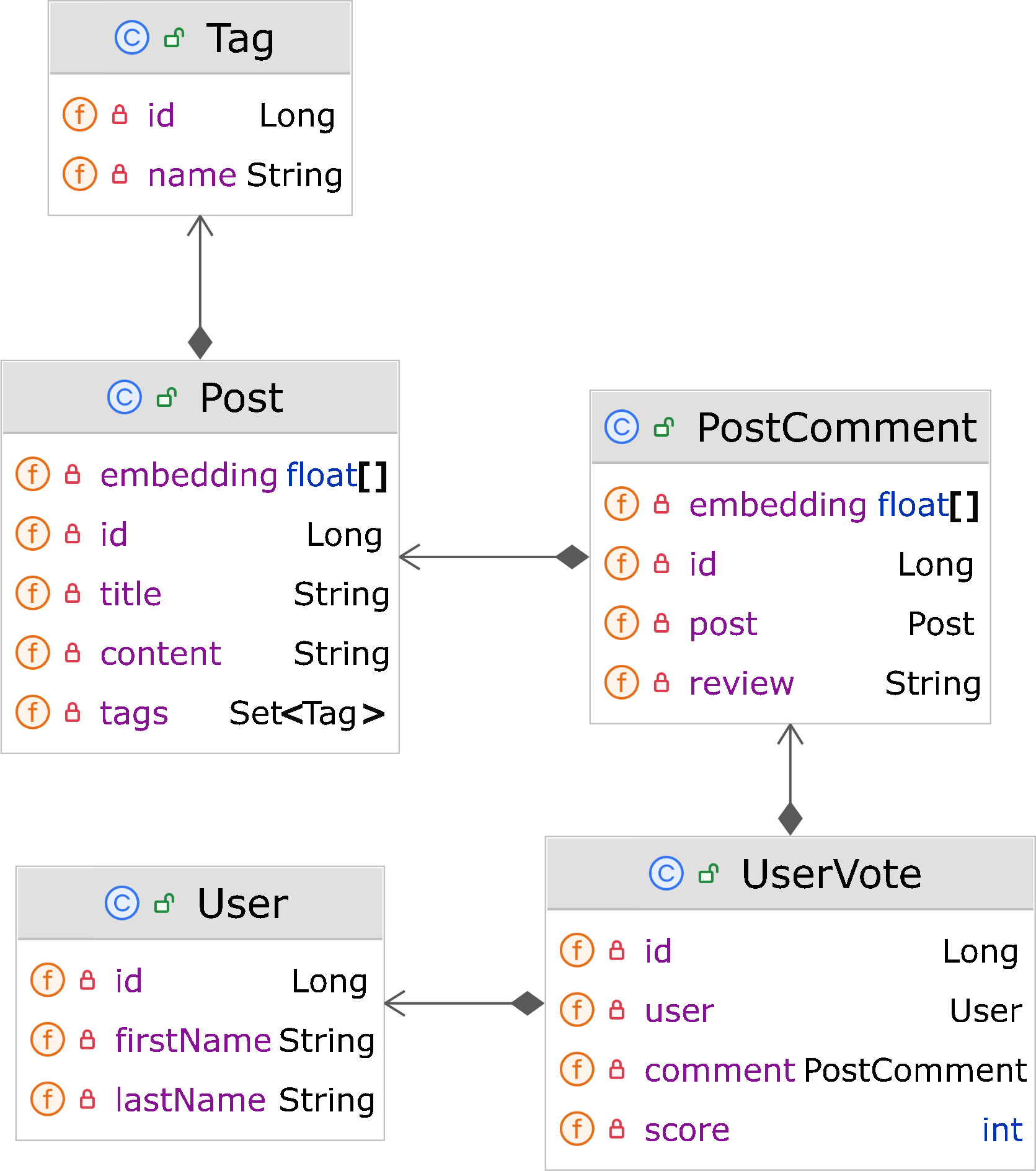
The posts table has a many-to-many relationship with the post_tags table and a one-to-many relationship with post_comments table. The UserVote entity records the score that a given User gave to a given PostComment, just like on Reddit (e.g., either 1 for an upvote or -1 for a downvote).
Both the Post and the PostComment entities store the embedding of their text content.
The Post entity is mapped as follows:
@Entity
@Table(name = "posts")
public class Post {

    @Id
    private Long id;

    @Column(length = 100)
    private String title;

    @Column(columnDefinition = "text")
    private String content;

    @Type(PostgreSQLVectorType.class)
    @Column(columnDefinition = "vector(1024)")
    private float[] embedding;

    @ManyToMany
    @JoinTable(
        name = "post_tags",
        joinColumns = @JoinColumn(name = "post_id"),
        inverseJoinColumns = @JoinColumn(name = "tag_id")
    )
    private Set<Tag> tags = new HashSet<>();

    //Getters and setters omitted for brevity
}
The embedding attribute is a float[], and the @Type annotation tells Hibernate to use the PostgreSQLVectorType from Hypersistence Utils to map it to a pgvector vector column.
The columnDefinition attribute is needed because my test case uses hbm2ddl to generate the schema. In a production system, you are better off managing the database schema with an automatic schema migration tool, like Flyway. With Flyway, the vector(1024) column type is defined in the migration script.
The vector column type takes the number of dimensions as an argument, and our embedding model generates 1024 dimensions, so we use vector(1024). If you try to insert a vector with a different number of dimensions, PostgreSQL is going to reject it.
Unlike the PostgreSQLInetType or the PostgreSQLRangeType, the PostgreSQLVectorType cannot be registered automatically by Hypersistence Utils since it would override the default way of mapping float[] entity attributes. That’s why we need the @Type annotation explicitly. If I remove it, Hibernate would store the content of the float[] array using the default column type defined by the Dialect.
The PostComment entity uses the same mapping for its embedding attribute:
@Entity
@Table(name = "post_comments")
public class PostComment {

    @Id
    @GeneratedValue
    private Long id;

    @ManyToOne(fetch = FetchType.LAZY)
    @JoinColumn(name = "post_id")
    private Post post;

    @Column(length = 250)
    private String review;

    @Type(PostgreSQLVectorType.class)
    @Column(columnDefinition = "vector(1024)")
    private float[] embedding;

    //Getters and setters omitted for brevity
}
The
PostgreSQLVectorTypeextends the Hypersistence UtilsImmutableType, so Hibernate compares thefloat[]references when checking whether the entity attribute has changed.Therefore, if you want to change the embedding, you have to set a new
float[]array, as modifying the existing array in place is not going to be detected by the dirty checking mechanism.
How to create the pgvector extension and the HNSW index
In our test case, Hibernate generates the database schema. However, the vector extension must be created before the posts table, while the HNSW index can only be created after the posts table exists.
For this reason, we are using the following Hibernate configuration properties:
properties.put(
    AvailableSettings.JAKARTA_HBM2DDL_CREATE_SOURCE,
    "script-then-metadata"
);
properties.put(
    AvailableSettings.JAKARTA_HBM2DDL_CREATE_SCRIPT_SOURCE,
    "pgvector/create-extension.sql"
);
properties.put(
    AvailableSettings.JAKARTA_HBM2DDL_LOAD_SCRIPT_SOURCE,
    "pgvector/create-indexes.sql"
);
The script-then-metadata setting instructs Hibernate to run the create-extension.sql script prior to generating the tables from the entity mappings:
CREATE EXTENSION IF NOT EXISTS vector;
And the create-indexes.sql script creates the HNSW indexes once the tables are created:
CREATE INDEX idx_posts_embedding ON posts USING hnsw (embedding vector_cosine_ops);
CREATE INDEX idx_post_comments_embedding ON post_comments USING hnsw (embedding vector_cosine_ops);
The vector_cosine_ops operator class tells PostgreSQL that the index is going to be used by queries that sort by the cosine distance, so the index operator class must match the distance operator used by your queries.
How to generate embeddings with Spring AI and Ollama
To generate the embeddings, we are going to use Spring AI with a local Ollama server, so all the data is processed on our machine.
First, we need to pull the embedding model and the chat model that we are going to use:
ollama pull bge-m3
ollama pull qwen3:8b
The bge-m3 model generates 1024-dimension embeddings, while the qwen3:8b model is the one we are going to use for the RAG example.
Next, we need to add the Spring AI Ollama dependency:
<dependency>
    <groupId>org.springframework.ai</groupId>
    <artifactId>spring-ai-ollama</artifactId>
    <version>${spring-ai.version}</version>
</dependency>
The Spring AI 2.0 branch is built on top of Spring Framework 7.0, which is what I used for this example.
If you are not using Spring Boot, you can define the Ollama beans in your Spring configuration like this:
@Value("${ollama.base-url}")
private String ollamaBaseUrl;

@Value("${ollama.embedding-model}")
private String embeddingModel;

@Value("${ollama.chat-model}")
private String chatModel;

@Bean
public OllamaApi ollamaApi() {
    return OllamaApi.builder()
        .baseUrl(ollamaBaseUrl)
        .build();
}

@Bean
public EmbeddingModel embeddingModel(OllamaApi ollamaApi) {
    return OllamaEmbeddingModel.builder()
        .ollamaApi(ollamaApi)
        .options(
            OllamaEmbeddingOptions.builder()
                .model(embeddingModel)
                .build()
        )
        .build();
}

@Bean
public ChatModel chatModel(OllamaApi ollamaApi) {
    return OllamaChatModel.builder()
        .ollamaApi(ollamaApi)
        .options(
            OllamaChatOptions.builder()
                .model(chatModel)
                .temperature(0.0)
                .disableThinking()
                .build()
        )
        .build();
}
In our test example, the Ollama URL and the model names are resolved from the Spring Environment, which can be provided via the @TestPropertySource annotation of our integration test:
@ContextConfiguration(classes = SpringDataJPAPgVectorConfiguration.class)
@TestPropertySource(properties = {
    "ollama.base-url=http://localhost:11434",
    //bge-m3 generates 1024-dimension embeddings, hence the vector(1024) column type
    "ollama.embedding-model=bge-m3",
    "ollama.chat-model=qwen3:8b"
})
public class SpringDataJPAPgVectorTest extends AbstractSpringTest {
This way, if you want to try a different chat model, like qwen3:4b, you just need to change the ollama.chat-model property. If you switch the embedding model, make sure that the number of dimensions matches the vector(1024) column definition.
The disableThinking option turns off the reasoning mode of the Qwen3 model, and the temperature of 0.0 makes the answers as deterministic as possible.
The nice thing about the Spring AI EmbeddingModel is that its embed method returns a float[], which is exactly the Java type that the PostgreSQLVectorType maps to the pgvector vector column. So, there’s no conversion needed between the embedding model and the JPA entity.
The ForumService uses the EmbeddingModel to generate the embeddings when creating the Post entities:
@Transactional
public List<Post> createPosts(List<Post> posts) {
    List<float[]> embeddings = embeddingModel.embed(
        posts.stream()
            .map(post -> embeddingText(post.getTitle(), post.getContent()))
            .toList()
    );
    for (int i = 0; i < posts.size(); i++) {
        posts.get(i).setEmbedding(embeddings.get(i));
    }
    return postRepository.persistAll(posts);
}
There are two things to notice about the createPosts method.
First, the embed method takes a List of texts, so all the embeddings are generated with a single call to the Ollama server instead of one call for every Post.
Second, calling the embedding model can take hundreds of milliseconds, and you are better off not holding a database connection while waiting for an external service to respond.
Since we disabled the auto-commit mode in HikariCP and set the hibernate.connection.provider_disables_autocommit property, Hibernate acquires the database connection when the first SQL statement is executed, not when the transaction starts. For more details about this optimization, check out this article.
Therefore, even if the createPosts method is @Transactional, no database connection is acquired while the embeddings are being generated, as the first SQL statement is executed by the persistAll method of the PostRepository. Sweet!
Semantic search with pgvector
The PostRepository provides the following method to find the posts that are the closest to a given embedding:
@Repository
public interface PostRepository extends BaseJpaRepository<Post, Long> {

    @Query(value = """
        SELECT
            p.id AS id,
            p.title AS title,
            p.content AS content,
            p.embedding <=> CAST(:embedding AS vector) AS distance
        FROM posts p
        ORDER BY distance
        LIMIT :limit
        """,
        nativeQuery = true
    )
    List<PostSearchResult> findMostSimilar(
        @Param("embedding") float[] embedding,
        @Param("limit") int limit
    );
}
The <=> operator computes the cosine distance between the embedding column and the query embedding. The cosine distance is 0 when the two vectors point in the same direction, so the most similar posts come first.
The CAST is needed because the float[] parameter is bound as a real[] array, which pgvector can convert to a vector.
And, since we use ORDER BY and LIMIT on the distance, PostgreSQL can use the HNSW index we created previously, as we are going to see later in this article.
The query returns a PostSearchResult Java Record that looks as follows:
public record PostSearchResult(
    Long id,
    String title,
    String content,
    Double distance
) {
}
A 1024-dimension vector takes 4 KB, and there’s no reason to fetch it just to display the search results. For more details about using DTO projections and Java Records with Spring Data JPA, check out this article and this one.
The ForumService generates the embedding of the user query and passes it to the findMostSimilar method:
public List<PostSearchResult> findSimilarPosts(String query, int limit) {
    return postRepository.findMostSimilar(
        embeddingModel.embed(query),
        limit
    );
}
Our test data contains ten posts about JDBC batching, connection pooling, the N+1 query problem, locking, MVCC, deadlocks, indexing, caching, read-only transactions, and keyset pagination.
When searching for the posts that are related to the following question:
List<PostSearchResult> results = forumService.findSimilarPosts(
    "How can I group many writes so they are sent to the database in a single roundtrip?",
    3
);
We get the following results:
Query:["
    SELECT
        p.id AS id,
        p.title AS title,
        p.content AS content,
        p.embedding <=> CAST(? AS vector) AS distance
    FROM posts p
    ORDER BY distance
    LIMIT ?
"],
Params:[(
    {"-0.029948652","0.004965238","-0.020636093", ..., "0.024447016","-0.0034716225"},
    3
)]

Post: [How to batch INSERT and UPDATE statements with Hibernate], distance: 0.39389962859130767
Post: [The best way to fix the N+1 query problem], distance: 0.4977985462957304
Post: [A beginner's guide to database deadlocks], distance: 0.5175799965518333
As you can see, the batching post comes first, even if the words batch, INSERT, statement, or JDBC don’t appear in the query.
pgvector distance operators
Besides the cosine distance, pgvector supports the following distance operators for the vector type:
| Operator | Distance | HNSW operator class |
|---|---|---|
<-> |
Euclidean (L2) | vector_l2_ops |
<#> |
Negative inner product | vector_ip_ops |
<=> |
Cosine | vector_cosine_ops |
<+> |
Taxicab (L1) | vector_l1_ops |
The <#> operator returns the negative inner product because PostgreSQL index scans only support the ascending order for operators. The <+> operator requires pgvector 0.7.0 or newer.
To see how these operators relate to each other, we are going to run the following query:
float[] queryEmbedding = embeddingModel.embed("How can I prevent lost updates?");

List<Tuple> tuples = entityManager.createNativeQuery("""
    SELECT
        p.title AS title,
        p.embedding <=> CAST(:embedding AS vector) AS cosine_distance,
        p.embedding <-> CAST(:embedding AS vector) AS euclidean_distance,
        p.embedding <#> CAST(:embedding AS vector) AS negative_inner_product,
        p.embedding <+> CAST(:embedding AS vector) AS taxicab_distance
    FROM posts p
    ORDER BY cosine_distance
    LIMIT 3
    """, Tuple.class)
.setParameter("embedding", queryEmbedding)
.getResultList();
And we get the following results:
Post: [Optimistic vs. pessimistic locking],
    cosine distance: 0.4689728348447819,
    Euclidean distance: 0.9684757952090294,
    negative inner product: -0.5310269594192505,
    taxicab distance: 24.77721405029297
Post: [A beginner's guide to database deadlocks],
    cosine distance: 0.5102807149709334,
    Euclidean distance: 1.0102282410685366,
    negative inner product: -0.4897192120552063,
    taxicab distance: 25.665912628173828
Post: [How to use the Hibernate second-level cache],
    cosine distance: 0.5208619013530779,
    Euclidean distance: 1.0206485632975497,
    negative inner product: -0.47913792729377747,
    taxicab distance: 26.184947967529297
The bge-m3 embeddings are normalized, meaning that their norm is 1. For normalized vectors, the cosine distance is equal to 1 minus the inner product, and the squared Euclidean distance is twice the cosine distance. That’s exactly what the test asserts for every Tuple:
double cosineDistance = ((Number) tuple.get("cosine_distance")).doubleValue();
double euclideanDistance = ((Number) tuple.get("euclidean_distance")).doubleValue();
double negativeInnerProduct = ((Number) tuple.get("negative_inner_product")).doubleValue();

//For normalized vectors, the cosine distance is 1 - inner product
assertEquals(cosineDistance, 1 + negativeInnerProduct, 0.001);
//and the squared Euclidean distance is 2 * cosine distance
assertEquals(euclideanDistance * euclideanDistance, 2 * cosineDistance, 0.001);
Therefore, for normalized embeddings, the cosine, Euclidean, and inner product operators produce the same ranking.
If your embedding model generates normalized vectors, you are better off using the inner product operator, as it’s the cheapest one to compute. Just remember to create the HNSW index using the matching
vector_ip_opsoperator class.
Combining the vector search with SQL filtering
If we were using a dedicated vector database, we’d have to copy the tags into the vector metadata and keep them in sync with the relational database.
With pgvector, the embeddings can be stored next to the business data, so we can combine the vector search with any SQL filtering criteria.
For instance, the following query searches only the posts that have a given tag:
@Query(value = """
    SELECT
        p.id AS id,
        p.title AS title,
        p.content AS content,
        p.embedding <=> CAST(:embedding AS vector) AS distance
    FROM posts p
    WHERE EXISTS (
        SELECT 1
        FROM post_tags pt
        JOIN tags t ON t.id = pt.tag_id
        WHERE
            pt.post_id = p.id AND
            t.name = :tag
    )
    ORDER BY distance
    LIMIT :limit
    """,
    nativeQuery = true
)
List<PostSearchResult> findMostSimilarByTag(
    @Param("embedding") float[] embedding,
    @Param("tag") String tag,
    @Param("limit") int limit
);
When searching for How can I make my SQL queries run faster? among all posts, and then only among the posts tagged with PostgreSQL, we get the following results:
-- All posts
Post: [Keyset pagination with SQL], distance: 0.3812737207731176
Post: [How to choose the right PostgreSQL index], distance: 0.410163304766783
Post: [The best way to fix the N+1 query problem], distance: 0.4503270983695945

-- Only the posts tagged with PostgreSQL
Post: [How to choose the right PostgreSQL index], distance: 0.410163304766783
Post: [How does MVCC work in PostgreSQL], distance: 0.49754521353139236
Without the filter, the keyset pagination post comes first. With the PostgreSQL tag filter, we get only the two posts that have this tag, and the PostgreSQL index post comes first, with the same distance as in the unfiltered query.
When filtering, the HNSW index returns
hnsw.ef_searchcandidates (40 by default), and the filtering is applied afterward. So, if the filter is very selective, you could get fewer rows than yourLIMIT.Since version 0.8.0, pgvector supports iterative index scans, which continue scanning the index until enough rows match the filter. You can enable them with
SET hnsw.iterative_scan = relaxed_order.
Checking that the HNSW index is used
To validate that the k-nearest neighbor query uses the HNSW index, we can run EXPLAIN on it:
List<String> executionPlan = transactionTemplate.execute(transactionStatus -> {
    //With only 10 rows, PostgreSQL would choose a Seq Scan
    entityManager.createNativeQuery("SET LOCAL enable_seqscan = off").executeUpdate();
    entityManager.createNativeQuery("SET LOCAL hnsw.ef_search = 100").executeUpdate();

    return entityManager.createNativeQuery("""
        EXPLAIN
        SELECT p.id
        FROM posts p
        ORDER BY p.embedding <=> CAST(:embedding AS vector)
        LIMIT 3
        """, String.class)
    .setParameter("embedding", queryEmbedding)
    .getResultList();
});
Since our posts table contains only ten rows, a sequential scan is cheaper than an index scan, and that’s why we disable it for the current transaction using SET LOCAL enable_seqscan = off.
The hnsw.ef_search setting controls the size of the candidate list used by the HNSW index scan. A larger value gives you better recall at the price of a slower query.
When running the EXPLAIN query, we get the following execution plan:
Limit  (cost=137.88..138.39 rows=3 width=16)
  ->  Index Scan using idx_posts_embedding on posts p  (cost=137.88..181.00 rows=250 width=16)
        Order By: (embedding <=> '[-0.03274494,-0.011070083, ..., -0.045585852,-0.02668148]'::vector)
As you can see, PostgreSQL uses the idx_posts_embedding HNSW index to find the nearest neighbors.
Recommending posts using the user votes
Now, let’s see how we can recommend posts to a user based on the comments they upvoted.
The idea is to compute the user interest vector as the average of the embeddings of all the comments the user has upvoted, and then find the posts that are the closest to that vector:
@Query(value = """
    SELECT
        p.id AS id,
        p.title AS title,
        p.content AS content,
        p.embedding <=> (
            SELECT AVG(pc.embedding)
            FROM user_votes uv
            JOIN post_comments pc ON pc.id = uv.comment_id
            WHERE
                uv.user_id = :userId AND
                uv.score > 0
        ) AS distance
    FROM posts p
    WHERE NOT EXISTS (
        SELECT 1
        FROM user_votes uv
        JOIN post_comments pc ON pc.id = uv.comment_id
        WHERE
            uv.user_id = :userId AND
            pc.post_id = p.id
    )
    ORDER BY distance
    LIMIT :limit
    """,
    nativeQuery = true
)
List<PostSearchResult> findRecommendedForUser(
    @Param("userId") Long userId,
    @Param("limit") int limit
);
pgvector supports the AVG aggregate function for the vector type, so the user interest vector is computed by PostgreSQL in a scalar subquery. And, since the subquery doesn’t reference the outer query, PostgreSQL evaluates it only once.
The NOT EXISTS condition filters out the posts that the user has already voted on. I used NOT EXISTS instead of NOT IN because NOT IN would return an empty result set if the subquery returns a NULL value.
Notice that this time we don’t call the embedding model at all. All the work is done by the database.
In our test data, Alice upvoted the comments about the reWriteBatchedInserts JDBC Driver setting and the HikariCP pool size, while Bob upvoted the comments about the @Version attribute and VACUUM, and downvoted the comment about the IDENTITY generator.
When running the findRecommendedForUser query for Alice and Bob, we get the following recommendations:
-- Alice's recommendations
Post: [How does MVCC work in PostgreSQL], distance: 0.5011097943024798
Post: [Keyset pagination with SQL], distance: 0.5021294612836986
Post: [How to choose the right PostgreSQL index], distance: 0.5160280053038221

-- Bob's recommendations
Post: [A beginner's guide to database deadlocks], distance: 0.4479121398879282
Post: [Spring read-only transactions], distance: 0.45879245298771776
Post: [How to use the Hibernate second-level cache], distance: 0.500194931551214
As you can see, Bob gets the deadlocks post first, which matches his interest in locking and long-running transactions.
Alice’s recommendations are less clear-cut, as the three posts are almost at the same distance from her interest vector. With only two upvotes and ten posts, there’s not much signal to work with, and the more votes a user casts, the more accurate the interest vector gets.
Updating the embeddings
When the post content changes, we need to generate a new embedding as well:
@Transactional
public void updatePost(Long postId, String title, String content) {
    float[] embedding = embeddingModel.embed(embeddingText(title, content));

    postRepository.findById(postId).orElseThrow()
        .setTitle(title)
        .setContent(content)
        .setEmbedding(embedding);
}
Notice that we call the embedding model before loading the Post entity. Since the connection is acquired by the findById query, the call to the embedding model doesn’t hold a database connection. If we loaded the Post entity first, the connection would be held while waiting for the Ollama server to respond.
Because we set a new float[] reference, the dirty checking mechanism detects the change, and Hibernate executes the following UPDATE statement when the transaction is committed:
Query:["
    update posts
    set content=?, embedding=?, title=?
    where id=?
"],
Params:[(
    A B-Tree index can speed up equality and range predicates, ...,
    [-0.05269654,-0.021100393,-0.048264783, ..., -0.03690881,0.05642196,-0.02047322],
    How to choose the right PostgreSQL index,
    7
)]
Notice that the embedding parameter is sent using the pgvector text format, which is what the PostgreSQLVectorType uses when binding the float[] value.
Retrieval-Augmented Generation with pgvector and Spring AI
Finally, let’s see how we can answer the user questions using the blog posts stored in PostgreSQL.
The Retrieval-Augmented Generation (RAG) technique consists of fetching the most relevant documents from the database and passing them as context to the chat model, which can then answer the question based on our own data:
public String answer(String question) {
    String context = findSimilarPosts(question, 3)
        .stream()
        .map(post -> """
            Title: %s
            Content: %s
            """.formatted(post.title(), post.content())
        )
        .collect(Collectors.joining(System.lineSeparator()));

    return chatModel.call(
        new SystemMessage("""
            You are the assistant of a blog about Java data access and database performance.
            Answer the question in at most three sentences, using only the following blog posts,
            and mention the title of the blog post you used to answer the question.

            %s
            """.formatted(context)
        ),
        new UserMessage(question)
    );
}
The retrieval part is the same findSimilarPosts method we used for the semantic search, and the generation part is done by the qwen3:8b model running on our local Ollama server.
When asking the following question:
String answer = forumService.answer(
    "How can I speed up saving thousands of entities with Hibernate?"
);
The chat model gives us the following answer:
To speed up saving thousands of entities with Hibernate, configure the
`hibernate.jdbc.batch_size` property to group multiple INSERT and UPDATE
statements into a single JDBC batch, as explained in the blog post
"How to batch INSERT and UPDATE statements with Hibernate." Additionally,
use the `order_inserts` and `order_updates` properties to ensure statements
targeting the same table are batched together.
As you can see, the answer is based on the content of our batching post, and the chat model even mentions the post title, as instructed by the system message.
If you enjoyed this article, I bet you are going to love my Book and Video Courses as well.



Conclusion
Thanks to the new PostgreSQLVectorType from Hypersistence Utils, mapping a pgvector vector column to a float[] entity attribute takes just one @Type annotation. And, since the Spring AI EmbeddingModel returns the embeddings as float[] too, you can store them without any conversion.
Because the embeddings are stored next to your business data, you can combine the vector similarity search with joins, filters, and aggregations in a single SQL query, so for many applications, you might not need a separate vector database at all.
The code for this article is available on GitHub.