
Transactions and Concurrency Control
Are you struggling with performance issues in your Spring, Jakarta EE, or Java EE application?
What if there were a tool that could automatically detect what caused performance issues in your JPA and Hibernate data access layer?
Wouldn’t it be awesome to have such a tool to watch your application and prevent performance issues during development, long before they affect production systems?
Well, Hypersistence Optimizer is that tool! And it works with Spring Boot, Spring Framework, Jakarta EE, Java EE, Quarkus, Micronaut, or Play Framework.
So, rather than fixing performance issues in your production system on a Saturday night, you are better off using Hypersistence Optimizer to help you prevent those issues so that you can spend your time on the things that you love!
In this article, you are going to learn how to map a JPA entity to the ResultSet of a SQL query using the @Subselect Hibernate-specific annotation.
Let’s assume we have two PostgreSQL functions in our database:
CREATE OR REPLACE FUNCTION public.count_comments(
    IN postid bigint,
    OUT commentcount bigint)
  RETURNS bigint AS
'     BEGIN
      SELECT COUNT(*) INTO commentCount
      FROM post_comment
      WHERE post_id = postId;
      END;
'
  LANGUAGE plpgsql VOLATILE
  COST 100;
ALTER FUNCTION public.count_comments(bigint)
  OWNER TO postgres;

CREATE OR REPLACE FUNCTION public.post_comments(postid bigint)
  RETURNS refcursor AS
'     DECLARE
           postComments REFCURSOR;
      BEGIN
      OPEN postComments FOR
      SELECT *
      FROM post_comment
      WHERE post_id = postId;
      RETURN postComments;
      END;
'
  LANGUAGE plpgsql VOLATILE
  COST 100;
ALTER FUNCTION public.post_comments(bigint)
  OWNER TO postgres;
In our application, we want to know all the PostgreSQL functions we can call, and, for this purpose, we can use the following SQL query:
SELECT
    functions.routine_name as name,
    string_agg(functions.data_type, ',') as params
FROM (
    SELECT
        routines.routine_name,
        parameters.data_type,
        parameters.ordinal_position
    FROM
        information_schema.routines
    LEFT JOIN
        information_schema.parameters
    ON
        routines.specific_name = parameters.specific_name
    WHERE
        routines.specific_schema='public'
    ORDER BY
        routines.routine_name,
        parameters.ordinal_position
) AS functions
GROUP BY functions.routine_name
When running the SQL query above, we get the following result set:
| name | params |
|---|---|
| count_comments | bigint,bigint |
| post_comments | bigint |
That’s great, but we want this result set to be mapped as a JPA entity, like in the following diagram.
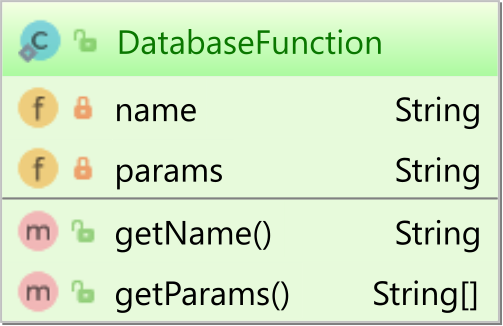
Knowing how to query the PostgreSQL database functions, our DatabaseFunction can be mapped like this:
@Entity
@Immutable
@Subselect(
    "SELECT " +
    "    functions.routine_name as name, " +
    "    string_agg(functions.data_type, ',') as params " +
    "FROM (" +
    "    SELECT " +
    "        routines.routine_name, " +
    "        parameters.data_type, " +
    "        parameters.ordinal_position " +
    "    FROM " +
    "        information_schema.routines " +
    "    LEFT JOIN " +
    "        information_schema.parameters " +
    "    ON " +
    "        routines.specific_name = parameters.specific_name " +
    "    WHERE " +
    "        routines.specific_schema='public' " +
    "    ORDER BY " +
    "        routines.routine_name, " +
    "        parameters.ordinal_position " +
    ") AS functions " +
    "GROUP BY functions.routine_name"
)
public class DatabaseFunction {

    @Id
    private String name;

    private String params;

    public String getName() {
        return name;
    }

    public String[] getParams() {
        return params.split(",");
    }
}
The @Subselect Hibernate-specific annotation allows you to map a read-only entity directly to the ResultSet of a given SQL query.
Notice that the entity is mapped with the
@Immutableannotation since the query is just a read-only projection.
You can also encapsulate the query in a database view, like this:
CREATE OR REPLACE VIEW database_functions AS
    SELECT
        functions.routine_name as name,
        string_agg(functions.data_type, ',') as params
    FROM (
        SELECT
            routines.routine_name,
            parameters.data_type,
            parameters.ordinal_position
        FROM
            information_schema.routines
        LEFT JOIN
            information_schema.parameters
        ON
            routines.specific_name = parameters.specific_name
        WHERE
            routines.specific_schema='public'
        ORDER BY routines.routine_name, parameters.ordinal_position
    ) AS functions
    GROUP BY functions.routine_name;
Mapping a JPA entity to a database view is even simpler and can be done using plain JPA mappings:
@Entity
@Immutable
@Table(name = "database_functions")
public class DatabaseFunction {

    @Id
    private String name;

    private String params;

    public String getName() {
        return name;
    }

    public String[] getParams() {
        return params.split(",");
    }
}
We can query the DatabaseFunction entity using JPQL, as illustrated by the following example:
List<DatabaseFunction> databaseFunctions =
entityManager.createQuery(
    "select df " +
    "from DatabaseFunction df", DatabaseFunction.class)
.getResultList();

DatabaseFunction countComments = databaseFunctions.get(0);

assertEquals(
    "count_comments",
    countComments.getName()
);
assertEquals(
    2,
    countComments.getParams().length
);
assertEquals(
    "bigint",
    countComments.getParams()[0]
);

DatabaseFunction postComments = databaseFunctions.get(1);

assertEquals(
    "post_comments",
    postComments.getName()
);
assertEquals(
    1,
    postComments.getParams().length
);
assertEquals(
    "bigint",
    postComments.getParams()[0]
);
If you enjoyed this article, I bet you are going to love my Book and Video Courses as well.



That’s it!
Mapping an entity to an SQL result set is actually very easy with JPA and Hibernate.
You can either use the Hibernate-specific @Subselect annotation, in case you don’t want to map the query to a database view. Or, if you map the query as a view, you can simply use that instead of an actual database table.







