How to escape SQL reserved keywords with JPA and Hibernate
Are you struggling with performance issues in your Spring, Jakarta EE, or Java EE application?
Imagine having a tool that could automatically detect performance issues in your JPA and Hibernate data access layer long before pushing a problematic change into production!
With the widespread adoption of AI agents generating code in a heartbeat, having such a tool that can watch your back and prevent performance issues during development, long before they affect production systems, can save your company a lot of money and make you a hero!
Hypersistence Optimizer is that tool, and it works with Spring Boot, Spring Framework, Jakarta EE, Java EE, Quarkus, Micronaut, or Play Framework.
So, rather than allowing performance issues to annoy your customers, you are better off preventing those issues using Hypersistence Optimizer and enjoying spending your time on the things that you love!
Introduction
In this article, we are going to see how you can escape SQL reserved keywords with JPA and Hibernate.
I decided to write this article because I keep on seeing this problem on the Hibernate forum or StackOverflow.
How to escape SQL reserved keywords with JPA and #Hibernate@vlad_mihalcea https://t.co/Pyi6u9pR3k pic.twitter.com/d1eLcCeMe3
— Java (@java) February 2, 2019
Reserved keywords
Because SQL is a declarative language, the keywords that form the grammar of the language are reserved for internal use, and they cannot be employed when defining a database identifier (e.g., catalog, schema, table, column name).
Now, since each relational database provides a custom SQL dialect, the list of reserved keywords may differ from one database to another, as illustrated by the following list:
Domain Model
Let’s assume that we are developing the application we are developing is required to store information about database tables. Therefore, we can use the following Table entity:
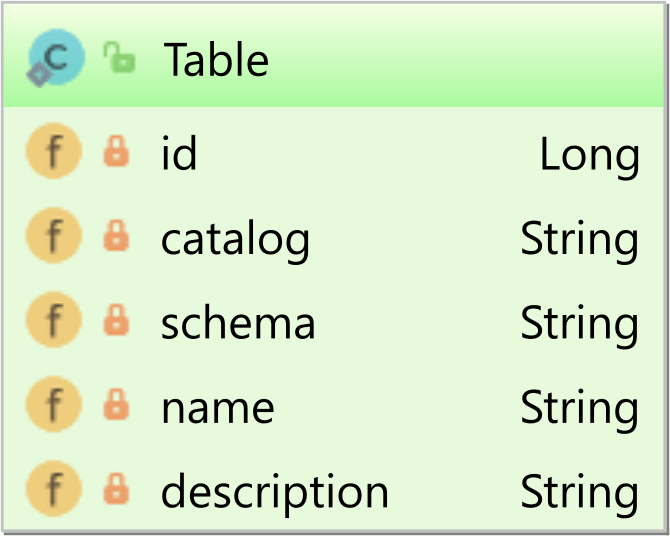
Now, if we map the Table entity like this:
@Entity(name = "Table")
public class Table {

    @Id
    @GeneratedValue
    private Long id;

    private String catalog;

    private String schema;

    private String name;

    @Column(name = "desc")
    private String description;

    //Getters and setters omitted for brevity
}
And, we try to generate the database schema using the hbm2ddl tool, the schema generation process will fail as follows:
Caused by: org.hibernate.tool.schema.spi.CommandAcceptanceException:
	Error executing DDL "create table Table (id bigint not null, catalog varchar(255), desc varchar(255), name varchar(255), schema varchar(255), primary key (id))" via JDBC Statement
Caused by: java.sql.SQLSyntaxErrorException:
	unexpected token: TABLE
Because the TABLE keyword is reserved, we need to escape it. More, we need to escape the catalog, schema, and desc column names since these are also reserved by the database.
Manual escaping using the JPA column name attribute
The first option you have to escape a database identifier is to wrap the table or column name using the double quote sign (e.g., “) as illustrated by the following JPA entity mapping:
@Entity(name = "Table")
@javax.persistence.Table(name = "\"Table\"")
public class Table {

    @Id
    @GeneratedValue
    private Long id;

    @Column(name = "\"catalog\"")
    private String catalog;

    @Column(name = "\"schema\"")
    private String schema;

    private String name;

    @Column(name = "\"desc\"")
    private String description;

    //Getters and setters omitted for brevity
}
Now, when generating the database schema using the hbm2ddl tool, Hibernate is going to generate the following DDL statement:
CREATE TABLE "table" (
    id bigint NOT NULL,
    "catalog" VARCHAR(255),
    "desc" VARCHAR(255),
    name VARCHAR(255),
    "schema" VARCHAR(255),
    PRIMARY KEY (id)
)
Notice that the table name, as well as the columns using SQL reserved keywords, are properly escaped this time.
When persisting a Table entity:
entityManager.persist(
    new Table()
    .setCatalog("library")
    .setSchema("public")
    .setName("book")
    .setDescription(
        "The book table stores book-related info"
    )
);
Hibernate generates the proper SQL INSERT statement:
INSERT INTO "table" (
    "catalog",
    "desc",
    name,
    "schema",
    id
)
VALUES (
    'library',
    'The book table stores book-related info',
    'book',
    'public',
    1
)
Notice that the
Tableentity creation uses the Fluent-style API pattern. For more details about building JPA entities using the Fluent-style API, check out this article.
When fetching the Table entity:
List<Table> tables = entityManager.createQuery(
    "select t " +
    "from Table t " +
    "where t.description like :description", Table.class)
.setParameter("description", "%book%")
.getResultList();

assertEquals(1, tables.size());
Hibernate escapes all database identifiers we have explicitly escaped in the JPA entity mapping:
SELECT
    t.id AS id1_0_,
    t."catalog" AS catalog2_0_,
    t."desc" AS desc3_0_,
    t.name AS name4_0_,
    t."schema" AS schema5_0_
FROM
    "table" t
WHERE
    t."desc" LIKE '%book%'
Manual escaping using the Hibernate-specific backtick character
You can also escape a given database object qualifier using the backtick (e.g., `) character.
@Entity(name = "Table")
@javax.persistence.Table(name = "`table`")
public class Table {

    @Id
    @GeneratedValue
    private Long id;

    @Column(name = "`catalog`")
    private String catalog;

    @Column(name = "`schema`")
    private String schema;

    @Column(name = "`name`")
    private String name;

    @Column(name = "`desc`")
    private String description;

    //Getters and setters omitted for brevity
}
The Hibernate-specific backtick escape is equivalent to the JPA double-quotes escape character, so all the generated DDL or DML statements are exactly as in the previous section.
Global escaping using the Hibernate globally_quoted_identifiers property
Another option is to set the hibernate.globally_quoted_identifiers property to true in the persistence.xml configuration file:
<property
    name="hibernate.globally_quoted_identifiers"
    value=true"
/>
This way, Hibernate is going to escape all database identifiers, meaning that we don’t need to manually escape the table or column names:
@Entity(name = "Table")
public class Table {

    @Id
    @GeneratedValue
    private Long id;

    private String catalog;

    private String schema;

    private String name;

    @Column(name = "desc")
    private String description;

    //Getters and setters omitted for brevity
}
When generating the database schema, Hibernate is going to escape the table name as well as all columns:
CREATE TABLE "Table" (
    "id" bigint NOT NULL,
    "catalog" VARCHAR(255),
    "desc" VARCHAR(255),
    "name" VARCHAR(255),
    "schema" VARCHAR(255),
    PRIMARY KEY ("id")
)
When persisting the Table entity, the SQL INSERT statement will automatically escape the table and the column names:
INSERT INTO "table" (
    "catalog",
    "desc",
    "name",
    "schema",
    "id"
)
VALUES (
    'library',
    'The book table stores book-related info',
    'book',
    'public',
    1
)
Notice that even the id and name column names are escaped this time.
The same applies to any SQL statement generated by Hibernate, so fetching the Table entities matching the provided description generates the following SQL SELECT query:
SELECT
    t."id" AS id1_0_,
    t."catalog" AS catalog2_0_,
    t."desc" AS desc3_0_,
    t."name" AS name4_0_,
    t."schema" AS schema5_0_
FROM
    "table" t
WHERE
    t."desc" LIKE '%book%'
Enabling the Hibernate globally_quoted_identifiers_skip_column_definitions property
Now, let’s assume we need to provide a custom DDL definition for a given table column, as illustrated by the following code snippet:
@Entity(name = "Table")
public class Table {

	@Id
	@GeneratedValue
	@Column(columnDefinition = "smallint")
	private Integer id;

	private String catalog;

	private String schema;

	private String name;

	private String description;

    //Getters and setters omitted for brevity
}
If the hibernate.globally_quoted_identifiers property is enabled and we try to generate the database schema using hbm2ddl, Hibernate is going to throw the following exception:
CREATE TABLE "Table" (
    "id" "smallint" NOT NULL,
    "catalog" VARCHAR(255),
    "desc" VARCHAR(255),
    "name" VARCHAR(255),
    "schema" VARCHAR(255),
    PRIMARY KEY ("id")
)

-- GenerationTarget encountered exception accepting command :
    Error executing DDL via JDBC Statement
The problem is caused by the explicit definition of the table Primary Key column that got escaped as well. Notice the double-quoted "smallint" column type associated with the id column.
To fix this issue, we need to also enable the hibernate.globally_quoted_identifiers_skip_column_definitions configuration property:
<property
    name="hibernate.globally_quoted_identifiers_skip_column_definitions"
    value=true"
/>
Now, Hibernate skips quoting the explicit column definition, and everything will work just fine:
CREATE TABLE "Table" (
    "id" smallint NOT NULL,
    "catalog" VARCHAR(255),
    "desc" VARCHAR(255),
    "name" VARCHAR(255),
    "schema" VARCHAR(255),
    PRIMARY KEY ("id")
)
The list of reserved words, that are skipped by Hibernate when setting the
hibernate.globally_quoted_identifiers_skip_column_definitionsproperty, are taken from the following sources:
java.sql.DatabaseMetaData.getSQLKeywords()provided by the current JDBC Driver,- the ANSI SQL keywords defined by the Hibernate
org.hibernate.engine.jdbc.env.spi.AnsiSqlKeywordsclass,- the Dialect-specific keywords defined by the
sqlKeywordsSetin the HibernateDialectObject instance.
Although you could automatically quote all identifiers, in reality, it’s much better if you escape only those database objects that include a reserved keyword. This will provide better control than the automatic quoting strategies.
If you enjoyed this article, I bet you are going to love my Book and Video Courses as well.



Conclusion
Escaping SQL reserved keywords is straightforward when using JPA and Hibernate. While the JPA column-level escaping is very useful if you only have a small number of database identifiers to be escaped, when the number of database identifiers using reserved keywords is large, the Hibernate global escaping becomes a very convenient alternative.







