
Transactions and Concurrency Control
Are you struggling with performance issues in your Spring, Jakarta EE, or Java EE application?
What if there were a tool that could automatically detect what caused performance issues in your JPA and Hibernate data access layer?
Wouldn’t it be awesome to have such a tool to watch your application and prevent performance issues during development, long before they affect production systems?
Well, Hypersistence Optimizer is that tool! And it works with Spring Boot, Spring Framework, Jakarta EE, Java EE, Quarkus, Micronaut, or Play Framework.
So, rather than fixing performance issues in your production system on a Saturday night, you are better off using Hypersistence Optimizer to help you prevent those issues so that you can spend your time on the things that you love!
If you’ve been using Hibernate long enough, then you surely must have seen this WARN log message when doing pagination while join-fetching multiple entities.
HHH000104: firstResult/maxResults specified with collection fetch; applying in memory!
In this article, I’m going to show two ways you can to fix this issue.
Considering we have the following entities:
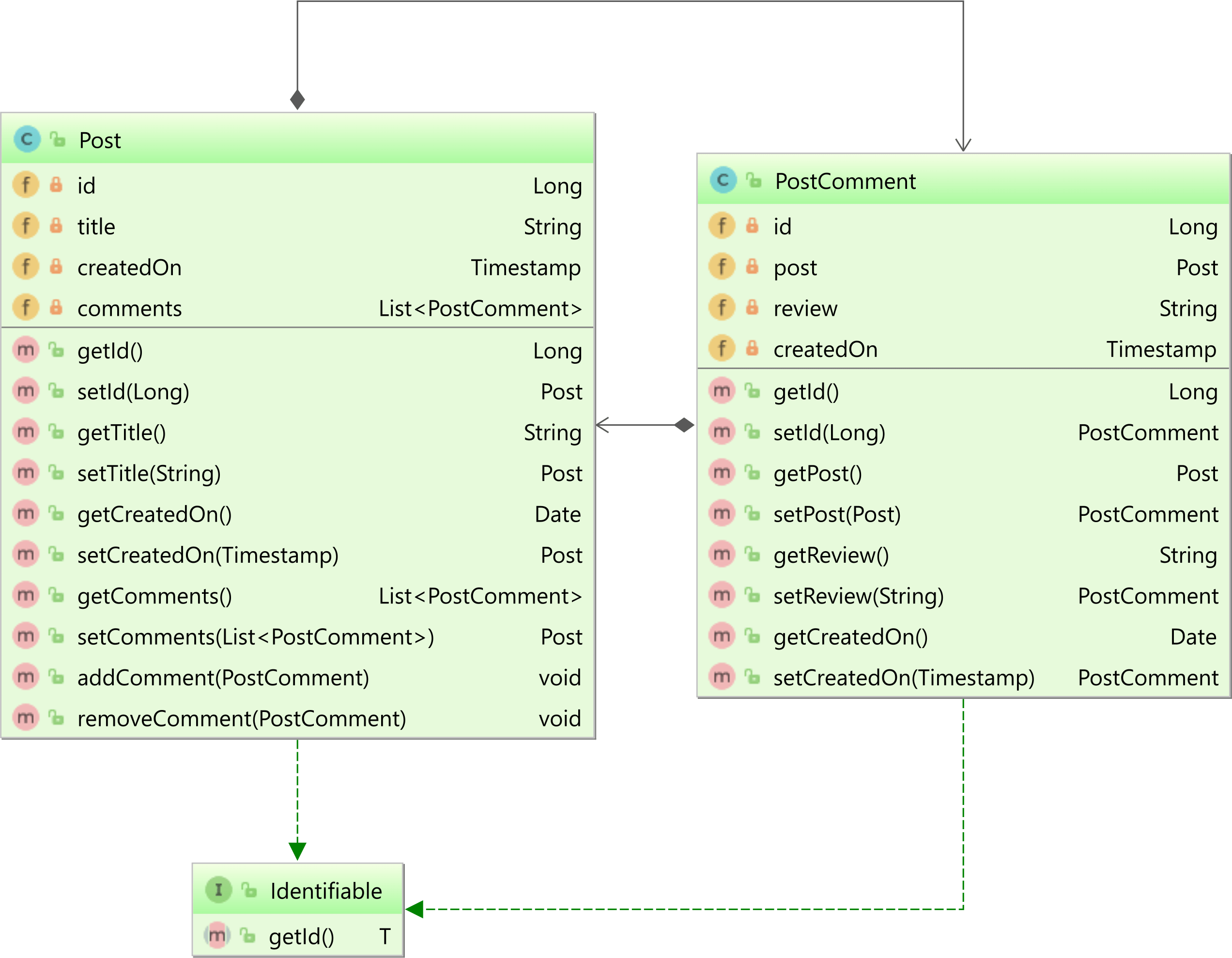
The Post entity has a bidirectional @OneToMany association with the PostComment child entity.
Notice that both entities use the Fluent-style API. For more details about building entities using a Fluent-style API with JPA and Hibernate, check out this article.
Now, let’s assume we create 50 Post entities, each one with several PostComment child entities.
LocalDateTime timestamp = LocalDateTime.of(
    2018, 10, 9, 12, 0, 0, 0
);

LongStream.rangeClosed(1, 50)
.forEach(postId -> {
    Post post = new Post()
    .setId(postId)
    .setTitle(
        String.format("High-Performance Java Persistence - Chapter %d",
        postId)
    )
    .setCreatedOn(
        Timestamp.valueOf(timestamp.plusMinutes(postId))
    );

    LongStream.rangeClosed(1, COMMENT_COUNT)
    .forEach(commentOffset -> {
        long commentId = ((postId - 1) * COMMENT_COUNT) + commentOffset;

        post.addComment(
            new PostComment()
            .setId(commentId)
            .setReview(
                String.format("Comment nr. %d - A must read!", commentId)
            )
            .setCreatedOn(
                Timestamp.valueOf(timestamp.plusMinutes(commentId))
            )
        );

    });

    entityManager.persist(post);
});
We want to fetch all Post entities whose titles match a given pattern. However, we want to fetch the associated PostComment entities as well.
As I explained in this article, you might be tempted to use a JPA pagination query to fetch the Post entities while also join fetching the PostComment entities as illustrated by the following JPQL query:
List<Post> posts  = entityManager.createQuery("""
    select p
    from Post p
    left join fetch p.comments
    where p.title like :titlePattern
    order by p.createdOn
    """, Post.class)
.setParameter(
    "titlePattern",
    "High-Performance Java Persistence %"
)
.setMaxResults(5)
.getResultList();
We want to fetch the Post entities along with their comments and limit the result set to a maximum number of entries.
When running the JPQL query above, Hibernate limits the number of Post entries, but it issues the aforementioned warning while executing the following SQL query:
-- HHH000104: firstResult/maxResults specified with collection fetch;
-- applying in memory!

SELECT
    p.id, p.created_on, p.title,
    pc.id, pc.post_id, pc.created_on, pc.review
FROM post p
LEFT OUTER JOIN post_comment pc ON p.id = pc.post_id
WHERE p.title LIKE 'High-Performance Java Persistence %'
ORDER BY p.created_on
Notice that the SQL query uses no pagination whatsoever. As mentioned by the HHH000104 warning message, the pagination is done in memory, which is bad.
The reason why Hibernate does the pagination in memory is that it cannot just truncate the result set using SQL-level pagination. If it did that, then the result set would be truncated in the middle of the PostComments rows, therefore returning a Post entity with just a subset of comments.
Because Hibernate favors consistency, it fetches the entire result set and does the pagination in memory. However, that can be suboptimal, so what can we do about it?
I also published a YouTube video about the JOIN FETCH with pagination, so if you’re interested in this topic, check out the video as well.
The easiest way to fix this issue is to execute two queries:
. The first query will fetch the Post entity identifiers matching the provided filtering criteria.
. The second query will use the previously extracted Post entity identifiers to fetch the Post and the PostComment entities.
This approach is very easy to implement and looks as follows:
List<Long> postIds = entityManager.createQuery("""
    select p.id
    from Post p
    where p.title like :titlePattern
    order by p.createdOn
    """, Long.class)
.setParameter(
    "titlePattern",
    "High-Performance Java Persistence %"
)
.setMaxResults(5)
.getResultList();

List<Post> posts = entityManager.createQuery("""
    select distinct p
    from Post p
    left join fetch p.comments
    where p.id in (:postIds)
    order by p.createdOn
    """, Post.class)
.setParameter("postIds", postIds)
.setHint(
    QueryHints.HINT_PASS_DISTINCT_THROUGH,
    false
)
.getResultList();

assertEquals(5, posts.size());

Post post1 = posts.get(0);

List<PostComment> comments = post1.getComments();

for (int i = 0; i < COMMENT_COUNT - 1; i++) {
    PostComment postComment1 = comments.get(i);

    assertEquals(
        String.format(
            "Comment nr. %d - A must read!",
            i + 1
        ),
        postComment1.getReview()
    );
}
Notice the
hibernate.query.passDistinctThroughJPA query hint we used to instruct Hibernate to prevent passing the JPQLDISTINCTkeyword to the underlying SQL query. For more details about this query hint, check out this article.
The second query also requires the ORDER BY clause, as, without it, the ordering of the Post records will not be guaranteed.
When executing the two JPQL queries above, Hibernate generates the following SQL queries:
Query:["
    SELECT p.id
    FROM post p
    WHERE p.title LIKE ?
    ORDER BY p.created_on
    LIMIT
        ?
"],
Params:[(
    'High-Performance Java Persistence %', 5
)]

Query:["
    SELECT
        p.id, p.created_on, p.title,
        pc.id, pc.post_id, pc.created_on, pc.review
    FROM post p
    LEFT OUTER JOIN post_comment pc ON p.id = pc.post_id
    WHERE p.id IN (?, ?, ?, ?, ?)
    ORDER BY p.created_on
"],
Params:[(
    1, 2, 3, 4, 5
)]
That’s the easiest way to fix the issue causing the HHH000104 warning message.
If you’re using Hibernate 6, you can also fetch the Post and PostComment collection using a single JPQL query:
List<Post> posts = entityManager.createQuery("""
    select p
    from Post p
    left join fetch p.comments pc
    where p.id in (
        select id
        from (
            select
                id as id,
                dense_rank() over (
                    order by createdOn ASC
                ) as ranking
            from Post
            where title like :titlePattern
        ) pr
        where ranking <= :rank
    )
    """, Post.class)
.setParameter(
    "titlePattern",
    "High-Performance Java Persistence %"
)
.setParameter("rank", 5)
.getResultList();

assertEquals(5, posts.size());
When executing the JPQL query above, Hibernate will run the following SQL query:
Query:["
    SELECT
        p.id, p.created_on, p.title,
        pc.post_id, pc.id, pc.created_on, pc.review
    FROM post p
    LEFT JOIN post_comment pc ON p.id = pc.post_id
    WHERE p.id IN (
        SELECT pr.id
        FROM (
            SELECT
                ps.id,
                dense_rank() OVER(
                     ORDER BY ps.created_on
                )
            FROM post ps
            WHERE ps.title LIKE ? ESCAPE ''
        ) pr(id, ranking)
        WHERE pr.ranking<=?
    )
"],
Params:[(
    High-Performance Java Persistence %,
    5
)]
Awesome, right?
If you enjoyed this article, I bet you are going to love my Book and Video Courses as well.



So, to fix the HHH000104 issue, you have two options. Either you execute two queries and fetch the entities in either read-write or read-only mode, or you use a single query with Window Functions.








Hello, this is a good explanation.
What if Post has not only PostComments, but also a @OneToMany List files? Is it possible to fetch 2 or more collections using the first solution, without Window Function?
(I am using Spring Data JPA and load List using @EntityGraph(attributePaths = {“comments”}) in repository)
Also I saw a solution using View – you create a PostView Entity, “post_view” table and make selects using PostViewRepository.
Yes, it’s possible. Here’s the proof.
You’re welcome.