
Transactions and Concurrency Control
Are you struggling with performance issues in your Spring, Jakarta EE, or Java EE application?
What if there were a tool that could automatically detect what caused performance issues in your JPA and Hibernate data access layer?
Wouldn’t it be awesome to have such a tool to watch your application and prevent performance issues during development, long before they affect production systems?
Well, Hypersistence Optimizer is that tool! And it works with Spring Boot, Spring Framework, Jakarta EE, Java EE, Quarkus, Micronaut, or Play Framework.
So, rather than fixing performance issues in your production system on a Saturday night, you are better off using Hypersistence Optimizer to help you prevent those issues so that you can spend your time on the things that you love!
All projects I’ve been working on have used database connection pooling and that’s for very good reasons. Sometimes we might forget why we are employing one design pattern or a particular technology, so it’s worth stepping back and reason on it. Every technology or technological decision has both upsides and downsides, and if you can’t see any drawback you need to wonder what you are missing.
Every database read or write operation requires a connection. So let’s see how database connection flow looks like:

The flow goes like this:
You can easily deduce that opening/closing connections are quite an expensive operation. PostgreSQL uses a separate OS process for every client connection, so a high rate of opening/closing connections is going to put a strain on your database management system.
The most obvious reasons for reusing a database connection would be:
Let’s compare how a no pooling solution compares to HikariCP which is probably the fastest connection pooling framework available.
The test will open and close 1000 connections.
private static final Logger LOGGER = LoggerFactory.getLogger(
    DataSourceConnectionTest.class
);

private static final int MAX_ITERATIONS = 1000;

private Slf4jReporter logReporter;

private Timer timer;

protected abstract DataSource getDataSource();

@Before
public void init() {
    MetricRegistry metricRegistry = new MetricRegistry();
    this.logReporter = Slf4jReporter
            .forRegistry(metricRegistry)
            .outputTo(LOGGER)
            .build();
    timer = metricRegistry.timer("connection");
}

@Test
public void testOpenCloseConnections() throws SQLException {
    for (int i = 0; i < MAX_ITERATIONS; i++) {
        Timer.Context context = timer.time();
        getDataSource().getConnection().close();
        context.stop();
    }
    logReporter.report();
}
Connection pooling is many times faster than the no pooling alternative.
| Metric | DB_A (ms) | DB_B (ms) | DB_C (ms) | DB_D (ms) | HikariCP (ms) |
|--------|-----------|-----------|-----------|-----------|---------------|
| min    |  11.174   |  5.441    | 24.468    |  0.860    | 0.001230      |
| max    | 129.400   | 26.110    | 74.634    | 74.313    | 1.014051      |
| mean   |  13.829   |  6.477    | 28.910    |  1.590    | 0.003458      |
| p99    |  20.432   |  9.944    | 54.952    |  3.022    | 0.010263      |
To understand why the pooling solution performed so well, we need to analyse the pooling connection management flow:
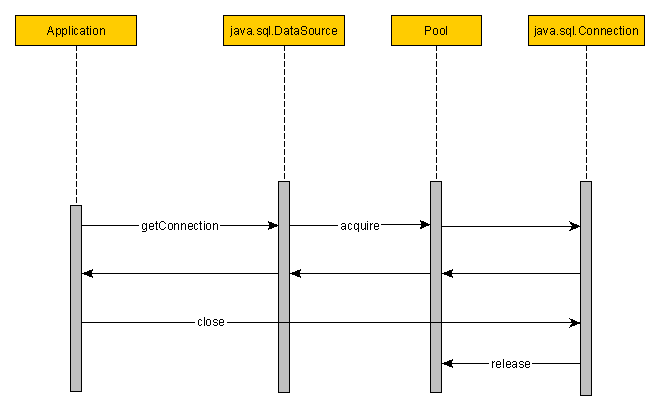
Whenever a connection is requested, the pooling data source will use the available connections pool to acquire a new connection. The pool will only create new connections when there are no available ones left and the pool hasn’t yet reached its maximum size. The pooling connection close() method is going to return the connection to the pool, instead of actually closing it.
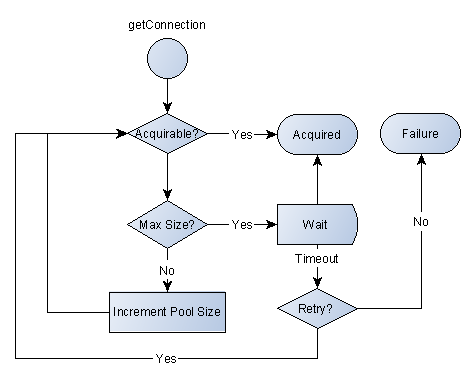
The connection pool acts as a bounded buffer for the incoming connection requests. If there is a traffic spike the connection pool will level it instead of saturating all available database resources.
The waiting step and the timeout mechanism are safety hooks, preventing excessive database server load. If one application gets way too much database traffic, the connection pool is going to mitigate it, therefore, preventing it from taking down the database server (hence affecting the whole enterprise system).
All these benefits come at a price, materialized in the extra complexity of the pool configuration (especially in large enterprise systems). So this is no silver-bullet and you need to pay attention to many pool settings such as:
If you enjoyed this article, I bet you are going to love my Book and Video Courses as well.



My next article will dig into enterprise connection pooling challenges and how FlexyPool can assist you finding the right pool sizes.







