
Transactions and Concurrency Control
Are you struggling with performance issues in your Spring, Jakarta EE, or Java EE application?
What if there were a tool that could automatically detect what caused performance issues in your JPA and Hibernate data access layer?
Wouldn’t it be awesome to have such a tool to watch your application and prevent performance issues during development, long before they affect production systems?
Well, Hypersistence Optimizer is that tool! And it works with Spring Boot, Spring Framework, Jakarta EE, Java EE, Quarkus, Micronaut, or Play Framework.
So, rather than fixing performance issues in your production system on a Saturday night, you are better off using Hypersistence Optimizer to help you prevent those issues so that you can spend your time on the things that you love!
In this article, we are going to see how easy it is to map an SQL Server JSON column when using the Hypersistence Utils project.
The Hypersistence Utils project supports JSON column types for PostgreSQL and MySQL and Oracle, and, as you will see in this article, the JsonType works just fine with Microsoft SQL Server.
How to map SQL Server JSON columns using JPA and Hibernate @vlad_mihalcea
— Java (@java) October 21, 2019
Read more: https://t.co/NVJFkDegFs pic.twitter.com/Z5THTsNm9V
When using SQL Server, you can use the NVARCHAR column type to persist JSON objects. The advantage of storing JSON in an NVARCHAR column is that writing or reading the entire JSON object is going to be fast. However, evaluating path expressions requires parsing the JSON object on every execution.
The SQL Server JSON storage type is similar to the
jsoncolumn type on PostgreSQL, and not to thejsonbone which stores the binary representation of the JSON object.
If the JSON document doesn’t exceed 8 KB, then it’s better to use the NVARCHAR2(4000) column type, as the entire JSON object will fit in a single database page. If the JSON document size exceeds 8KB, you can use the NVARCHAR(MAX) column type instead, which will allow you to store JSON documents up to 2 GB in size.
Let’s consider we are developing an online book store, and so we need to use the following book database table:
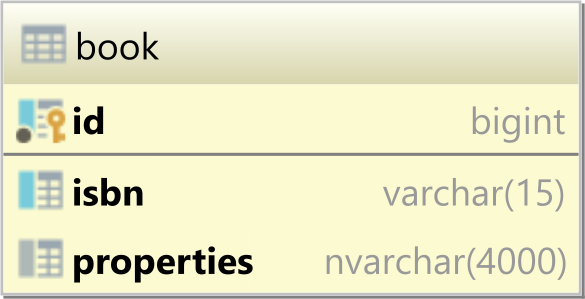
To create the book table, we can use the following DDL statement:
CREATE TABLE book (
    id BIGINT NOT NULL PRIMARY KEY,
    isbn VARCHAR(15),
    properties NVARCHAR(4000) CHECK(
        ISJSON(properties) = 1
    )
)
Notice that the properties column type is NVARCHAR(4000), and we defined a column-level constraint check which uses the ISJSON SQL Server function to validate whether the properties column is storing a proper JSON object.
To map the book table to a JPA entity, we have multiple options to represent the JSON column as an entity attribute. We could map it as a DTO if it has a pre-defined internal schema.
The most flexible way of mapping the JSON column is to use a String entity attribute.
For Hibernate 6, the mapping will look as follows:
@Entity(name = "Book")
@Table(name = "book")
public class Book {

    @Id
    private Long id;

    @NaturalId
    @Column(length = 15)
    private String isbn;

    @Type(JsonType.class")
    private String properties;
}
And for Hibernate 5, like this:
@Entity(name = "Book")
@Table(name = "book")
@TypeDef(name = "json", typeClass = JsonType.class)
public class Book {

    @Id
    private Long id;

    @NaturalId
    @Column(length = 15)
    private String isbn;

    @Type(type = "json")
    private String properties;
}
Notice that we are using a Fluent-style API for the setters, which will allow us to simplify the process of building an entity.
For more details about using Fluent-style API entity builders, check out this article.
The JsonType is the same Hibernate Type we previously used for Oracle or MySQL, and it’s being offered by the Hypersistence Utils project.
Now, when persisting a Book entity:
entityManager.persist(
    new Book()
        .setId(1L)
        .setIsbn("978-9730228236")
        .setProperties("""
            {
               "title": "High-Performance Java Persistence",
               "author": "Vlad Mihalcea",
               "publisher": "Amazon",
               "price": 44.99
            }
            """
        )
);
Hibernate generates the proper SQL INSERT statement:
INSERT INTO book (
    isbn,
    properties,
    id
)
VALUES (
    '978-9730228236',
    '{
        "title": "High-Performance Java Persistence",
        "author": "Vlad Mihalcea",
        "publisher": "Amazon",
        "price": 44.99
    }',
    1
)
When fetching the Book entity via its natural identifier, we can see that Hibernate fetches the entity just fine:
Book book = entityManager
    .unwrap(Session.class)
    .bySimpleNaturalId(Book.class)
    .load("978-9730228236");

assertEquals(
    "High-Performance Java Persistence",
    book.getJsonNodeProperties().get("title").asText()
);
We can also change the JSON entity property:
book.setProperties("""
    {
       "title": "High-Performance Java Persistence",
       "author": "Vlad Mihalcea",
       "publisher": "Amazon",
       "price": 44.99,
       "url": "https://amzn.com/973022823X"
    }
    """
);
And, Hibernate will issue the proper SQL UPDATE statement:
UPDATE
    book
SET
    properties =
    '{
        "title": "High-Performance Java Persistence",
        "author": "Vlad Mihalcea",
        "publisher": "Amazon",
        "price": 44.99,
        "url": "https://amzn.com/973022823X"
    }'
WHERE
    id = 1
You are not limited to using a String entity attribute. You can use a POJO as well, considering that the POJO properties match the JSON attributes:
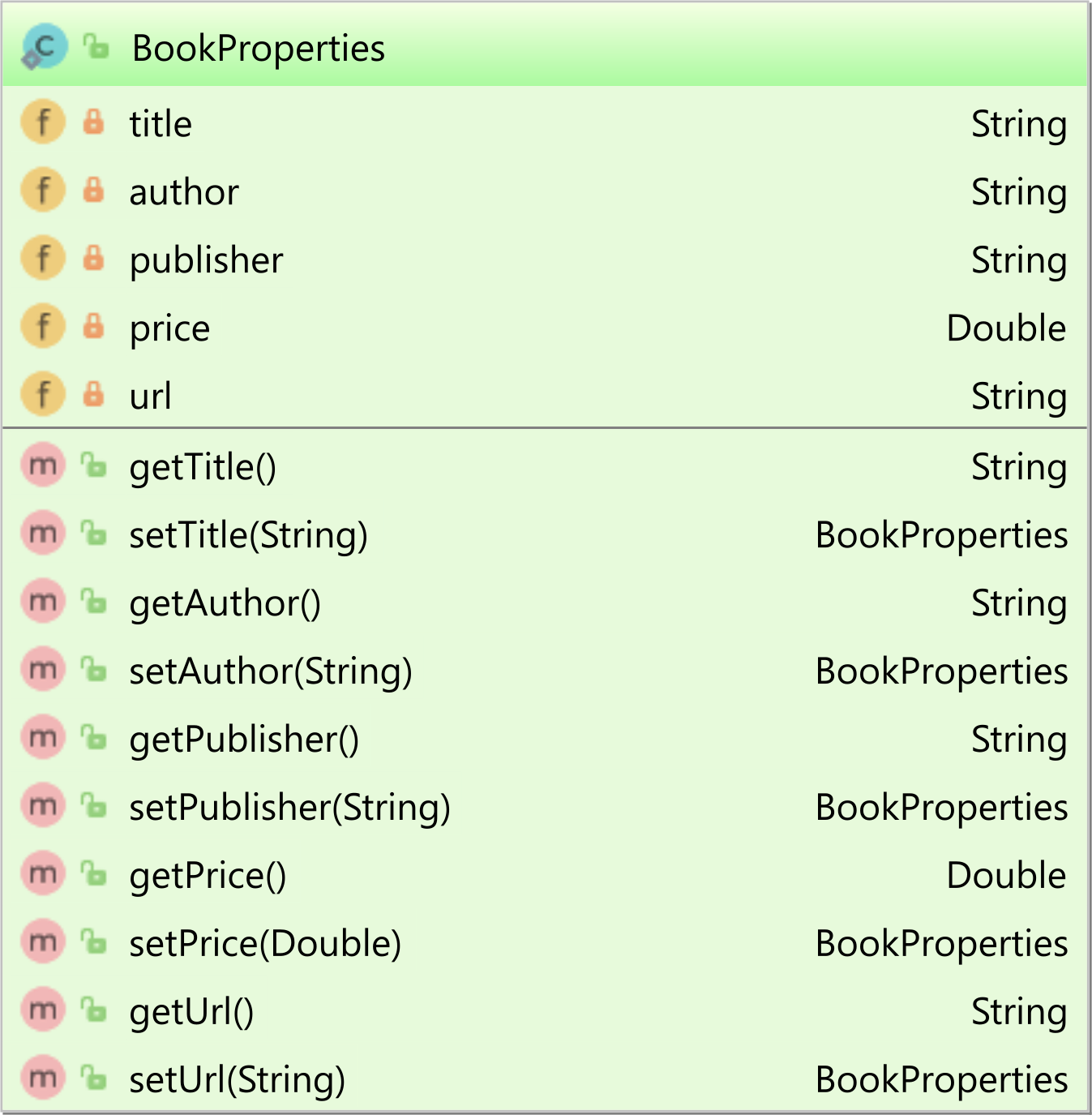
This time, the properties entity attribute will be mapped like this:
@Type(type = "json")
private BookProperties properties;
Using a POJO instead of a String-based JSON attribute allows us to simplify the read and write operations on the application side.
Notice how nicely we can build a Book entity instance thanks to the Fluent-style API employed by both the entity and the POJO class:
entityManager.persist(
    new Book()
        .setId(1L)
        .setIsbn("978-9730228236")
        .setProperties(
            new BookProperties()
                .setTitle("High-Performance Java Persistence")
                .setAuthor("Vlad Mihalcea")
                .setPublisher("Amazon")
                .setPrice(44.99D)
        )
);
Changing the properties entity attribute is also much simpler when using a POJO:
Book book = entityManager
    .unwrap(Session.class)
    .bySimpleNaturalId(Book.class)
    .load("978-9730228236");

book.getProperties().setUrl(
    "https://amzn.com/973022823X"
);
The SQL statements are the same no matter we are using a String or a POJO on the JPA side.
Now, you can also query the content of the JSON column using a native SQL query. For instance, to extract the book price for a given a title attribute value, we can execute the following SQL query:
Tuple tuple = (Tuple) entityManager.createNativeQuery("""
    SELECT
      id,
      CAST(JSON_VALUE(properties, '$.price') AS FLOAT) AS price
    FROM book
    WHERE
      JSON_VALUE(properties, '$.title') = :title
    ", Tuple.class)
.setParameter("title", "High-Performance Java Persistence")
.getSingleResult();
Or, you can fetch the reviews JSON array and map it to a JsonNode as illustrated by the following native SQL query:
Tuple tuple = (Tuple) entityManager.createNativeQuery("""
    SELECT
      id,
      JSON_QUERY(properties, '$.reviews') AS reviews
    FROM book
    WHERE
      isbn = :ISBN
    """, Tuple.class)
.setParameter("isbn", "978-9730228236")
.unwrap(NativeQuery.class)
.addScalar("id", LongType.INSTANCE)
.addScalar("reviews", new JsonType(JsonNode.class))
.getSingleResult();
Notice that we passed the JsonType to the Hibernate NativeQuery so that Hibernate knows how to handle the JSON array mapping.
If you enjoyed this article, I bet you are going to love my Book and Video Courses as well.



Mapping an SQL server JSON column is fairly easy when using the Hypersistence Utils project, and you have the flexibility of using either a POJO or a String entity attribute.
The Hypersistence Utils project offers support for mapping JSON columns to JPA entity attributes on all the Top 4 database systems: Oracle, MySQL, SQL Server, and PostgreSQL.
Besides JSON, you can map many other database-specific types, such as ARRAY, Hstore, Range, Inet, or custom enums.







