
Transactions and Concurrency Control
Are you struggling with performance issues in your Spring, Jakarta EE, or Java EE application?
What if there were a tool that could automatically detect what caused performance issues in your JPA and Hibernate data access layer?
Wouldn’t it be awesome to have such a tool to watch your application and prevent performance issues during development, long before they affect production systems?
Well, Hypersistence Optimizer is that tool! And it works with Spring Boot, Spring Framework, Jakarta EE, Java EE, Quarkus, Micronaut, or Play Framework.
So, rather than fixing performance issues in your production system on a Saturday night, you are better off using Hypersistence Optimizer to help you prevent those issues so that you can spend your time on the things that you love!
In this article, we are going to see how Spring handles transaction and database connection management.
I decided to write this article because this topic has been requested recurringly by the students taking my High-Performance Java Persistence training.
In order to provide declarative transaction management, Spring uses AOP (Aspect-Oriented Programming), and methods annotated with the @Transactional annotations are going to be intercepted by the TransactionInterceptor.
For instance, if you have a PostController calling a PostService method annotated with the @Transactional annotation, the flow will be executed as follows:
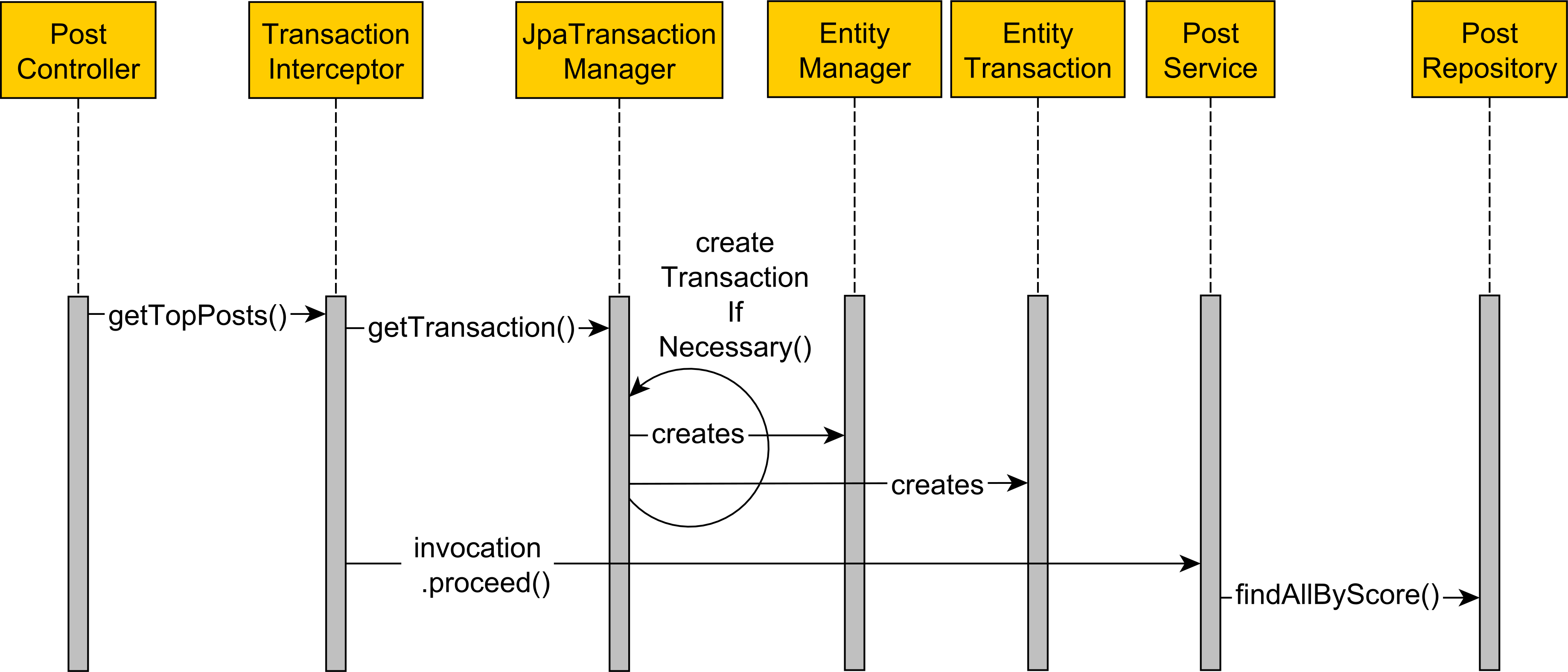
getTopPosts call is intercepted by the Spring TransactionInterceptor.EntityManager and EntityTransaction. Propagation.REQUIRED transaction propagation logic.getTopPosts service method is called.If you are using the Open Session In View Anti-Pattern, which unfortunately is enabled by default in Spring Boot, the
EntityManagerwill be created and bound to the current Thread in a webFilter.However, if you care about the long-term performance and scalability of your application, you are better off disabling the Open Session In View default mechanism.
When the JpaTransactionManager calls the begin method on the JPA EntityTransaction on a default read-write transactional method, the database connection will be acquired eagerly by Hibernate because it needs to make sure that the auto-commit mode is disabled:

However, fetching the database connection eagerly is to be avoided because if the service method executes a long-running processing task or calls an external web service, the connection will be held throughout all that time, depriving other concurrent Threads of using one of the limited physical connections stored in the connection pool.
So, to avoid this issue, you need to do two things:
First, you need to instruct the connection pool to disable the auto-commit mode upon creating a new physical database connection:
spring.datasource.hikari.auto-commit=false
Second, you need to let Hibernate know that you did that via the hibernate.connection.provider_disables_autocommit configuration property that I added myself when I was working for Red Hat:
spring.jpa.properties.hibernate.connection.provider_disables_autocommit=true
Now, the database connection will be acquired lazily.
To test the hibernate.connection.provider_disables_autocommit behavior, consider the following ProductService class:
@Service
@Transactional(readOnly = true)
public class ProductService {

    protected final Logger LOGGER = LoggerFactory.getLogger(
        getClass()
    );

    private final RestTemplate restTemplate;

    private ProductRepository productRepository;

    public ProductService(
        @Autowired RestTemplate restTemplate,
        @Autowired ProductRepository productRepository) {
        this.restTemplate = restTemplate;
        this.productRepository = productRepository;
    }

    public Product findById(Long id, FxCurrency currency) {
        FxRate fxRate = getFxRate();
        Product product = productRepository.findById(id)
            .orElseThrow();
        FxCurrency productCurrency = product.getCurrency();
        if (!productCurrency.equals(currency)) {
            product.convertTo(currency, fxRate);
        }
        return product;
    }

    @Transactional
    public Product findByIdReadWrite(Long id, FxCurrency currency) {
        return findById(id, currency);
    }

    private FxRate getFxRate() {
        long startNanos = System.nanoTime();
        String fxRateXmlString = restTemplate.getForObject(
            FxRateUtil.FX_RATE_XML_URL, String.class
        );
        FxRate fxRate = null;
        if (fxRateXmlString != null) {
            fxRate = FxRateUtil.parseFxRate(
                fxRateXmlString.getBytes(
                    StandardCharsets.UTF_8
                )
            );
        }
        SpringTransactionStatistics.report().fxRateTime(
            System.nanoTime() - startNanos
        );
        return fxRate;
    }
}
It’s a good idea to use the
@Transactional(readOnly = true)annotation at the class level and override it only for read-write methods.Check out this article for more details.
While the findByIdReadWrite method simply delegates the call to the findById method, it does so in a read-write transactional context that we are interested in testing.
So, when calling the findByIdReadWrite method:
Product ebook = productService.findByIdReadWrite(
    1L,
    FxCurrency.EUR
);

assertEquals(FxCurrency.EUR, ebook.getCurrency());

LOGGER.info(
    "The book price is {} {}",
    ebook.getPrice(),
    ebook.getCurrency()
);
We get the following log entries:
type=TIMER, name=fxRateTimer, count=1, min=593.851, max=593.851, mean=593.851, stddev=0.0, median=593.851, p75=593.851, p95=593.851, p98=593.851, p99=593.851, p999=593.851, mean_rate=1.4668408882484336, m1=0.0, m5=0.0, m15=0.0, rate_unit=events/second, duration_unit=milliseconds

type=TIMER, name=transactionTimer, count=1, min=18.0403, max=18.0403, mean=18.0403, stddev=0.0, median=18.0403, p75=18.0403, p95=18.0403, p98=18.0403, p99=18.0403, p999=18.0403, mean_rate=1.4658142077560041, m1=0.0, m5=0.0, m15=0.0, rate_unit=events/second, duration_unit=milliseconds

The book price is 22.66 EUR
While the FxRate is fetched by calling an external web service that takes 593.851 milliseconds, the connection was acquired an held for just 18.0403 milliseconds.
That’s why it’s good practice to acquire the database connection lazily as, otherwise, we’d have held the connection for more than 600 milliseconds.
However, if we call the findById read-only method:
Product ebook = productService.findById(
    1L,
    FxCurrency.EUR
);

assertEquals(FxCurrency.EUR, ebook.getCurrency());

LOGGER.info(
    "The book price is {} {}",
    ebook.getPrice(),
    ebook.getCurrency()
);
We get the following log entries:
type=TIMER, name=fxRateTimer, count=1, min=568.8503, max=568.8503, mean=568.8503, stddev=0.0, median=568.8503, p75=568.8503, p95=568.8503, p98=568.8503, p99=568.8503, p999=568.8503, mean_rate=1.4954563549567348, m1=0.0, m5=0.0, m15=0.0, rate_unit=events/second, duration_unit=milliseconds

type=TIMER, name=transactionTimer, count=1, min=668.3358999999999, max=668.3358999999999, mean=668.3358999999999, stddev=0.0, median=668.3358999999999, p75=668.3358999999999, p95=668.3358999999999, p98=668.3358999999999, p99=668.3358999999999, p999=668.3358999999999, mean_rate=1.4944683003098183, m1=0.0, m5=0.0, m15=0.0, rate_unit=events/second, duration_unit=milliseconds

The book price is 22.66 EUR
Not good at all!
The transactionTimer metric shows us that the connection was acquired and held for 668 milliseconds, meaning that something has hijacked our hibernate.connection.provider_disables_autocommit optimization.
The problem can be located in the beginTransaction method of the HibernateJpaDialect Spring class:
if (isolationLevelNeeded || definition.isReadOnly()) {
    if (this.prepareConnection && ConnectionReleaseMode.ON_CLOSE.equals(
            session.getJdbcCoordinator()
                .getLogicalConnection()
                .getConnectionHandlingMode()
                .getReleaseMode())) {
        preparedCon = session.getJdbcCoordinator()
            .getLogicalConnection().getPhysicalConnection();
        previousIsolationLevel = DataSourceUtils.prepareConnectionForTransaction(
            preparedCon, definition
        );
    }
    else if (isolationLevelNeeded) {
        throw new InvalidIsolationLevelException(
            "HibernateJpaDialect is not allowed to support custom isolation levels: " +
            "make sure that its 'prepareConnection' flag is on (the default) and that the " +
            "Hibernate connection release mode is set to ON_CLOSE.");
    }
}
When setting the readOnly or the isolationLevel attributes on the @Transactional annotation, Spring will need to fetch the JDBC Connection eagerly in order to set the readOnly flag or the custom isolation level, as illustrated by the following diagram:

So, how can we address this issue?
In our case, we can remove the @Transactional annotation from the ProductService so that the FxRate is not fetched while holding on to a database connection.
However, to avoid letting each Repository acquire and release a database connection independently and jeopardize atomicity, we can encapsulate the transactional unit of work into a TransactionalProductService that sets the transaction boundaries prior to calling the required ProductRepository methods.
Hibernate defines several connection management strategies that are encapsulated by the PhysicalConnectionHandlingMode enumeration.
In our case, we can choose to use the DELAYED_ACQUISITION_AND_RELEASE_AFTER_TRANSACTION strategy that delays the connection acquisition until Hibernate needs to execute a SQL statement.
To do that, we need to provide the following setting in the application.properties configuration file:
spring.jpa.properties.hibernate.connection.handling_mode=DELAYED_ACQUISITION_AND_RELEASE_AFTER_TRANSACTION
And now, when calling the findById read-only method, we get the following log entries:
type=TIMER, name=fxRateTimer, count=1, min=654.3166, max=654.3166, mean=654.3166, stddev=0.0, median=654.3166, p75=654.3166, p95=654.3166, p98=654.3166, p99=654.3166, p999=654.3166, mean_rate=1.3439789006064435, m1=0.0, m5=0.0, m15=0.0, rate_unit=events/second, duration_unit=milliseconds

type=TIMER, name=transactionTimer, count=1, min=12.6029, max=12.6029, mean=12.6029, stddev=0.0, median=12.6029, p75=12.6029, p95=12.6029, p98=12.6029, p99=12.6029, p999=12.6029, mean_rate=1.343151772792446, m1=0.0, m5=0.0, m15=0.0, rate_unit=events/second, duration_unit=milliseconds

The book price is 22.66 EUR
However, while it works, there are two issues with this approach.
First, by delaying the JDBC Connection acquisition, Spring can no longer set the read-only flag to the underlying JDBC connection, and that can affect the database transaction routing logic, in case you are using a tool like ProxySQL or HAProxy.
Second, it’s no longer possible to set the isolation level using the @Transactional annotation because the HibernateJpaDialect will throw the aforementioned InvalidIsolationLevelException.
If you enjoyed this article, I bet you are going to love my Book and Video Courses as well.



Delaying the connection acquisition is a very important optimization as it allows you to increase the number of database transactions that can execute on a pooled connection in a unit of time.
While setting the hibernate.connection.handling_mode configuration is a quick fix, it’s not really a proper solution, as we can no longer propagate the read-only flag and the isolation level to the underlying JDBC Connection in a declarative fashion.
The most flexible approach is to design the service layer properly so that the transactional methods are called as late as possible when executing a given business method.








This is a very important topic that most developers will not consider working with. The reason is that Hibernate default configurations made developer tasks easy, however, they’re not required to go down to complicated documentation. This type of article is valuable as it will discuss the edge cases properly to reduce the risk of developing under-performed SpringBoot applications.
Thanks and stay tuned for more.
You’re correct.
When I first read his book, I oversimplified his explanation of JTA. I did not recognize that JTA is about ensuring that transacations that talk to multiple data stores are still ACID.
Thanks again for all your work!
I’m glad I could help
Great article Vlad!
Would you disable auto-commit if the application talks to multiple databases?
Thanks and why not?
In “Spring Boot Persistence Best Practices” by Anghel Leonard, he recommends disabling auto-commit for applications with resource-local JPA transactions. However, he doesn’t have a recommendation for applications with multiple databases.
I was curious if you have a different recommendation because his book heavily references your work.
Thanks.
Maybe he was referring to JTA when he said that as in JTA, autocommit would break 2PC.
But, you can also have a Spring app with multiple DBs and no JTA, in which case you just have multiple Resource Local DataSources, TMs, EMFs, and you need to disable autocommit.