Seize the deal!
07
Days
:
01
Hours
:
38
Minutes
:
54
Seconds
You missed out!

High-Performance
Video Course Bundle
Save $199.6

High-Performance Spring Persistence
Video Course
Save $79.6
Are you struggling with performance issues in your Spring, Jakarta EE, or Java EE application?
Imagine having a tool that could automatically detect performance issues in your JPA and Hibernate data access layer long before pushing a problematic change into production!
With the widespread adoption of AI agents generating code in a heartbeat, having such a tool that can watch your back and prevent performance issues during development, long before they affect production systems, can save your company a lot of money and make you a hero!
Hypersistence Optimizer is that tool, and it works with Spring Boot, Spring Framework, Jakarta EE, Java EE, Quarkus, Micronaut, or Play Framework.
So, rather than allowing performance issues to annoy your customers, you are better off preventing those issues using Hypersistence Optimizer and enjoying spending your time on the things that you love!
In this article, I’m going to explain how you can implement a read-write and read-only transaction routing mechanism using the Spring framework.
This requirement is very useful since the Single-Primary Database Replication architecture not only provides fault-tolerance and better availability, but it allows us to scale read operations by adding more replica nodes.
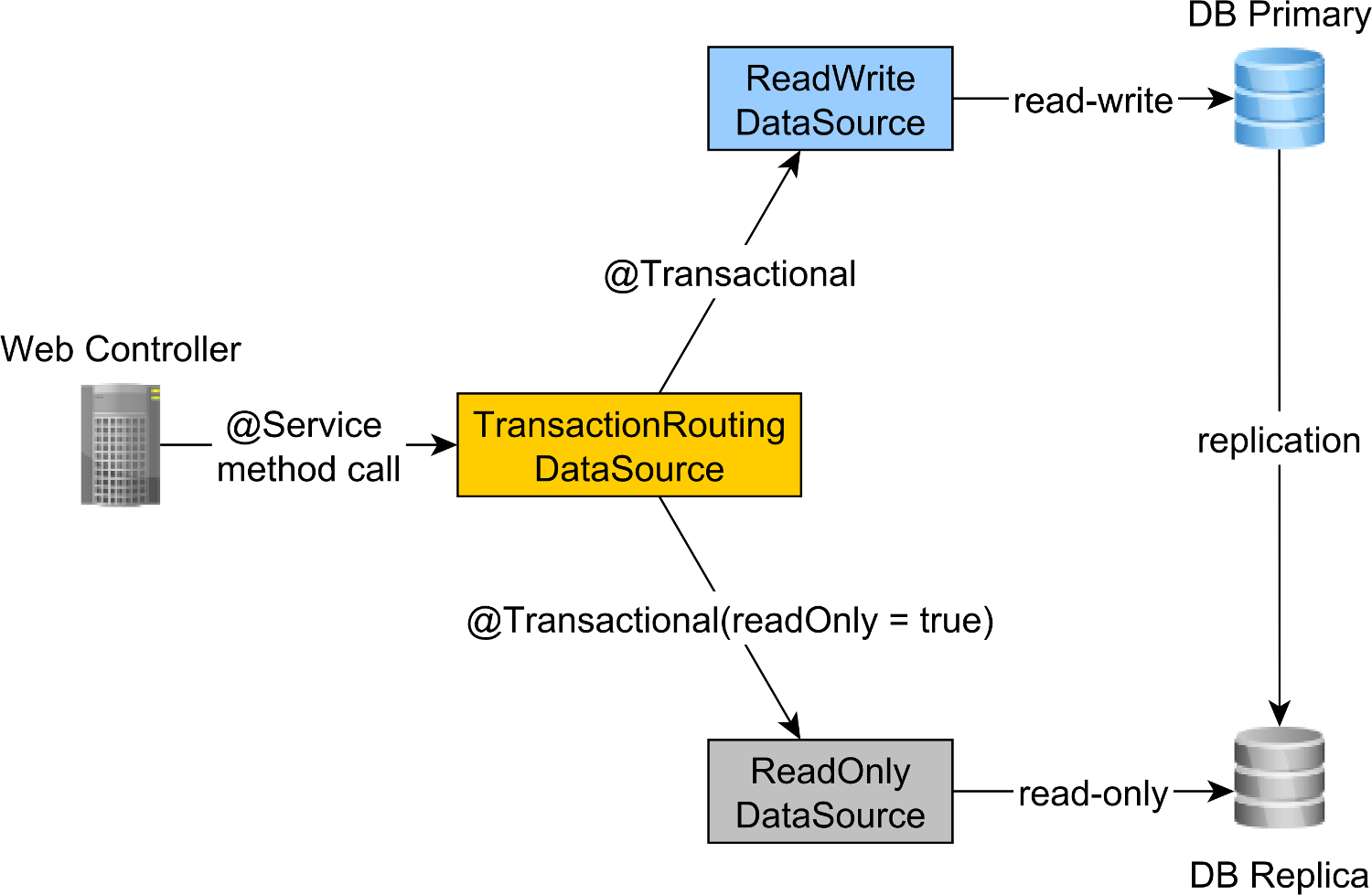
In a Spring application, the web @Controller calls a @Service method, which is annotated using the @Transactional annotation.
By default, Spring transactions are read-write, but you can explicitly configure them to be executed in a read-only context via the read-only attribute of the @Transactional annotation.
For instance, the following ForumServiceImpl component defines two service methods:
newPost, which requires a read-write transaction that needs to execute on the database Primary node, andfindAllPostsByTitle, which requires a read-only transaction that can be executed on a database Replica node, therefore reducing the load on the Primary node
@Service
public class ForumServiceImpl
        implements ForumService {

    @PersistenceContext
    private EntityManager entityManager;

    @Override
    @Transactional
    public Post newPost(String title, String... tags) {
        Post post = new Post();
        post.setTitle(title);

        post.getTags().addAll(
            entityManager.createQuery("""
                select t
                from Tag t
                where t.name in :tags
                """, Tag.class)
            .setParameter("tags", Arrays.asList(tags))
            .getResultList()
        );

        entityManager.persist(post);

        return post;
    }

    @Override
    @Transactional(readOnly = true)
    public List<Post> findAllPostsByTitle(String title) {
        return entityManager.createQuery("""
            select p
            from Post p
            where p.title = :title
            """, Post.class)
        .setParameter("title", title)
        .getResultList();
    }
}
Since the readOnly attribute of the @Transactional annotation is set to false by default, the newPost method uses a read-write transactional context.
It’s good practice to define the @Transactional(readOnly = true) annotation at the class level and only override it for read-write methods. This way, we can make sure that read-only methods are executed by default on the Replica nodes. And, if we forget to add the @Transactional annotation on a read-write method, we will get an exception since read-write transactions can only execute on the Primary node.
Therefore, a much better @Service class will look as follows:
@Service
@Transactional(readOnly = true)
public class ForumServiceImpl
        implements ForumService {

    @PersistenceContext
    private EntityManager entityManager;

    @Override
    @Transactional
    public Post newPost(String title, String... tags) {
        Post post = new Post();
        post.setTitle(title);

        post.getTags().addAll(
            entityManager.createQuery("""
                select t
                from Tag t
                where t.name in :tags
                """, Tag.class)
            .setParameter("tags", Arrays.asList(tags))
            .getResultList()
        );

        entityManager.persist(post);

        return post;
    }

    @Override
    public List<Post> findAllPostsByTitle(String title) {
        return entityManager.createQuery("""
            select p
            from Post p
            where p.title = :title
            """, Post.class)
        .setParameter("title", title)
        .getResultList();
    }
}
Notice that the findAllPostsByTitle no longer needs to define the @Transactional(readOnly = true) annotation since it’s inherited from the class-level annotation.
To route the read-write transactions to the Primary node and read-only transactions to the Replica node, we can define a ReadWriteDataSource that connects to the Primary node and a ReadOnlyDataSource that connect to the Replica node.
The read-write and read-only transaction routing is done by the Spring AbstractRoutingDataSource abstraction, which is implemented by the TransactionRoutingDatasource, as illustrated by the following diagram:
The TransactionRoutingDataSource is very easy to implement and looks as follows:
public class TransactionRoutingDataSource
        extends AbstractRoutingDataSource {

    @Nullable
    @Override
    protected Object determineCurrentLookupKey() {
        return TransactionSynchronizationManager
            .isCurrentTransactionReadOnly() ?
                DataSourceType.READ_ONLY :
                DataSourceType.READ_WRITE;
    }
}
Basically, we inspect the Spring TransactionSynchronizationManager class that stores the current transactional context to check whether the currently running Spring transaction is read-only or not.
The determineCurrentLookupKey method returns the discriminator value that will be used to choose either the read-write or the read-only JDBC DataSource.
The DataSourceType is just a basic Java Enum that defines our transaction routing options:
public enum  DataSourceType {
    READ_WRITE,
    READ_ONLY
}
The DataSource configuration looks as follows:
@Configuration
@ComponentScan(
    basePackages = "com.vladmihalcea.book.hpjp.util.spring.routing"
)
@PropertySource(
    "/META-INF/jdbc-postgresql-replication.properties"
)
public class TransactionRoutingConfiguration
        extends AbstractJPAConfiguration {

    @Value("${jdbc.url.primary}")
    private String primaryUrl;

    @Value("${jdbc.url.replica}")
    private String replicaUrl;

    @Value("${jdbc.username}")
    private String username;

    @Value("${jdbc.password}")
    private String password;

    @Bean
    public DataSource readWriteDataSource() {
        PGSimpleDataSource dataSource = new PGSimpleDataSource();
        dataSource.setURL(primaryUrl);
        dataSource.setUser(username);
        dataSource.setPassword(password);
        return connectionPoolDataSource(dataSource);
    }

    @Bean
    public DataSource readOnlyDataSource() {
        PGSimpleDataSource dataSource = new PGSimpleDataSource();
        dataSource.setURL(replicaUrl);
        dataSource.setUser(username);
        dataSource.setPassword(password);
        return connectionPoolDataSource(dataSource);
    }

    @Bean
    public TransactionRoutingDataSource actualDataSource() {
        TransactionRoutingDataSource routingDataSource =
            new TransactionRoutingDataSource();

        Map<Object, Object> dataSourceMap = new HashMap<>();
        dataSourceMap.put(
            DataSourceType.READ_WRITE,
            readWriteDataSource()
        );
        dataSourceMap.put(
            DataSourceType.READ_ONLY,
            readOnlyDataSource()
        );

        routingDataSource.setTargetDataSources(dataSourceMap);
        return routingDataSource;
    }

    @Override
    protected Properties additionalProperties() {
        Properties properties = super.additionalProperties();
        properties.setProperty(
            "hibernate.connection.provider_disables_autocommit",
            Boolean.TRUE.toString()
        );
        return properties;
    }

    @Override
    protected String[] packagesToScan() {
        return new String[]{
            "com.vladmihalcea.book.hpjp.hibernate.transaction.forum"
        };
    }

    @Override
    protected String databaseType() {
        return Database.POSTGRESQL.name().toLowerCase();
    }

    protected HikariConfig hikariConfig(
            DataSource dataSource) {
        HikariConfig hikariConfig = new HikariConfig();
        int cpuCores = Runtime.getRuntime().availableProcessors();
        hikariConfig.setMaximumPoolSize(cpuCores * 4);
        hikariConfig.setDataSource(dataSource);

        hikariConfig.setAutoCommit(false);
        return hikariConfig;
    }

    protected HikariDataSource connectionPoolDataSource(
            DataSource dataSource) {
        return new HikariDataSource(hikariConfig(dataSource));
    }
}
The /META-INF/jdbc-postgresql-replication.properties resource file provides the configuration for the read-write and read-only JDBC DataSource components:
hibernate.dialect=org.hibernate.dialect.PostgreSQL10Dialect

jdbc.url.primary=jdbc:postgresql://localhost:5432/high_performance_java_persistence
jdbc.url.replica=jdbc:postgresql://localhost:5432/high_performance_java_persistence_replica

jdbc.username=postgres
jdbc.password=admin
The jdbc.url.primary property defines the URL of the Primary node while the jdbc.url.replica defines the URL of the Replica node.
The readWriteDataSource Spring component defines the read-write JDBC DataSource while the readOnlyDataSource component define the read-only JDBC DataSource.
Note that both the read-write and read-only data sources use HikariCP for connection pooling. For more details about the benefits of using database connection pooling, check out this article.
The actualDataSource acts as a facade for the read-write and read-only data sources and is implemented using the TransactionRoutingDataSource utility.
The readWriteDataSource is registered using the DataSourceType.READ_WRITE key and the readOnlyDataSource using the DataSourceType.READ_ONLY key.
So, when executing a read-write @Transactional method, the readWriteDataSource will be used while when executing a @Transactional(readOnly = true) method, the readOnlyDataSource will be used instead.
Note that the
additionalPropertiesmethod defines thehibernate.connection.provider_disables_autocommitHibernate property, which I added to Hibernate to postpone the database acquisition for RESOURCE_LOCAL JPA transactions.Not only that the
hibernate.connection.provider_disables_autocommitallows you to make better use of database connections, but it’s the only way we can make this example work since, without this configuration, the connection is acquired prior to calling thedetermineCurrentLookupKeymethodTransactionRoutingDataSource.For more details about the
hibernate.connection.provider_disables_autocommitconfiguration, check out this article.
The remaining Spring components needed for building the JPA EntityManagerFactory are defined by the AbstractJPAConfiguration base class.
Basically, the actualDataSource is further wrapped by DataSource-Proxy and provided to the JPA ENtityManagerFactory. You can check out the source code on GitHub for more details.
To check if the transaction routing works, we are going to enable the PostgreSQL query log by setting the following properties in the postgresql.conf configuration file:
log_min_duration_statement = 0
log_line_prefix = '[%d] '
By setting the log_min_duration_statement property value to 0, we are telling PostgreSQL to log all statements.
The log_line_prefix property value instructs PostgreSQL to include the database catalog when logging a given SQL statement.
So, when calling the newPost and findAllPostsByTitle methods, like this:
Post post = forumService.newPost(
    "High-Performance Java Persistence",
    "JDBC", "JPA", "Hibernate"
);

List<Post> posts = forumService.findAllPostsByTitle(
    "High-Performance Java Persistence"
);
We can see that PostgreSQL logs the following messages:
[high_performance_java_persistence] LOG:  execute <unnamed>:
    BEGIN

[high_performance_java_persistence] DETAIL:
    parameters: $1 = 'JDBC', $2 = 'JPA', $3 = 'Hibernate'
[high_performance_java_persistence] LOG:  execute <unnamed>:
    select tag0_.id as id1_4_, tag0_.name as name2_4_
    from tag tag0_ where tag0_.name in ($1 , $2 , $3)

[high_performance_java_persistence] LOG:  execute <unnamed>:
    select nextval ('hibernate_sequence')

[high_performance_java_persistence] DETAIL:
    parameters: $1 = 'High-Performance Java Persistence', $2 = '4'
[high_performance_java_persistence] LOG:  execute <unnamed>:
    insert into post (title, id) values ($1, $2)

[high_performance_java_persistence] DETAIL:
    parameters: $1 = '4', $2 = '1'
[high_performance_java_persistence] LOG:  execute <unnamed>:
    insert into post_tag (post_id, tag_id) values ($1, $2)

[high_performance_java_persistence] DETAIL:
    parameters: $1 = '4', $2 = '2'
[high_performance_java_persistence] LOG:  execute <unnamed>:
    insert into post_tag (post_id, tag_id) values ($1, $2)

[high_performance_java_persistence] DETAIL:
    parameters: $1 = '4', $2 = '3'
[high_performance_java_persistence] LOG:  execute <unnamed>:
    insert into post_tag (post_id, tag_id) values ($1, $2)

[high_performance_java_persistence] LOG:  execute S_3:
    COMMIT

[high_performance_java_persistence_replica] LOG:  execute <unnamed>:
    BEGIN

[high_performance_java_persistence_replica] DETAIL:
    parameters: $1 = 'High-Performance Java Persistence'
[high_performance_java_persistence_replica] LOG:  execute <unnamed>:
    select post0_.id as id1_0_, post0_.title as title2_0_
    from post post0_ where post0_.title=$1

[high_performance_java_persistence_replica] LOG:  execute S_1:
    COMMIT
The log statements using the high_performance_java_persistence prefix were executed on the Primary node while the ones using the high_performance_java_persistence_replica on the Replica node.
So, everything works like a charm!
All the source code can be found in my High-Performance Java Persistence GitHub repository, so you can try it out too.
If you enjoyed this article, I bet you are going to love my Book and Video Courses as well.



The AbstractRoutingDataSource Spring utility is very useful when implementing a read-write and read-only transaction routing mechanism.
By using this routing pattern, you can redirect the read-only traffic to Replica nodes, so that the Primary node can better handle the read-write transactions.








Hi Vlad, is there a min version of Spring and Hibernate this will work on? Will really solve one of the problems at work.
The examples are on GitHub, and the repository has multiple branches that match various Spring and Hibernate versions.