
Transactions and Concurrency Control
Are you struggling with performance issues in your Spring, Jakarta EE, or Java EE application?
What if there were a tool that could automatically detect what caused performance issues in your JPA and Hibernate data access layer?
Wouldn’t it be awesome to have such a tool to watch your application and prevent performance issues during development, long before they affect production systems?
Well, Hypersistence Optimizer is that tool! And it works with Spring Boot, Spring Framework, Jakarta EE, Java EE, Quarkus, Micronaut, or Play Framework.
So, rather than fixing performance issues in your production system on a Saturday night, you are better off using Hypersistence Optimizer to help you prevent those issues so that you can spend your time on the things that you love!
In this article, we are going to see how we can map the OffsetDateTime ZoneOffset with the Hibernate TimeZoneColumn annotation.
As I explained in this article, by default, Hibernate doesn’t store the time-zone offset of an OffsetDateTime entity attribute in a separate column. Instead, the OffsetDateTime is stored as a java.time.Instant that is relative to the UTC time zone.
However, there are use cases when we need to save the associated ZoneOffset, and that’s exactly when you would use the TimeZoneColumn annotation.
Let’s assume we have the following post table:
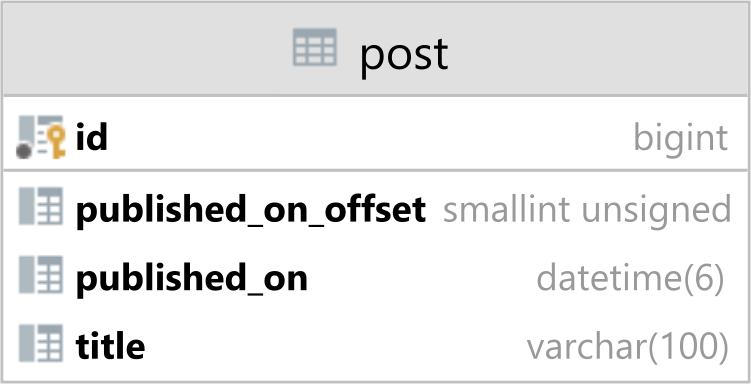
Because the OffsetDateTime object stores both the UTC-based date/time instant information and the ZoneOffset relative to UTC time zone, we are going to store these two values in the following columns:
published_on column stores the UTC-based date/time instant informationpublished_on_offset stores the ZoneOffset information of the local time zone relative to the UTC time zoneThe post table is mapped to the JPA Post entity like this:
@Entity(name = "Post")
@Table(name = "post")
public class Post {

    @Id
    private Long id;

    @Column(length = 100)
    private String title;

    @Column(name = "published_on")
    @TimeZoneStorage(TimeZoneStorageType.COLUMN)
    @TimeZoneColumn(name = "published_on_offset")
    private OffsetDateTime publishedOn;
}
Notice that we have a single publishedOn entity attribute using the OffsetDateTime Java type. Behind the scenes, Hibernate is going to use both the published_on and the published_on_offset table columns to construct the OffsetDateTime.
The TimeZoneStorage annotation tells Hibernate that it should fetch the ZoneOffset value from a dedicated table column. This approach is useful when the underlying relational database does not offer a native mechanism to persist the time zone offset along the date/time information.
The TimeZoneColumn annotation is used to specify the name of the column that contains the ZoneOffset value.
When persisting a Post entity that has the publishedOn attribute set to an OffsetDateTime value using the +12:00 time zone offset:
entityManager.persist(
    new Post()
        .setId(1L)
        .setTitle("High-Performance Java Persistence")
        .setPublishedOn(
            OffsetDateTime.of(
                2024, 2, 29,
                12, 30, 0, 0,
                ZoneOffset.of("+12:00")
            )
        )
);
We can see that Hibernate generates the following SQL INSERT statement:
Query:["
INSERT INTO post (
    published_on, published_on_offset,
    title, id
)
VALUES (
    ?, ?,
    ?, ?
)
"],
Params:[(
    2024-02-29 02:30:00.0, 43200,
    High-Performance Java Persistence, 1
)]
The reason why the log contains the value of 2024-02-29 02:30:00.0 for the published_on column is due to the toString method of the java.sql.Timestamp that’s bound in JDBC.
Behind the scenes, Hibernate uses the TimestampUtcAsJdbcTimestampJdbcType to bind the value of the published_on column, and the associated Instant value is bound using the UTC time zone:
final Instant instant = javaType.unwrap(
    value,
    Instant.class,
    options
);

st.setTimestamp(
    index,
    Timestamp.from(instant),
    UTC_CALENDAR
);
If we check the post table, we can see that the published_on column is set to its UTC value, and the offset is equal to 43200, which is the total zone offset in seconds. In our case, the ZoneOffset is +12:00, so the total zone offset in seconds is 12 hours times 3600.
| id | title                             | published_on        | published_on_offset |
| -- | --------------------------------- | ------------------- | ------------------- |
| 1  | High-Performance Java Persistence | 2024-02-29 00:30:00 | 43200               |
When fetching the Post entity, we can see that the OffsetDateTime value of the publishedOn attribute matches exactly the value we set when we persisted the entity:
Post post = entityManager.find(
    Post.class, 1L
);

assertEquals(
    OffsetDateTime.of(
        2024, 2, 29,
        12, 30, 0, 0,
        ZoneOffset.of("+12:00")
    ),
    post.getPublishedOn()
);
Awesome, right?
If you enjoyed this article, I bet you are going to love my Book and Video Courses as well.



Hibernate keeps on evolving and adding new features that we can use to address our data access requirements.
While in Hibernate 5, there was no built-in support for saving the OffsetDateTime ZoneOffset, since Hibernate 6, we can now use the TimeZoneColumn annotation to achieve this goal.
Thanks to both TimeZoneColumn and TimeZoneStorage annotations, we can now save the ZoneOffset of an OffsetDateTime entity attribute to a separate column, therefore allowing us to reconstruct the exact same OffsetDateTime object value that we used when we persisted the entity.








If you are still stuck on Hibernate 5.x, another alternative is to use JPA’s
@PostLoadfeature like this:@PostLoad public void updateLoadedOffsets() { this.publishedOn = publishedOn.withOffsetSameInstant(ZoneOffset.ofTotalSeconds(publishedOnOffset)); }