
Transactions and Concurrency Control
Are you struggling with performance issues in your Spring, Jakarta EE, or Java EE application?
What if there were a tool that could automatically detect what caused performance issues in your JPA and Hibernate data access layer?
Wouldn’t it be awesome to have such a tool to watch your application and prevent performance issues during development, long before they affect production systems?
Well, Hypersistence Optimizer is that tool! And it works with Spring Boot, Spring Framework, Jakarta EE, Java EE, Quarkus, Micronaut, or Play Framework.
So, rather than fixing performance issues in your production system on a Saturday night, you are better off using Hypersistence Optimizer to help you prevent those issues so that you can spend your time on the things that you love!
In this article, I want to show you how you can map a String JPA property to a JSON database column using the Hypersistence Utils open-source project.
Although it’s probably more common to use a JsonNode or POJO (Plain Old Java Object) on the Java side, the Hypersistence Utils framework is very flexible and allows you to use a String JPA property type to represent a JSON structure.
How to map a String JPA property to a JSON column using #Hibernate @vlad_mihalcea https://t.co/6ttwyQks7v pic.twitter.com/fuXWYAXrCy
— Java (@java) February 7, 2019
Considering we have a book database table that defines a properties column of the jsonb PostgreSQL type.
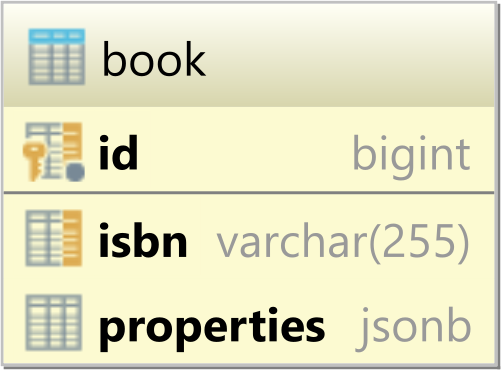
Depending on the Hibernate version, the Book JPA entity can be mapped as follows.
For Hibernate 6 and newer:
@Entity(name = "Book")
@Table(name = "book")
public class Book {

    @Id
    @GeneratedValue
    private Long id;

    @NaturalId
    private String isbn;

    @Type(JsonType.class)
    @Column(columnDefinition = "jsonb")
    private String properties;

    //Getters and setters omitted for brevity
}
And, for Hibernate 5:
@Entity(name = "Book")
@Table(name = "book")
@TypeDef(
    name = "json",
    typeClass = JsonType.class
)
public class Book {

    @Id
    @GeneratedValue
    private Long id;

    @NaturalId
    private String isbn;

    @Type(type = "json")
    @Column(columnDefinition = "jsonb")
    private String properties;

    //Getters and setters omitted for brevity
}
The isbn property is mapped using the Hibernate-specific @NaturalId annotation, which allows you to retrieve the entity by its natural identifier.
The properties JPA attribute encodes various book-related properties in a JSON String object. From the JPA @Column definition, we can see that the associated database column is of the type jsonb.
Now, since Hibernate does not provide a native Type to handle JSON database columns, we need to use the JsonType offered by the Hypersistence Utils library.
To use the hibernate-types library in your project, just add the following Maven dependency:
<dependency>
    <groupId>io.hypersistence</groupId>
    <artifactId>hypersistence-utils-hibernate-55</artifactId>
    <version>${hypersistence-utils.version}</version>
</dependency>
If you’re using an older version of Hibernate, go to the Hypersistence Utils GitHub repository and find the matching dependency for your current Hibernate version.
When persisting the following Book entity:
entityManager.persist(
    new Book()
        .setIsbn("978-9730228236")
        .setProperties(
            "{" +
            "   \"title\": \"High-Performance Java Persistence\"," +
            "   \"author\": \"Vlad Mihalcea\"," +
            "   \"publisher\": \"Amazon\"," +
            "   \"price\": 44.99" +
            "}"
        )
);
Hibernate generates the following SQL INSERT statement:
INSERT INTO book (
    isbn,
    properties,
    id
)
VALUES (
    '978-9730228236',
    '{"title":"High-Performance Java Persistence","author":"Vlad Mihalcea","publisher":"Amazon","price":44.99}',
    1
)
Notice the Fluent-style API used when creating the
Bookentity. For more details about building entities using a Fluent-style API, check out this article.
Now, when fetching the previously persisted Book entity:
Book book = entityManager
    .unwrap(Session.class)
    .bySimpleNaturalId(Book.class)
    .load("978-9730228236");

assertTrue(book.getProperties().contains("\"price\": 44.99"));
We can see that the properties attribute is properly populated by the JsonType.
Cool, right?
If you enjoyed this article, I bet you are going to love my Book and Video Courses as well.



Although creating a custom Hibernate Type is straightforward, it’s much more convenient to use the Hypersistence Utils open-source project since you only need to add one dependency and specify which custom Type you want to use.








Hey Vlad
this worked like a treat 1st time for me – thanks so much.