JPA and Hibernate Query setParameter – User Guide
Are you struggling with performance issues in your Spring, Jakarta EE, or Java EE application?
What if there were a tool that could automatically detect what caused performance issues in your JPA and Hibernate data access layer?
Wouldn’t it be awesome to have such a tool to watch your application and prevent performance issues during development, long before they affect production systems?
Well, Hypersistence Optimizer is that tool! And it works with Spring Boot, Spring Framework, Jakarta EE, Java EE, Quarkus, Micronaut, or Play Framework.
So, rather than fixing performance issues in your production system on a Saturday night, you are better off using Hypersistence Optimizer to help you prevent those issues so that you can spend your time on the things that you love!
Introduction
In this article, I’m going to show you how the JPA Query setParameter method works for basic entity attributes, and how you can use it when dealing with custom Hibernate types.
If you ever stumbled on the “column is of type jsonb but expression is of type bytea” PostgreSQL issue and didn’t know how to fix it, then you should definitely read this article.
Domain Model
Let’s assume that our application uses the following Book entity:
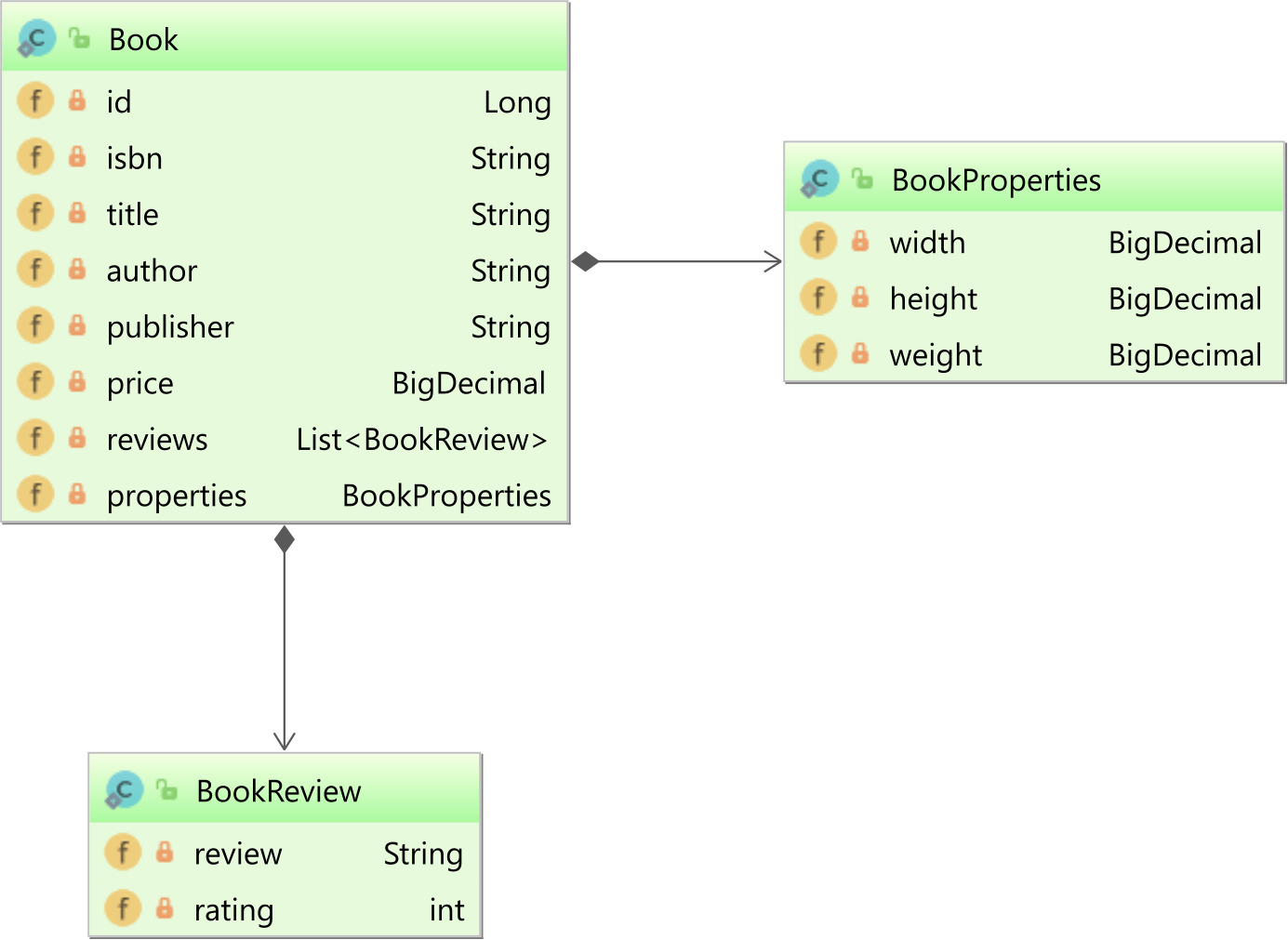
The BookReview is a simple POJO (Plain Old Java Object) using the Fluent-style API:
public class BookReview implements Serializable {

    private String review;

    private int rating;

    public String getReview() {
        return review;
    }

    public BookReview setReview(String review) {
        this.review = review;
        return this;
    }

    public int getRating() {
        return rating;
    }

    public BookReview setRating(int rating) {
        this.rating = rating;
        return this;
    }
}
The BookProperties is also a POJO type:
public class BookProperties implements Serializable {

    private BigDecimal width;

    private BigDecimal height;

    private BigDecimal weight;

    public BigDecimal getWidth() {
        return width;
    }

    public BookProperties setWidth(BigDecimal width) {
        this.width = width;
        return this;
    }

    public BigDecimal getHeight() {
        return height;
    }

    public BookProperties setHeight(BigDecimal height) {
        this.height = height;
        return this;
    }

    public BigDecimal getWeight() {
        return weight;
    }

    public BookProperties setWeight(BigDecimal weight) {
        this.weight = weight;
        return this;
    }
}
The Book entity maps the List of BookReview and the BookProperties attributes to JSON column types:
@Entity(name = "Book")
@Table(name = "book")
public class Book {

    @Id
    private Long id;

    private String isbn;

    private String title;

    private String author;

    private String publisher;

    private BigDecimal price;

    @Type(JsonType.class)
    @Column(columnDefinition = "jsonb")
    private List<BookReview> reviews = new ArrayList<>();

    @Type(JsonType.class)
    @Column(columnDefinition = "jsonb")
    private BookProperties properties;

    //Getters and setters omitted for brevity
}
The JsonType is from the amazing Hypersistence Utils project, which you should definitely start using if your application persistence layer is implemented using JPA and Hibernate.
We are also going to persist a single Book entity that looks like this:
entityManager.persist(
    new Book()
        .setId(1L)
        .setIsbn("978-9730228236")
        .setTitle("High-Performance Java Persistence")
        .setAuthor("Vlad Mihalcea")
        .setPrice(new BigDecimal("44.99"))
        .setPublisher("Amazon KDP")
);
JPA Query setParameter method
The JPA Query interface allows you to set the JDBC bind parameter values via multiple overloaded setParameter methods.
For instance, if you want to find a Book entity by its isbn property, you can use the following JPQL query:
Book book = entityManager.createQuery("""
    select b
    from Book b
    where b.isbn = :isbn
    """,
    Book.class)
.setParameter("isbn", "978-9730228236")
.getSingleResult();
When running the above JPQL query, Hibernate generates the following SQL query:
Query:["
    SELECT
        b.id as id1_0_,
        b.author as author2_0_,
        b.isbn as isbn3_0_,
        b.price as price4_0_,
        b.properties as properti5_0_,
        b.publisher as publishe6_0_,
        b.reviews as reviews7_0_,
        b.title as title8_0_
    FROM
        book b
    WHERE
        b.isbn = ?
"],
Params:[(
    978-9730228236
)]
For JPQL queries, the JDBC parameter values are bound using their associated Hibernate entity property type. Since the isbn property is of the type String, Hibernate binds it as a JDBC Types.VARCHAR.
Binding a List using the JPA Query setParameter method
The setParameter method allows you to pass a List of parameter values, which is needed for the IN, ANY, ALL clause types.
For instance, you can filter the Book entities by their publisher:
List<Book> books = entityManager.createQuery("""
    select b
    from Book b
    where b.publisher in (:publishers)
    """,
    Book.class)
.setParameter(
    "publishers",
    Arrays.asList(
        "O'Reilly",
        "Manning",
        "Amazon KDP"
    )
)
.getResultList();
And, Hibernate is going to execute the following SQL query:
Query:["
    SELECT
        b.id as id1_0_,
        b.author as author2_0_,
        b.isbn as isbn3_0_,
        b.price as price4_0_,
        b.properties as properti5_0_,
        b.publisher as publishe6_0_,
        b.reviews as reviews7_0_,
        b.title as title8_0_
    FROM
        book b
    WHERE
        b.publisher IN (
            ?,
            ?,
            ?
        )
"],
Params:[(
    O'Reilly,
    Manning,
    Amazon KDP
)]
JPA Query setParameter method and native SQL queries
When you are executing a native SQL query, Hibernate no longer knows the associated column type. For basic types, which are covered by the JDBC `Types interface, Hibernate manages to bind the parameter values since it knows how to handle the basic properties.
The problem comes when you are using custom types, like JSON, ARRAY, or database-specific Enum column types.
Fixing the “column reviews is of type jsonb but expression is of type record” issue
Let’s assume we want to set the reviews column using the following SQL UPDATE statement:
UPDATE
    book
SET
    reviews = :reviews
WHERE
    isbn = :isbn AND
    jsonb_array_length(reviews) = 0
Notice that the reviews column is of jsonb type, and if you pass the JSON data via the JPA setParameter Query method on PostgreSQL:
int updateCount = entityManager.createNativeQuery("""
    UPDATE
        book
    SET
        reviews = :reviews
    WHERE
        isbn = :isbn AND
        jsonb_array_length(reviews) = 0
    """)
.setParameter("isbn", "978-9730228236")
.setParameter(
    "reviews",
    Arrays.asList(
        new BookReview()
            .setReview("Excellent book to understand Java Persistence")
            .setRating(5),
        new BookReview()
            .setReview("The best JPA ORM book out there")
            .setRating(5)
    )
)
.executeUpdate();
You are going to get the following failure message:
UPDATE
    book
SET
    reviews = (?, ?)
WHERE
    isbn = ? AND
    jsonb_array_length(reviews) = 0

Caused by: org.postgresql.util.PSQLException:
  ERROR: column "reviews" is of type jsonb but expression is of type record
  Hint: You will need to rewrite or cast the expression.
The problem is we are passing a List of BookReview objects, which Hibernate doesn’t know how to map to a jsonb PostgreSQL type. If you take a look at the SQL query, you can see that Hibernate passed the List values as if the underlying column was a composite type.
The fix is very easy. We just need to unwrap the JPA Query to a Hibernate org.hibernate.query.Query and call the setParameter method that takes a Hibernate Type instance:
int updateCount = entityManager.createNativeQuery("""
    UPDATE
        book
    SET
        reviews = :reviews
    WHERE
        isbn = :isbn AND
        jsonb_array_length(reviews) = 0
    """)
.setParameter("isbn", "978-9730228236")
.unwrap(org.hibernate.query.Query.class)
.setParameter(
    "reviews",
    Arrays.asList(
        new BookReview()
            .setReview("Excellent book to understand Java Persistence")
            .setRating(5),
        new BookReview()
            .setReview("The best JPA ORM book out there")
            .setRating(5)
    ),
    JsonType.INSTANCE
)
.executeUpdate();
And now Hibernate is going to bind the reviews column using the JsonType:
Query:["
    UPDATE
        book
    SET
        reviews = ?
    WHERE
        isbn = ? AND
    jsonb_array_length(reviews) = 0
"],
Params:[(
    [
       {
          "review":"Excellent book to understand Java Persistence",
          "rating":5
       },
       {
          "review":"The best JPA ORM book out there",
          "rating":5
       }
    ],
    978-9730228236
)]
Fixing the “column reviews is of type jsonb but expression is of type bytea” issue
Let’s assume we want to set the properties column using the following SQL UPDATE statement:
UPDATE
    book
SET
    properties = :properties
WHERE
    isbn = :isbn AND
    properties ->> 'weight' is null
Notice that the properties column is of jsonb type, so if we don’t set the Hibernate Type explicitly:
int updateCount = entityManager.createNativeQuery("""
    UPDATE
        book
    SET
        properties = :properties
    WHERE
        isbn = :isbn AND
        properties ->> 'weight' is null
    """)
.setParameter("isbn", "978-9730228236")
.setParameter(
    "properties",
    new BookProperties()
        .setWidth(new BigDecimal("8.5"))
        .setHeight(new BigDecimal("11"))
        .setWeight(new BigDecimal("2.5"))
)
.executeUpdate();
We get the following PostgreSQL error message:
Caused by: org.postgresql.util.PSQLException:
  ERROR: column "properties" is of type jsonb but expression is of type bytea
  Hint: You will need to rewrite or cast the expression.
The bytea type stands for byte array, and, since the BookProperties type implements the Serializable interface, Hibernate falls back to using the SerializableType when no other type is more appropriate. But, since you cannot bind a byte array to a jsonb column, PostgreSQL throws the aforementioned error.
To fix it, we have to set the JsonType explicitly using the Hibernate-specific setParameter Query method:
int updateCount = entityManager.createNativeQuery("""
    UPDATE
        book
    SET
        properties = :properties
    WHERE
        isbn = :isbn AND
        properties ->> 'weight' is null
    """)
.setParameter("isbn", "978-9730228236")
.unwrap(org.hibernate.query.Query.class)
.setParameter(
    "properties",
    new BookProperties()
        .setWidth(new BigDecimal("8.5"))
        .setHeight(new BigDecimal("11"))
        .setWeight(new BigDecimal("2.5")),
    JsonType.INSTANCE
)
.executeUpdate();
And now the SQL UPDATE statement runs successfully:
Query:["
    UPDATE
        book
    SET
        properties = ?
    WHERE
        isbn = ? AND
        properties ->> 'weight' is null
"],
Params:[(
    {
       "width":8.5,
       "height":11,
       "weight":2.5
    },
    978-9730228236
)]
Awesome, right?
If you enjoyed this article, I bet you are going to love my Book and Video Courses as well.



Conclusion
The JPA setParameter Query method is very useful for basic entity properties that can be mapped using the default Hibernate ORM types.
However, for custom column types, like JSON, you should use the Hibernate-specific org.hibernate.query.Query interface and call the setParameter method that allows you to pass the Hibernate Type, which will be used to bind the associated column in the SQL UPDATE statement.








