
Transactions and Concurrency Control
Are you struggling with performance issues in your Spring, Jakarta EE, or Java EE application?
What if there were a tool that could automatically detect what caused performance issues in your JPA and Hibernate data access layer?
Wouldn’t it be awesome to have such a tool to watch your application and prevent performance issues during development, long before they affect production systems?
Well, Hypersistence Optimizer is that tool! And it works with Spring Boot, Spring Framework, Jakarta EE, Java EE, Quarkus, Micronaut, or Play Framework.
So, rather than fixing performance issues in your production system on a Saturday night, you are better off using Hypersistence Optimizer to help you prevent those issues so that you can spend your time on the things that you love!
In this article, I’m going to show you how the JPA @Version entity property works when using Hibernate.
The most significant benefit of adding a version property to a JPA entity is that we can prevent the lost update anomaly, therefore ensuring that data integrity is not compromised.
Let’s consider we have the following Product entity in our application:
@Entity(name = "Product")
@Table(name = "product")
public class Product {

    @Id
    private Long id;

    private int quantity;

    @Version
    private int version;

    //Getters and setters omitted for brevity
}
Notice the version property uses the JPA @Version annotation which instructs Hibernate that this property will be used for the optimistic locking mechanism.
When persisting a Product entity:
Product product = new Product();
product.setId(1L);

entityManager.persist(product);
Hibernate will use the initial version value of 0 which is automatically assigned by the JVM since the version property is a primitive integer value.
INSERT INTO product (
    quantity,
    version,
    id
)
VALUES (
    0,
    0,
    1
)
When fetching and modifying the Product entity:
Product product = entityManager.find(
    Product.class,
    1L
);

product.setQuantity(5);
Hibernate uses the version property in the WHERE clause of the executing UPDATE statement:
UPDATE
    product
SET
    quantity = 5,
    version = 1
WHERE
    id = 1 AND
    version = 0
All the INSERT, UPDATE and DELETE statements executed by Hibernate are done via the executeUpdate method of the JDBC PreparedStatement object.
The executeUpdate method returns an integer which represents the number of records affected by the DML statements. In our case, we expect a value of 1 since there is only one Product entity having the provided identifier. More, by including the version property we check if the entity that we have previously loaded hasn’t changed in between the read and write operations.
So, if the returned value is not 1, then a StaleStateExcetion is thrown, which will be wrapped in a JPA OptimisticLockException when bootstrapping Hibernate using JPA.
The only two situations when the returned value is not 1 are if the entity was either modified, in which case the version did not match, or if the entity was deleted, hence the record could not be found at all.
When deleting a versioned entity:
Product product = entityManager.getReference(
    Product.class,
    1L
);

entityManager.remove(product);
Hibernate is going to use the version property in the WHERE clause of the associated DELETE statement:
DELETE FROM
    product
WHERE
    id = 1 AND
    version = 1
To understand how the version property can help you prevent lost updates, consider the following example:
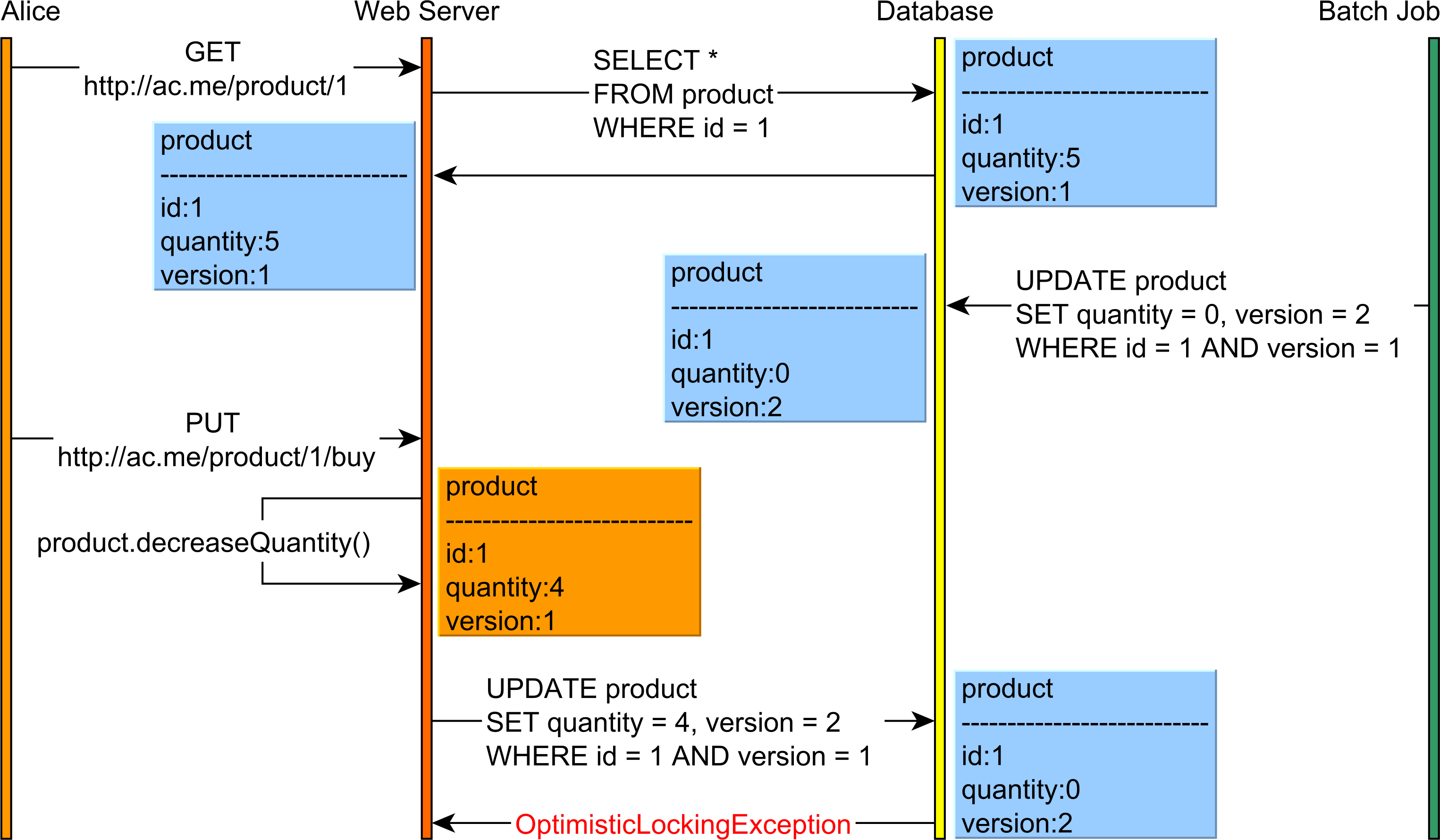
This example can be summarized as follows:
Product entity which has a quantity value of 5 and a version of 1.Product quantity to 0 and the version is now 2.Product, hence the Product quantity is decreased.EntityManager is flushed, the UPDATE is going to be executed using the old version value, hence an OptimisticLockException will be thrown because the Product version has changed.This example is encapsulated by the following test case:
Product product = entityManager.find(Product.class, 1L);

executeSync(() -> doInJPA(_entityManager -> {
    LOGGER.info("Batch processor updates product stock");

    Product _product = _entityManager.find(
        Product.class,
        1L
    );
    _product.setQuantity(0);
}));

LOGGER.info("Changing the previously loaded Product entity");
product.setQuantity(4);
When executing the test case above, Hibernate executes the following SQL statements:
DEBUG [Alice]: n.t.d.l.SLF4JQueryLoggingListener -
Query:["
    SELECT
        p.id as id1_0_0_,
        p.quantity as quantity2_0_0_,
        p.version as version3_0_0_
    FROM
        product p
    WHERE
        p.id = ?
"],
Params:[(
    1
)]

-- Batch processor updates product stock

DEBUG [Bob]: n.t.d.l.SLF4JQueryLoggingListener -
Query:["
    SELECT
        p.id as id1_0_0_,
        p.quantity as quantity2_0_0_,
        p.version as version3_0_0_
    FROM
        product p
    WHERE
        p.id = ?
"],
Params:[(
    1
)]

DEBUG [Bob]: n.t.d.l.SLF4JQueryLoggingListener -
Query:["
    UPDATE
        product
    SET
        quantity = ?,
        version = ?
    WHERE
        id=? AND
        version=?
"],
Params:[(
    0,
    2,
    1,
    1
)]

-- Changing the previously loaded Product entity

DEBUG [Alice]: n.t.d.l.SLF4JQueryLoggingListener -
Query:["
    UPDATE
        product
    SET
        quantity = ?,
        version = ?
    WHERE
        id=? AND
        version=?
"],
Params:[(
    4,
    2,
    1,
    1
)]

ERROR [Alice]: o.h.i.ExceptionMapperStandardImpl - HHH000346:
Error during managed flush [Row was updated or deleted by another transaction
(or unsaved-value mapping was incorrect) :
[com.vladmihalcea.book.hpjp.hibernate.concurrency.version.Product#1]]
Notice that Alice’s UPDATE fails because the version column value has changed.
The version is taken into consideration when merging a detached entity, as illustrated by the following example.

This example can be summarized as follows:
Product entity which has a quantity value of 5 and a version of 1.Product quantity to 0 and the version is now 2.Product, hence the Product quantity is decreased.Product entity, an OptimisticLockException will be thrown because the Product version has changed.The following test case encapsulates all the aforementioned logic:
String productJsonString = doInJPA(entityManager -> {
    return JacksonUtil.toString(
        entityManager.find(
            Product.class,
            1L
        )
    );
});

executeSync(() -> doInJPA(entityManager -> {
    LOGGER.info("Batch processor updates product stock");

    Product product = entityManager.find(
        Product.class,
        1L
    );

    product.setQuantity(0);
}));

LOGGER.info("Changing the previously loaded Product entity");

ObjectNode productJsonNode = (ObjectNode) JacksonUtil
.toJsonNode(productJsonString);

int quantity  = productJsonNode.get("quantity").asInt();

productJsonNode.put(
    "quantity",
    String.valueOf(--quantity)
);

doInJPA(entityManager -> {
    LOGGER.info("Merging the Product entity");

    Product product = JacksonUtil.fromString(
        productJsonNode.toString(),
        Product.class
    );
    entityManager.merge(product);
});
When executing the test case above, Hibernate the following SQL statements:
DEBUG [Alice]: n.t.d.l.SLF4JQueryLoggingListener -
Query:["
    SELECT
        p.id as id1_0_0_,
        p.quantity as quantity2_0_0_,
        p.version as version3_0_0_
    FROM
        product p
    WHERE
        p.id = ?
"],
Params:[(
    1
)]

-- Batch processor updates product stock

DEBUG [Bob]: n.t.d.l.SLF4JQueryLoggingListener -
Query:["
    SELECT
        p.id as id1_0_0_,
        p.quantity as quantity2_0_0_,
        p.version as version3_0_0_
    FROM
        product p
    WHERE
        p.id = ?
"],
Params:[(
    1
)]

DEBUG [Bob]: n.t.d.l.SLF4JQueryLoggingListener -
Query:["
    UPDATE
        product
    SET
        quantity = ?,
        version = ?
    WHERE
        id=? AND
        version=?
"],
Params:[(
    0,
    2,
    1,
    1
)]

-- Changing the previously loaded Product entity

-- Merging the Product entity

DEBUG [Alice]: n.t.d.l.SLF4JQueryLoggingListener -
Query:["
    SELECT
        p.id as id1_0_0_,
        p.quantity as quantity2_0_0_,
        p.version as version3_0_0_
    FROM
        product p
    WHERE
        p.id = ?
"],
Params:[(
    1
)]

ERROR [Alice]: c.v.b.h.h.c.v.VersionTest - Throws
javax.persistence.OptimisticLockException:
Row was updated or deleted by another transaction (or unsaved-value mapping was incorrect)
at org.hibernate.internal.ExceptionConverterImpl.wrapStaleStateException(ExceptionConverterImpl.java:226)
    at org.hibernate.internal.ExceptionConverterImpl.convert(ExceptionConverterImpl.java:93)
    at org.hibernate.internal.ExceptionConverterImpl.convert(ExceptionConverterImpl.java:181)
    at org.hibernate.internal.ExceptionConverterImpl.convert(ExceptionConverterImpl.java:188)
    at org.hibernate.internal.SessionImpl.fireMerge(SessionImpl.java:917)
    at org.hibernate.internal.SessionImpl.merge(SessionImpl.java:891)
So, when trying to merge the detached Product entity, Hibernate first loads the current database snapshot and attaches the loading-time state into the current Persistence Context. When copying the detached entity state onto the newly loaded Product entity, Hibernate detects that the version has changed, hence it throws the OptimisticLOckException right away, therefore skipping the UPDATE which would have failed with the same exception.
Trying to set the version of an entity to a specific value is a mistake because the default optimistic locking mechanism does not take into consideration the version from the entity Java object but from the loading-time snapshot.
More, if you try to change the version, the dirty checking mechanism will trigger a useless UPDATE.
So, when executing the following test case:
Product product = entityManager.find(
    Product.class,
    1L
);

product.setVersion(100);
Hibernate generates an UPDATE statement that only increments the version while leaving all the other columns unchanged (their values are identical to the ones that were previously loaded from the database):
UPDATE
    product
SET
    quantity = 5,
    version = 2
WHERE
    id = 1 AND
    version = 1
If you want to force an entity version change, you need to use either
OPTIMISTIC_FORCE_INCREMENTorPESSIMISTIC_FORCE_INCREMENT.Note that the default UPDATE includes all the columns associated with the current entity. This allows Hibernate to batch DML statements automatically and to benefit from statement caching as well.
If you want the UPDATE statement to include just the columns that have been modified, you need to use the
@DynamicUpdateannotation at the entity level.
If you enjoyed this article, I bet you are going to love my Book and Video Courses as well.



The @Version annotation allows Hibernate to activate the optimistic locking mechanism whenever executing an UPDATE or a DELETE statement against the entity in question.
By using the optimistic locking mechanism, you can prevent lost updates both when the entity is attached to the current Persistence Context or when the entity has been modified in the detached state.







