Bulk Update and Delete with JPA and Hibernate
Are you struggling with performance issues in your Spring, Jakarta EE, or Java EE application?
What if there were a tool that could automatically detect what caused performance issues in your JPA and Hibernate data access layer?
Wouldn’t it be awesome to have such a tool to watch your application and prevent performance issues during development, long before they affect production systems?
Well, Hypersistence Optimizer is that tool! And it works with Spring Boot, Spring Framework, Jakarta EE, Java EE, Quarkus, Micronaut, or Play Framework.
So, rather than fixing performance issues in your production system on a Saturday night, you are better off using Hypersistence Optimizer to help you prevent those issues so that you can spend your time on the things that you love!
Introduction
JPA and Hibernate allow us to execute bulk update and delete queries so that we can process multiple rows that match the business use case filtering criteria.
When modifying multiple records, you have two options. You could either use batch processing or bulk processing.
While batch processing is useful when entities are already managed by the current Persistence Context because it can reduce the number of INSERT, UPDATE, or DELETE statements that get executed, bulk processing allows us to modify the underlying database records with a single SQL statement.
Domain Model
Let’s assume that our application uses the following entities:
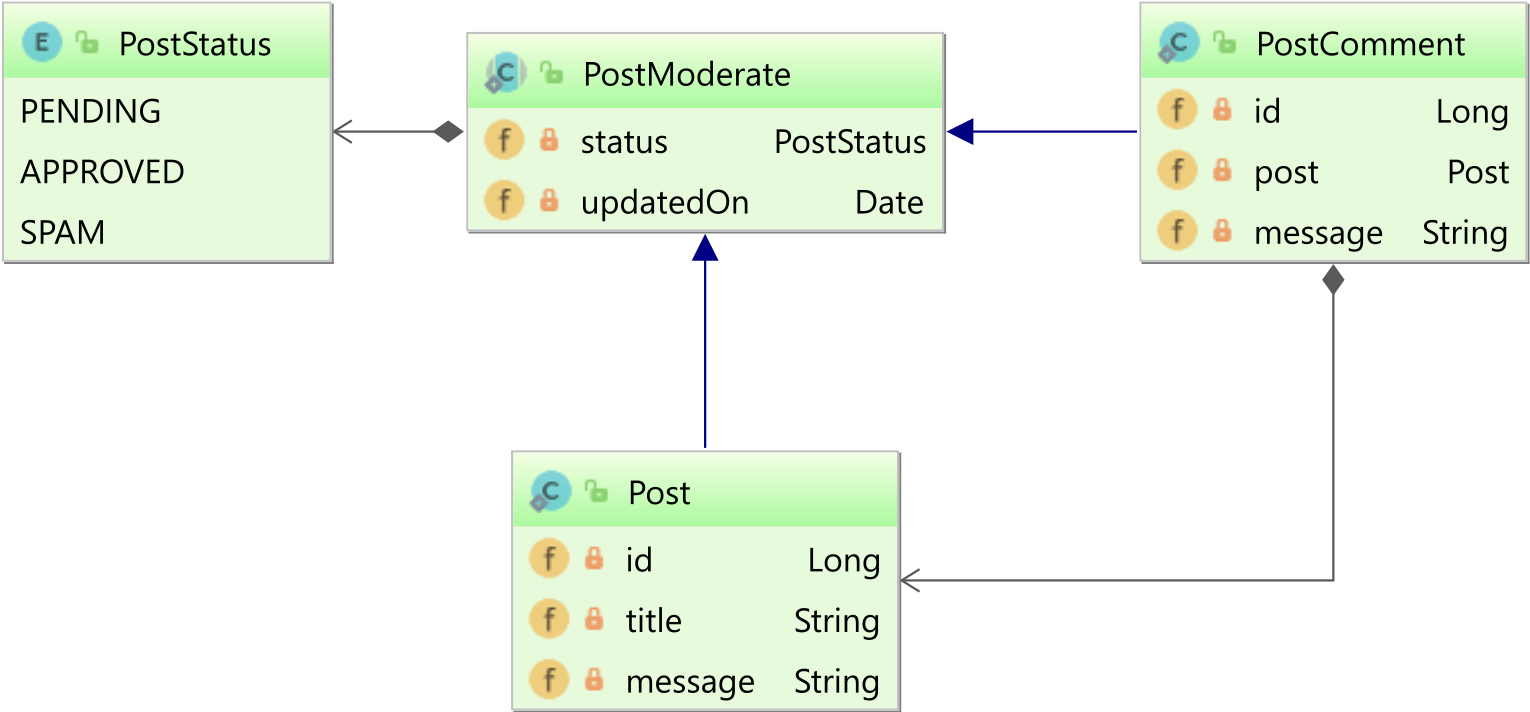
The Post or PostComment entity visibility is controlled via the PostStatus Java Enum. When first created, the Post and PostComment entities have the status of PENDING, so they are hidden away from the user. To be displayed, the Post or PostComment entities need to be moderated. If the moderators decide that a given posting is valid, the status changes to APPROVED, and the record becomes visible. Otherwise, the posting is marked as SPAM.
If you want to persist
Enumproperties, then the most compact column type is the shortest available integer column type.For more details about the advantages and disadvantages of various
Enum-persisting strategies, check out this article.
In order to share the status property, the Post and PostComment entities extend the PostModerate @MappedSuperclass base class, which looks as follows:
@MappedSuperclass
public abstract class PostModerate<T extends PostModerate> {

    @Enumerated(EnumType.ORDINAL)
    @Column(columnDefinition = "smallint")
    private PostStatus status = PostStatus.PENDING;

    @Column(name = "updated_on")
    private Date updatedOn = new Date();

    public PostStatus getStatus() {
        return status;
    }

    public T setStatus(PostStatus status) {
        this.status = status;
        return (T) this;
    }

    public Date getUpdatedOn() {
        return updatedOn;
    }

    public T setUpdatedOn(Date updatedOn) {
        this.updatedOn = updatedOn;
        return (T) this;
    }
}
If you want to reuse properties from across several entities, you can use the @MappedSuperClass annotation.
Therefore, the Post entity is going to look like this:
@Entity(name = "Post")
@Table(name = "post")
public class Post extends PostModerate<Post> {

    @Id
    private Long id;

    private String title;

    private String message;

    public Long getId() {
        return id;
    }

    public Post setId(Long id) {
        this.id = id;
        return this;
    }

    public String getTitle() {
        return title;
    }

    public Post setTitle(String title) {
        this.title = title;
        return this;
    }

    public String getMessage() {
        return message;
    }

    public Post setMessage(String message) {
        this.message = message;
        return this;
    }
}
And, the PostComment child entity will look as follows:
@Entity(name = "PostComment")
@Table(name = "post_comment")
public class PostComment extends PostModerate<PostComment> {

    @Id
    private Long id;

    @ManyToOne(fetch = FetchType.LAZY)
    private Post post;

    private String message;

    public Long getId() {
        return id;
    }

    public PostComment setId(Long id) {
        this.id = id;
        return this;
    }

    public Post getPost() {
        return post;
    }

    public PostComment setPost(Post post) {
        this.post = post;
        return this;
    }

    public String getMessage() {
        return message;
    }

    public PostComment setMessage(String message) {
        this.message = message;
        return this;
    }
}
By default,
@ManyToOneand@OneToOneassociations use theFetchType.EAGERfetching strategy, which is very bad for performance and can lead to N+1 query issues.For more details, check out this article.
Now, let’s add some entities into our system:
entityManager.persist(
    new Post()
        .setId(1L)
        .setTitle("High-Performance Java Persistence")
        .setStatus(PostStatus.APPROVED)
);

entityManager.persist(
    new Post()
        .setId(2L)
        .setTitle("Spam title")
);

entityManager.persist(
    new Post()
        .setId(3L)
        .setMessage("Spam message")
);

entityManager.persist(
    new PostComment()
        .setId(1L)
        .setPost(entityManager.getReference(Post.class, 1L))
        .setMessage("Spam comment")
);
So, we now have a Post entity with an APPROVED status, two Post entities, and one PostComment child entity with a PENDING status and containing spam info.
Bulk Update with JPA and Hibernate
To mark as spam all Post records that contain spam info, we can use the following bulk update JPQL statement:
int updateCount = entityManager.createQuery("""
    update Post
    set
        updatedOn = CURRENT_TIMESTAMP,
        status = :newStatus
    where
        status = :oldStatus and
        (
            lower(title) like :spamToken or
            lower(message) like :spamToken
        )
    """)
.setParameter("newStatus", PostStatus.SPAM)
.setParameter("oldStatus", PostStatus.PENDING)
.setParameter("spamToken", "%spam%")
.executeUpdate();

assertEquals(2, updateCount);
When executing the above JPQL query, Hibernate generates the following SQL statement:
UPDATE
    post
SET
    updated_on = CURRENT_TIMESTAMP,
    status = 2
WHERE
    status = 0 AND (
        lower(title) LIKE '%spam%' OR
        lower(message) LIKE '%spam%'
    )
To moderate the PostComment entities, we can use the following JPQL bulk update statement:
int updateCount = entityManager.createQuery("""
    update PostComment
    set
        updatedOn = CURRENT_TIMESTAMP,
        status = :newStatus
    where
        status = :oldStatus and
        lower(message) like :spamToken
    """)
.setParameter("newStatus", PostStatus.SPAM)
.setParameter("oldStatus", PostStatus.PENDING)
.setParameter("spamToken", "%spam%")
.executeUpdate();

assertEquals(1, updateCount);
And Hibernate will generate the expected bulk update SQL query:
UPDATE
    post_comment
SET
    updated_on = CURRENT_TIMESTAMP,
    status = 2
WHERE
    status = 0 AND
    lower(message) LIKE '%spam%'
Bulk Delete with JPA and Hibernate
To delete all Post entities that were marked as spam, and which are older than 7 days, we can use the following bulk delete JPQL statement:
int deleteCount = entityManager.createQuery("""
    delete from Post
    where
        status = :status and
        updatedOn <= :validityThreshold
    """)
.setParameter("status", PostStatus.SPAM)
.setParameter(
    "validityThreshold",
    Timestamp.valueOf(
        LocalDateTime.now().minusDays(7)
    )
)
.executeUpdate();

assertEquals(2, deleteCount);
And, to delete all PostComment entities that were marked as spam, and which are older than 3 days, we can use the following bulk delete JPQL statement:
int deleteCount = entityManager.createQuery("""
    delete from PostComment
    where
        status = :status and
        updatedOn <= :validityThreshold
    """)
.setParameter("status", PostStatus.SPAM)
.setParameter(
    "validityThreshold",
    Timestamp.valueOf(
        LocalDateTime.now().minusDays(3)
    )
)
.executeUpdate();

assertEquals(1, deleteCount);
That’s it!
If you enjoyed this article, I bet you are going to love my Book and Video Courses as well.



Conclusion
Bulk update and delete statements are very useful whenever we want to process some records that can be filtered using the same predicate.
The JPQL bulk and update statements are very similar to the SQL ones, and the performance can be better than if you were using batching instead.








